Ligation sequencing DNA V14 (SQK-LSK114) (GDE_9161_v114_revAC_24Sep2025)


Flongle: Protocol
Ligation sequencing DNA V14 (SQK-LSK114) V GDE_9161_v114_revAC_24Sep2025
This protocol:
- Uses genomic DNA
- Has a library preparation time of ~65 minutes
- Can be used with a fragmentation step (optional)
- Requires no PCR
- Is compatible with R10.4.1 flow cells
For Research Use Only
FOR RESEARCH USE ONLY
Contents
Introduction to the protocol
Library preparation
Sequencing and data analysis
Troubleshooting
Overview
This protocol:
- Uses genomic DNA
- Has a library preparation time of ~65 minutes
- Can be used with a fragmentation step (optional)
- Requires no PCR
- Is compatible with R10.4.1 flow cells
For Research Use Only
1. Overview of the protocol
Introduction to the Ligation Sequencing Kit V14 (SQK-LSK114) protocol
This protocol describes how to carry out sequencing of a DNA sample using the Ligation Sequencing Kit V14 (SQK-LSK114). It is recommended that a Lambda control experiment is completed first to become familiar with the technology.
Steps in the sequencing workflow:
Prepare for your experiment
You will need to:
- Extract your DNA, and check its length, quantity and purity. The quality checks performed during the protocol are essential in ensuring experimental success.
- Ensure you have your sequencing kit, the correct equipment and third-party reagents
- Download the software for acquiring and analysing your data
- Check your flow cell to ensure it has enough pores for a good sequencing run
Library preparation
The table below is an overview of the steps required in the library preparation, including timings and optional stopping points.
| Library preparation | Process | Time | Stop option |
|---|---|---|---|
| DNA repair and end-prep | Repair the DNA and prepare the DNA ends for adapter attachment | 35 minutes | 4°C overnight |
| Adapter ligation and clean-up | Attach the sequencing adapters to the DNA ends | 20 minutes | We recommend sequencing your library as soon as it is adapted. DNA library can be stored at 4°C for short-term storage or for repeated use (such as re-loading your flow cell) DNA library can be stored at -80°C for long-term storage. |
| Priming and loading the flow cell | Prime the flow cell and load the prepared library for sequencing | 10 minutes |

Sequencing and analysis
You will need to:
- Start a sequencing run using the MinKNOW software which will collect raw data from the device and basecall reads.
- Start the EPI2ME software and select a bioinformatics workflow to analyse your data.
Compatibility of this protocol
This protocol should only be used in combination with:
- Ligation Sequencing Kit V14 (SQK-LSK114)
- Control Expansion (EXP-CTL001)
- Flongle Sequencing Expansion (EXP-FSE002)
- R10.4.1 Flongle Flow Cells (FLO-FLG114)
- MinION Mk1D - MinION Mk1D IT requirements document
- GridION - GridION IT requirements document
2. Equipment and consumables
Materials
- 500 ng (or 50-100 fmol) of high molecular weight DNA
- OR 50+ ng high molecular weight genomic DNA if performing DNA fragmentation
- Ligation Sequencing Kit V14 (SQK-LSK114)
- Flongle Sequencing Expansion (EXP-FSE002)
Consumables
- Flongle Flow Cell
- Qubit dsDNA HS Assay Kit (Invitrogen, Q32851)
- NEBNext® Companion Module v2 for Oxford Nanopore Technologies® Ligation Sequencing (NEB, E7672S or E7672L)
- Freshly prepared 80% ethanol in nuclease-free water
- Nuclease-free water (e.g. Thermo Scientific, AM9937)
- 1.5 ml Eppendorf DNA LoBind tubes
- 0.2 ml thin-walled PCR tubes
- Qubit™ Assay Tubes (Invitrogen, Q32856)
Equipment
- MinION or GridION device
- Flongle adapter
- Hula mixer (gentle rotator mixer)
- Magnetic separation rack, suitable for 1.5 ml Eppendorf tubes
- Microfuge
- Vortex mixer
- Thermal cycler
- P1000 pipette and tips
- P200 pipette and tips
- P100 pipette and tips
- P20 pipette and tips
- P10 pipette and tips
- P2 pipette and tips
- Ice bucket with ice
- Timer
- Qubit™ fluorometer (or equivalent for QC check)
Flow cell deterioration/saturation
At Oxford Nanopore, we are continuously improving our production processes to deliver more robust products. In the case of the Flongle, we are seeing an improvement in the stability of the flow cells that we ship. However, a small number of flow cells have been shown to rapidly deteriorate upon loading. This can be seen as saturation in the MinKNOW GUI and we are working hard to resolve this issue. In the meantime, we suggest the following loading recommendations and the use of buffers from the Flongle Sequencing Expansion (EXP-FSE002) shipped with your Flongle Flow Cells. If your flow cell rapidly deteriorates/saturates upon loading, please contact support@nanoporetech.com for assistance.
Loading recommendations: Following standard input recommendations, the protocol should produce final library (adapted DNA in Elution Buffer (EB)) to load at least two Flongle Flow Cells. We recommend reserving sufficient library to load a second Flongle Flow Cell, should you need to generate more data.
Flongle Sequencing Expansion (EXP-FSE002)
There are three components that come into direct contact with a flow cell at the point of loading (SB: Sequencing Buffer, FCF: Flow Cell Flush and LIB: Library Beads or LIS: Library Solution). These components are stored in plastic vials, and we found very low levels of contaminants seeping out of this plastic and impacting the robustness of the Flongle Flow Cell (MinION and PromethION Flow Cells are not affected by this).
When storing these components in glass vials instead of plastic, the incidence of flow cell deterioration was found to be reduced.

As a result, we have produced a Flongle Sequencing Expansion (EXP-FSE002) with the three components in glass vials, sufficient for 12 Flongle Flow Cell loads in total.
To load a library onto your Flongle Flow Cell, you will need to use the following:
Flongle Sequencing Expansion (EXP-FSE002) components
- Sequencing Buffer (SB)
- Flow Cell Flush (FCF)
- Library Beads (LIB) or Library Solution (LIS)
Sequencing Kit components
- Flow Cell Tether (FCT)
Oxford Nanopore deems the lifespan of the Flow Cell Expansion to be 6 months from receipt by the customer.
Please refer to the Table below for starting inputs for library preparation and sequencing using a Flongle Flow Cell.
Adjust your sample input quantity depending on your initial DNA sample length:
| Fragment library length | Starting input |
|---|---|
| Very short (<1 kb) | 50 fmol |
| Short (1-10 kb) | 50–100 fmol |
| Long (>10 kb) | 500 ng |
Users can start with lower input quantities (down to 50 ng) if performing DNA fragmentation to increase the number of DNA molecules in the sample, or if amplifying the sample by PCR.
For more information on sample input and flow cell loading amounts for our ligation sequencing protocols please visit our know-how document.
Input DNA
How to QC your input DNA
It is important that the input DNA meets the quantity and quality requirements. Using too little or too much DNA, or DNA of poor quality (e.g. highly fragmented or containing RNA or chemical contaminants) can affect your library preparation.
For instructions on how to perform quality control of your DNA sample, please read the Input DNA/RNA QC protocol.
Chemical contaminants
Depending on how the DNA is extracted from the raw sample, certain chemical contaminants may remain in the purified DNA, which can affect library preparation efficiency and sequencing quality. Read more about contaminants on the Contaminants page of the Community.
NEBNext® Companion Module v2 for Oxford Nanopore Technologies® Ligation Sequencing
We recommend buying the NEBNext® Companion Module v2 for Oxford Nanopore Technologies® Ligation Sequencing (NEB, E7672S or E7672L), which contains all the NEB reagents needed for use with the Ligation Sequencing Kit.
The previous version, NEBNext® Companion Module for Oxford Nanopore Technologies® Ligation Sequencing (NEB, E7180S or E7180L) is compatible, but the recommended v2 module offers more efficient dA-tailing and ligation, a result of the FFPEv2 DNA Repair Buffer and Salt-T4 DNA Ligase, respectively. A marked cost saving per sample preparation is also realised when using the v2 module.
Note: for our amplicon protocols, NEBNext FFPE DNA Repair Mix is not required and purchasing the required reagents separately is more cost effective.
Third-party reagents
We have validated and recommend the use of all the third-party reagents used in this protocol. Alternatives have not been tested by Oxford Nanopore Technologies.
For all third-party reagents, we recommend following the manufacturer's instructions to prepare the reagents for use.
Check your flow cell
We highly recommend that you check the number of pores in your flow cell prior to starting a sequencing experiment. This should be done within 12 weeks of purchasing your MinION/GridION/PromethION Flow Cells or within four weeks of purchasing Flongle Flow Cells. Oxford Nanopore Technologies will replace any unused flow cell with fewer than the number of pores listed in the Table below, when the result is reported within two days of performing the flow cell check, and when the storage recommendations have been followed. To do the flow cell check, please follow the instructions in the Flow Cell Check document.
| Flow cell | Minimum number of active pores covered by warranty |
|---|---|
| Flongle Flow Cell | 50 |
| MinION/GridION Flow Cell | 800 |
| PromethION Flow Cell | 5000 |
We strongly recommend using the Ligation Buffer (LNB) supplied in the Ligation Sequencing Kit V14 rather than any third-party ligase buffers to ensure high ligation efficiency of the Ligation Adapter (LA).
Ligation Adapter (LA) included in this kit and protocol is not interchangeable with other sequencing adapters.
Ligation Sequencing Kit V14 (SQK-LSK114) contents
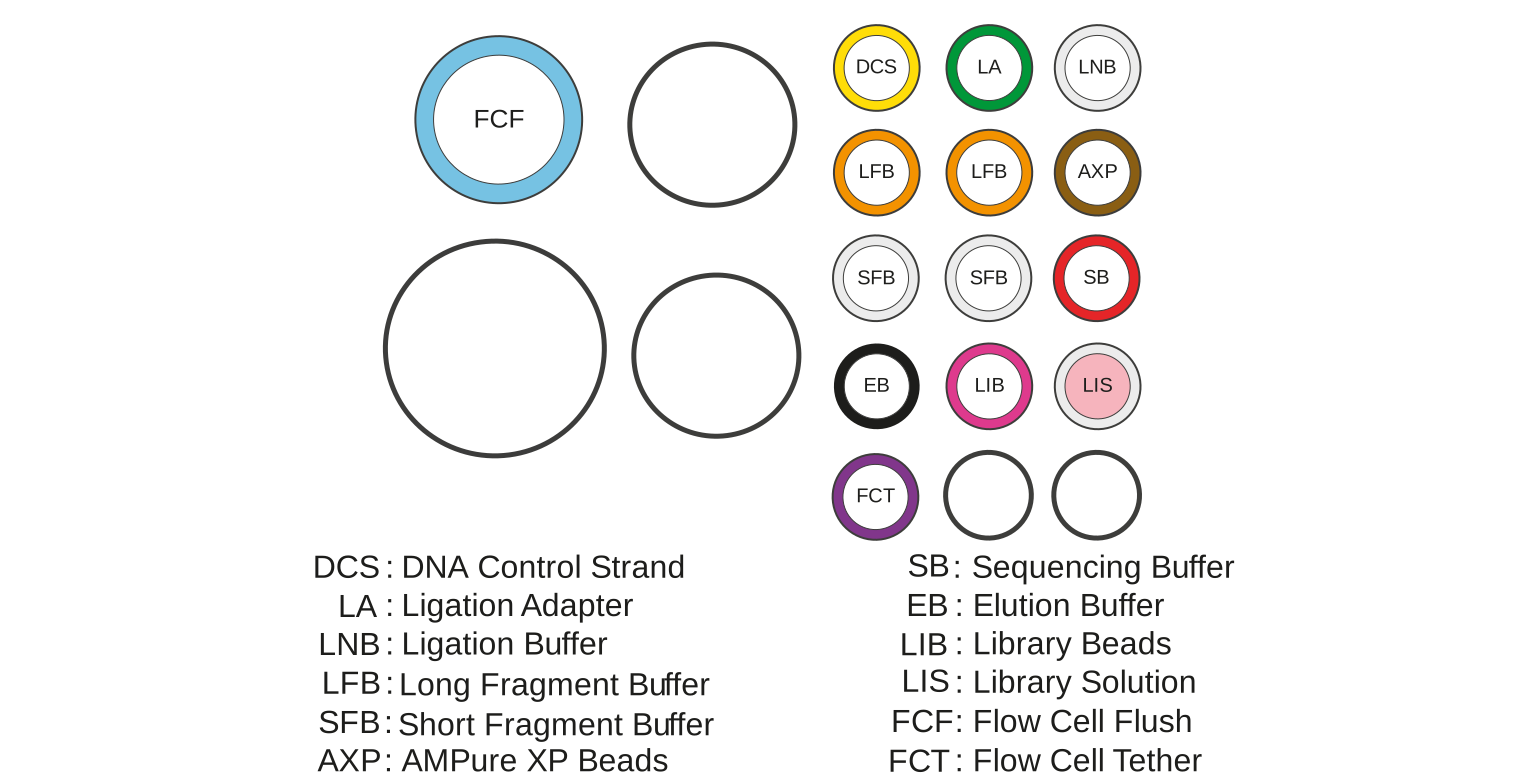
Note: This product pontains AMPure XP reagent manufactured by Beckman Coulter, Inc. and can be stored at -20°C with the kit without detriment to reagent stability.
Note: The DNA Control Sample (DCS) is a 3.6 kb standard amplicon mapping the 3' end of the Lambda genome.
Flongle Sequencing Expansion (EXP-FSE002) contents
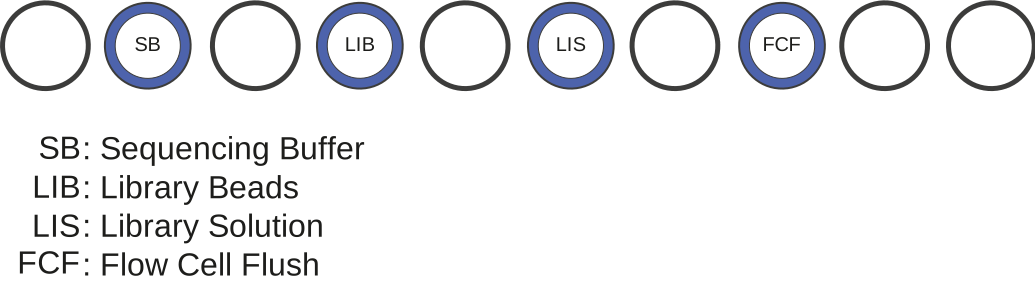
| Name | Acronym | Cap colour | Number of vials | Fill volume per vial (µl) |
|---|---|---|---|---|
| Sequencing Buffer | SB | Blue | 1 | 250 |
| Library Beads | LIB | Blue | 1 | 200 |
| Library Solution | LIS | Blue | 1 | 200 |
| Flow Cell Flush | FCF | Blue | 1 | 1,600 |
Oxford Nanopore Technologies deem the useful life of the Flow Cell Expansion to be 6 months from receipt by the customer.
Please note that Oxford Nanopore Technologies deems the lifespan of the Flongle Sequencing Expansion (EXP-FSE002) to be 6 months from receipt by the customer.
3. DNA repair and end-prep
Materials
- 500 ng high molecular weight genomic DNA / 50–100 fmol amplicon DNA
- DNA Control Sample (DCS)
- AMPure XP Beads (AXP)
Consumables
- NEBNext® FFPE DNA Repair Mix from the NEBNext® Companion Module v2 (NEB, E7672S or E7672L)
- NEBNext® Ultra II End Prep Enzyme Mix from the NEBNext® Companion Module v2 (NEB, E7672S or E7672L)
- NEBNext® FFPE DNA Repair Buffer v2 from the NEBNext® Companion Module v2 (NEB, E7672S or E7672L)
- Qubit dsDNA HS Assay Kit (Invitrogen, Q32851)
- Freshly prepared 80% ethanol in nuclease-free water
- Nuclease-free water (e.g. Thermo Scientific, AM9937)
- Qubit™ Assay Tubes (Invitrogen, Q32856)
- 1.5 ml Eppendorf DNA LoBind tubes
- 0.2 ml thin-walled PCR tubes
Equipment
- P1000 pipette and tips
- P100 pipette and tips
- P10 pipette and tips
- Thermal cycler
- Microfuge
- Hula mixer (gentle rotator mixer)
- Magnetic separation rack
- Ice bucket with ice
- Qubit™ fluorometer (or equivalent for QC check)
We recommend using the NEBNext® Companion Module v2 for Oxford Nanopore Technologies® Ligation Sequencing (NEB, E7672S or E7672L), which contains all the NEB reagents needed for use with the Ligation Sequencing Kit.
The previous version, NEBNext® Companion Module for Oxford Nanopore Technologies® Ligation Sequencing (NEB, E7180S or E7180L) is also compatible, but the recommended v2 module offers more efficient dA-tailing and ligation.
Check your flow cell.
We recommend performing a flow cell check before starting your library prep to ensure you have a flow cell with sufficient pores for a good sequencing run.
See the flow cell check document for more information.
Thaw DNA Control Sample (DCS) at room temperature, spin down, mix by pipetting, and place on ice.
Prepare the NEB reagents in accordance with manufacturer’s instructions, and place on ice.
For optimal performance, NEB recommend the following:
Thaw all reagents on ice.
Flick and/or invert the reagent tubes to ensure they are well mixed.
Note: Do not vortex the FFPE DNA Repair Mix or Ultra II End Prep Enzyme Mix.Always spin down tubes before opening for the first time each day.
Vortex the FFPE DNA Repair Buffer v2, or the NEBNext FFPE DNA Repair Buffer and Ultra II End Prep Reaction Buffer to ensure they are well mixed.
Note: These buffers may contain a white precipitate. If this occurs, allow the mixture(s) to come to room temperature and pipette the buffer several times to break up the precipitate, followed by a quick vortex to mix.The FFPE DNA Repair Buffers may have a yellow tinge and is fine to use if yellow.
Prepare the DNA in nuclease-free water:
- Transfer 500 ng (or 50-100 fmol) input DNA into a 1.5 ml Eppendorf DNA LoBind tube
- Adjust the volume to 23.5 μl with nuclease-free water
- Mix thoroughly by flicking the tube to avoid unwanted shearing
- Spin down briefly in a microfuge
In a 0.2 ml thin-walled PCR tube, mix the following:
Between each addition, pipette mix 10-20 times.
| Reagent | Volume |
|---|---|
| DNA from the previous step | 23.5 µl |
| DNA CS (optional) | 0.5 µl |
| NEBNext FFPE DNA Repair Buffer v2 | 3.5 µl |
| NEBNext FFPE DNA Repair Mix | 1 µl |
| Ultra II End-prep Enzyme Mix | 1.5 µl |
| Total | 30 µl |
If using the previous version of the NEBNext® Companion Module for Oxford Nanopore Technologies® Ligation Sequencing (NEB, E7180S or E7180L):
Between each addition, pipette mix 10-20 times.
| Reagent | Volume |
|---|---|
| DNA from previous step | 23.5 µl |
| DNA CS (optional) | 0.5 µl |
| NEBNext FFPE DNA Repair Buffer | 1.75 µl |
| NEBNext FFPE DNA Repair Mix | 1 µl |
| Ultra II End-prep Reaction Buffer | 1.75 µl |
| Ultra II End-prep Enzyme Mix | 1.5 µl |
| Total | 30 µl |
Thoroughly mix the reaction by gently pipetting and briefly spinning down.
Using a thermal cycler, incubate at 20°C for 5 minutes and 65°C for 5 minutes. Then cool down to between 4°C and 20°C on the thermal cycler or place the samples on ice.
Resuspend the AMPure XP Beads (AXP) by vortexing.
Spin down and transfer the DNA sample to a clean 1.5 ml Eppendorf DNA LoBind tube.
Add 30 µl of resuspended AMPure XP beads (AXP) to the end-prep reaction and mix by flicking the tube.
Incubate on a Hula mixer (rotator mixer) for 5 minutes at room temperature.
Freshly prepare 500 μl of 80% ethanol in nuclease-free water.
Spin down the sample and pellet on a magnet until supernatant is clear and colourless. Keep the tube on the magnet, and pipette off the supernatant.
Keep the tube on the magnet and wash the beads with 200 µl of freshly prepared 80% ethanol without disturbing the pellet. Remove the ethanol using a pipette and discard.
Repeat the previous step.
Spin down and place the tube back on the magnet. Pipette off any residual ethanol. Allow to dry for ~30 seconds, but do not dry the pellet to the point of cracking.
Remove the tube from the magnetic rack and resuspend the pellet in 31 µl nuclease-free water by gently pipetting up and down or by flicking the tube. Incubate for 2 minutes at room temperature.
Pellet the beads on a magnet until the eluate is clear and colourless, for at least 1 minute.
Remove and retain 31 µl of eluate into a clean 1.5 ml Eppendorf DNA LoBind tube.
Quantify 1 µl of eluted sample using a Qubit fluorometer.
Take forward the repaired and end-prepped DNA into the adapter ligation step. However, at this point it is also possible to store the sample at 4°C overnight.
4. Adapter ligation and clean-up
Materials
- Ligation Adapter (LA)
- Ligation Buffer (LNB)
- Long Fragment Buffer (LFB)
- S Fragment Buffer (SFB)
- AMPure XP Beads (AXP)
- Elution Buffer (EB)
Consumables
- Salt-T4® DNA Ligase (NEB, M0467)
- Qubit dsDNA HS Assay Kit (Invitrogen, Q32851)
- Qubit™ Assay Tubes (Invitrogen, Q32856)
- 1.5 ml Eppendorf DNA LoBind tubes
Equipment
- Magnetic separation rack
- Microfuge
- Vortex mixer
- P1000 pipette and tips
- P100 pipette and tips
- P20 pipette and tips
- P10 pipette and tips
- Qubit™ fluorometer (or equivalent for QC check)
We recommend using the Salt-T4® DNA Ligase (NEB, M0467).
Salt-T4® DNA Ligase (NEB, M0467) can be bought separately or is provided in the NEBNext® Companion Module v2 for Oxford Nanopore Technologies® Ligation Sequencing (NEB, E7672S or E7672L).
The Quick T4 DNA Ligase (NEB, E6057) available in the previous version NEBNext® Companion Module for Oxford Nanopore Technologies® Ligation Sequencing (NEB, E7180S or E7180L) is also compatible, but the new recommended reagent offers more efficient end ligation.
Although third-party ligase products may be supplied with their own buffer, the ligation efficiency of the Ligation Adapter (LA) is higher when using the Ligation Buffer (LNB) supplied in the Ligation Sequencing Kit.
Spin down the Ligation Adapter (LA) and Salt-T4® DNA Ligase, and place on ice.
Thaw Ligation Buffer (LNB) at room temperature, spin down and mix by pipetting. Due to viscosity, vortexing this buffer is ineffective. Place on ice immediately after thawing and mixing.
Thaw the Elution Buffer (EB) at room temperature and mix by vortexing. Then spin down and place on ice.
Depending on the wash buffer (LFB or SFB) used, the clean-up step after adapter ligation is designed to either enrich for DNA fragments of >3 kb, or purify all fragments equally.
- To enrich for DNA fragments of 3 kb or longer, use Long Fragment Buffer (LFB)
- To retain DNA fragments of all sizes, use Short Fragment Buffer (SFB)
Thaw either Long Fragment Buffer (LFB) or Short Fragment Buffer (SFB) at room temperature and mix by vortexing. Then spin down and keep at room temperature.
In a 1.5 ml Eppendorf DNA LoBind tube, mix in the following order:
Between each addition, pipette mix 10-20 times.
| Reagent | Volume |
|---|---|
| DNA sample from the previous step | 30 µl |
| Ligation Adapter (LA) | 2.5 µl |
| Ligation Buffer (LNB) | 12.5 µl |
| Salt-T4® DNA Ligase | 5 µl |
| Total | 50 µl |
Thoroughly mix the reaction by gently pipetting and briefly spinning down.
Incubate the reaction for 10 minutes at room temperature.
Resuspend the AMPure XP Beads (AXP) by vortexing.
Add 20 µl of resuspended AMPure XP beads (AXP) to the reaction and mix by flicking the tube.
Incubate on a Hula mixer (rotator mixer) for 5 minutes at room temperature.
Spin down the sample and pellet on a magnet. Keep the tube on the magnet, and pipette off the supernatant when clear and colourless.
Wash the beads by adding either 125 μl Long Fragment Buffer (LFB) or 125 μl Short Fragment Buffer (SFB). Flick the beads to resuspend, then return the tube to the magnetic rack and allow the beads to pellet. Remove the supernatant using a pipette and discard.
Repeat the previous step.
Spin down and place the tube back on the magnet. Pipette off any residual supernatant. Allow to dry for ~30 seconds, but do not dry the pellet to the point of cracking.
Remove the tube from the magnetic rack and resuspend pellet in 7 µl Elution Buffer (EB). Incubate for 10 minutes at room temperature. For high molecular weight DNA, incubating at 37° C can improve the recovery of long fragments.
Pellet the beads on a magnet until the eluate is clear and colourless, for at least 1 minute.
Remove and retain 7 µl of eluate containing the DNA library into a clean 1.5 ml Eppendorf DNA LoBind tube.
Dispose of the pelleted beads.
Quantify 1 µl of eluted sample using a Qubit fluorometer.
Prepare your final library to 5-10 fmol in 5 µl of Elution Buffer (EB).
If required, we recommend using a mass to mol calculator such as the NEB calculator.
We recommend loading 5-10 fmol of this final prepared library onto the R10.4.1 flow cell.
Following standard input recommendations, the protocol should produce enough final library (adapter DNA in EB) to load at least two Flongle Flow Cells. We recommend reserving enough library to load onto a second flow cell. Loading more than 10 fmol can have a detrimental effect on output. Dilute the library in EB or nuclease-free water to a final volume of 5 μl.
The prepared library is used for loading into the flow cell. Store the library on ice or at 4°C until ready to load.
Library storage recommendations
We recommend storing libraries in Eppendorf DNA LoBind tubes at 4°C for short-term storage or repeated use, for example, re-loading flow cells between washes. For single use and long-term storage of more than 3 months, we recommend storing libraries at -80°C in Eppendorf DNA LoBind tubes.
5. Flongle Flow Cell loading
Materials
- Flongle Sequencing Expansion (EXP-FSE002)
- Flow Cell Tether (FCT)
Consumables
- Flongle Flow Cell
- 1.5 ml Eppendorf DNA LoBind tubes
Equipment
- Flongle adapter
- MinION or GridION device
- P200 pipette and tips
- P20 pipette and tips
- P10 pipette and tips
Please note, this kit is only compatible with R10.4.1 flow cells (FLO-FLG114).
Flongle Sequencing Expansion (EXP-FSE002)
To load a library onto your Flongle Flow Cell, you will need to use the following:
Flongle Sequencing Expansion (EXP-FSE002) components
- Sequencing Buffer (SB)
- Flow Cell Flush (FCF)
- Library Beads (LIB) or Library Solution (LIS)
Sequencing Kit components
- Flow Cell Tether (FCT)
Oxford Nanopore Technologies deem the useful life of the Flow Cell Expansion to be 6 months from receipt by the customer.
Do NOT touch the reverse side of the Flongle Flow Cell array or the contact pads on the Flongle adapter. ALWAYS wear gloves when handling Flongle Flow Cells and adapters to avoid damage to the flow cell or adapter.

The diagram below shows the components of the Flongle flow cell:
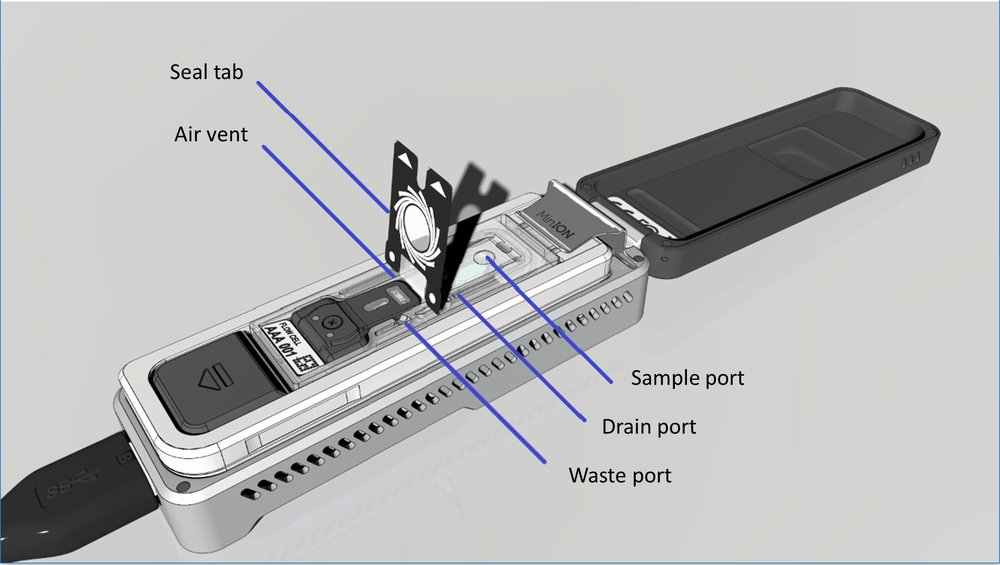
The seal tab, air vent, waste channel, drain port and sample port are visible here. The sample port, drain port and air vent only become accessible once the seal tab is peeled back.
Thaw the Sequencing Buffer (SB), Library Beads (LIB) or Library Solution (LIS, if using), Flow Cell Tether (FCT) and Flow Cell Flush (FCF) at room temperature before mixing by vortexing. Then spin down and store on ice.
In a fresh 1.5 ml Eppendorf DNA LoBind tube, mix 117 µl of Flow Cell Flush (FCF) with 3 µl of Flow Cell Tether (FCT) and mix by pipetting.
Place the Flongle adapter into the MinION or one of the five GridION positions.
The adapter should sit evenly and flat on the MinION Mk1B/Mk1D or GridION platform. This ensures the flow cell assembly is flat during the next stage.
The adapter needs to be plugged into your device, and the device should be plugged in and powered on before inserting the Flongle Flow Cell.

Place the flow cell into the Flongle adapter, and press the flow cell down until you hear a click.
The flow cell should sit evenly and flat inside the adapter, to avoid any bubbles forming inside the fluidic compartments.

How to prime and load a Flongle Flow Cell
A short video describing how to prime and load a Flongle Flow Cell.
Peel back the seal tab from the Flongle Flow Cell, up to a point where the sample port is exposed, as follows:
- Lift up the seal tab:
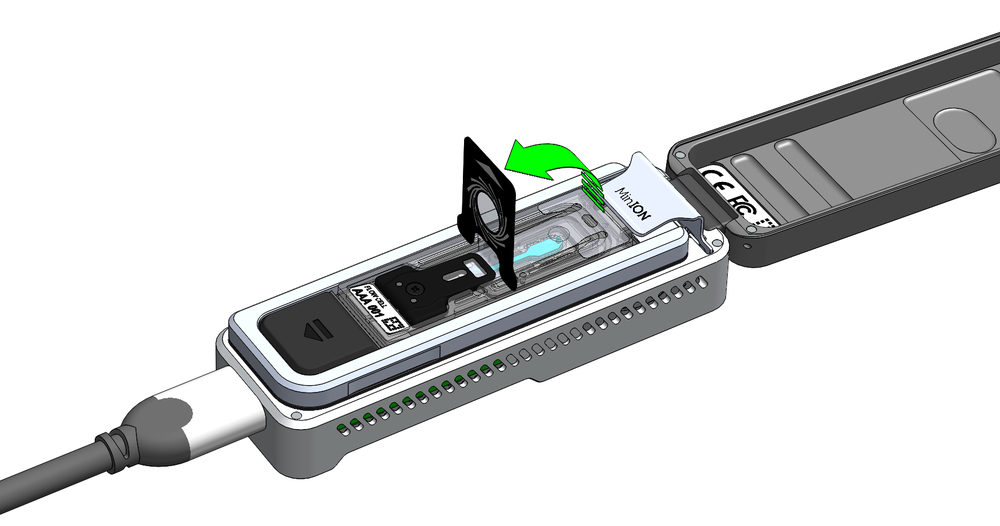
- Pull the seal tab to open access to the sample port:

- Hold the seal tab open by using adhesive on the tab to stick to the MinION Mk1B/Mk1D lid:

To prime your flow cell with the mix of Flow Cell Flush (FCF) and Flow Cell Tether (FCT) that was prepared earlier, ensure that there is no air gap in the sample port or the pipette tip. Place the P200 pipette tip inside the sample port and slowly dispense the 120 µl of priming fluid into the Flongle Flow Cell by slowly pipetting down. We also recommend twisting the pipette plunger down to avoid flushing the flow cell too vigorously.

The Library Beads (LIB) tube contains a suspension of beads. These beads settle very quickly. It is vital that they are mixed immediately before use.
We recommend using the Library Beads (LIB) for most sequencing experiments. However, the Library Solution (LIS) is available for more viscous libraries.
Vortex the vial of Library Beads (LIB). Note that the beads settle quickly, so immediately prepare the Sequencing Mix in a fresh 1.5 ml Eppendorf DNA LoBind tube for loading the Flongle, as follows:
| Reagents | Volume |
|---|---|
| Sequencing Buffer (SB) | 15 µl |
| Library Beads (LIB) mixed immediately before use, or Library Solution (LIS), if using. | 10 µl |
| DNA library | 5 µl |
| Total | 30 µl |
To add the Sequencing Mix to the flow cell, ensure that there is no air gap in the sample port or the pipette tip. Place the P200 tip inside the sample port and slowly dispense the Sequencing Mix into the flow cell by slowly pipetting down. We also recommend twisting the pipette plunger down to avoid flushing the flow cell too vigorously.
Seal the Flongle flow cell using the adhesive on the seal tab, as follows:
- Stick the transparent adhesive tape to the sample port.

- Replace the top (Wheel icon section) of the seal tab to its original position.

Close the device lid and set up a sequencing run on MinKNOW.
When a flow cell is inserted into the MinION Mk1D, the device lid will sit on top of the flow cell, leaving a small gap around the sides. This is normal and has no impact on the performance of the device.
Please refer to this FAQ regarding the device lid.

6. Data acquisition and basecalling
How to start sequencing
Once you have loaded your flow cell, the sequencing run can be started on MinKNOW, our sequencing software that controls the device, data acquisition and real-time basecalling. For more detailed information on setting up and using MinKNOW, please see the MinKNOW protocol.
MinKNOW can be used and set up to sequence in multiple ways:
- On a computer either direcly or remotely connected to a sequencing device.
- Directly on a GridION or PromethION 24/48 sequencing device.
For more information on using MinKNOW on a sequencing device, please see the device user manuals:
To start a sequencing run on MinKNOW:
1. Navigate to the start page and click Start sequencing.
2. Fill in your experiment details, such as name and flow cell position (if using a GridION) and sample ID.
3. Select the Ligation Sequencing Kit V14 (SQK-LSK114) on the Kit page.
4. Configure the sequencing parameters for your sequencing run or keep to the default settings on the Run configuration tab.
Note: If basecalling was turned off when a sequencing run was set up, basecalling can be performed post-run on MinKNOW. For more information, please see the MinKNOW protocol.
5. Click Start to initiate the sequencing run.
Data analysis after sequencing
After sequencing and basecalling, the data can be analysed. For further information about options for basecalling and post-basecalling analysis, please refer to the Data Analysis document.
In the Downstream analysis section, we outline further options for analysing your data.
7. Downstream analysis
Post-basecalling analysis
There are several options for further analysing your basecalled data:
EPI2ME workflows
For in-depth data analysis, Oxford Nanopore Technologies offers a range of bioinformatics tutorials and workflows available in EPI2ME, which are available in the EPI2ME section of the Community. The platform provides a vehicle where workflows deposited in GitHub by our Research and Applications teams can be showcased with descriptive texts, functional bioinformatics code and example data.
Research analysis tools
Oxford Nanopore Technologies' Research division has created a number of analysis tools, that are available in the Oxford Nanopore GitHub repository. The tools are aimed at advanced users, and contain instructions for how to install and run the software. They are provided as-is, with minimal support.
Community-developed analysis tools
If a data analysis method for your research question is not provided in any of the resources above, please refer to the resource centre and search for bioinformatics tools for your application. Numerous members of the Nanopore Community have developed their own tools and pipelines for analysing nanopore sequencing data, most of which are available on GitHub. Please be aware that these tools are not supported by Oxford Nanopore Technologies, and are not guaranteed to be compatible with the latest chemistry/software configuration.
8. Issues during DNA/RNA extraction and library preparation
Below is a list of the most commonly encountered issues, with some suggested causes and solutions.
We also have an FAQ section available on the Nanopore Community Support section.
If you have tried our suggested solutions and the issue still persists, please contact Technical Support via email (support@nanoporetech.com) or via LiveChat in the Nanopore Community.
Low sample quality
| Observation | Possible cause | Comments and actions |
|---|---|---|
| Low DNA purity (Nanodrop reading for DNA OD 260/280 is <1.8 and OD 260/230 is <2.0–2.2) | The DNA extraction method does not provide the required purity | The effects of contaminants are shown in the Contaminants document. Please try an alternative extraction method that does not result in contaminant carryover. Consider performing an additional SPRI clean-up step. |
| Low RNA integrity (RNA integrity number <9.5 RIN, or the rRNA band is shown as a smear on the gel) | The RNA degraded during extraction | Try a different RNA extraction method. For more info on RIN, please see the RNA Integrity Number document. Further information can be found in the DNA/RNA Handling page. |
| RNA has a shorter than expected fragment length | The RNA degraded during extraction | Try a different RNA extraction method. For more info on RIN, please see the RNA Integrity Number document. Further information can be found in the DNA/RNA Handling page. We recommend working in an RNase-free environment, and to keep your lab equipment RNase-free when working with RNA. |
Low DNA recovery after AMPure bead clean-up
| Observation | Possible cause | Comments and actions |
|---|---|---|
| Low recovery | DNA loss due to a lower than intended AMPure beads-to-sample ratio | 1. AMPure beads settle quickly, so ensure they are well resuspended before adding them to the sample. 2. When the AMPure beads-to-sample ratio is lower than 0.4:1, DNA fragments of any size will be lost during the clean-up. |
| Low recovery | DNA fragments are shorter than expected | The lower the AMPure beads-to-sample ratio, the more stringent the selection against short fragments. Please always determine the input DNA length on an agarose gel (or other gel electrophoresis methods) and then calculate the appropriate amount of AMPure beads to use. 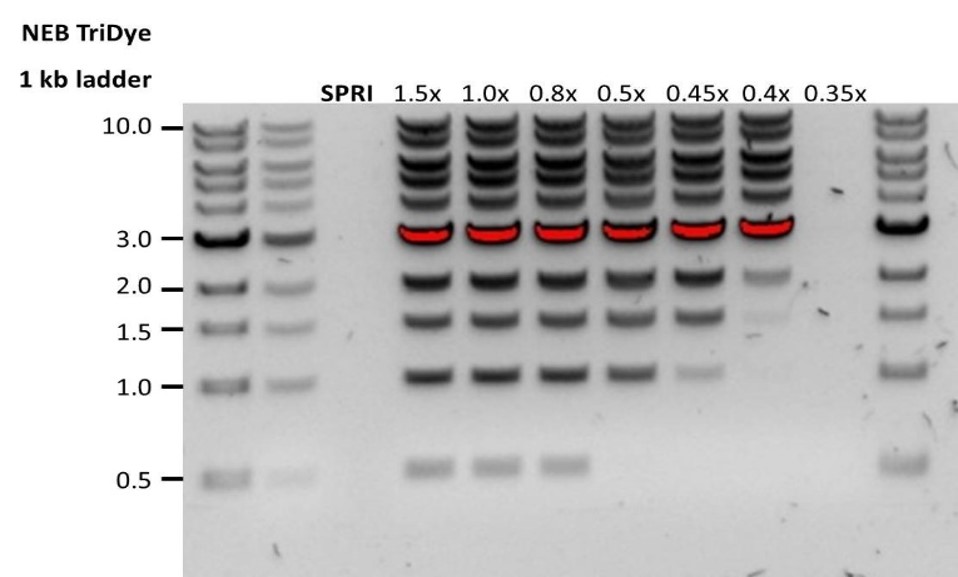 |
| Low recovery after end-prep | The wash step used ethanol <70% | DNA will be eluted from the beads when using ethanol <70%. Make sure to use the correct percentage. |
9. Issues during the sequencing run
Below is a list of the most commonly encountered issues, with some suggested causes and solutions.
We also have an FAQ section available on the Nanopore Community Support section.
If you have tried our suggested solutions and the issue still persists, please contact Technical Support via email (support@nanoporetech.com) or via LiveChat in the Nanopore Community.
Fewer pores at the start of sequencing than after Flow Cell Check
| Observation | Possible cause | Comments and actions |
|---|---|---|
| MinKNOW reported a lower number of pores at the start of sequencing than the number reported by the Flow Cell Check | An air bubble was introduced into the nanopore array | After the Flow Cell Check it is essential to remove any air bubbles near the priming port before priming the flow cell. If not removed, the air bubble can travel to the nanopore array and irreversibly damage the nanopores that have been exposed to air. The best practice to prevent this from happening is demonstrated in videos for how to load a MinION Flow Cell and how to load a PromethION Flow Cell. |
| MinKNOW reported a lower number of pores at the start of sequencing than the number reported by the Flow Cell Check | The flow cell is not correctly inserted into the device | Stop the sequencing run, remove the flow cell from the sequencing device and insert it again, checking that the flow cell is firmly seated in the device and that it has reached the target temperature. If applicable, try a different position on the device (GridION/PromethION). |
| MinKNOW reported a lower number of pores at the start of sequencing than the number reported by the Flow Cell Check | Contaminations in the library damaged or blocked the pores | The pore count during the Flow Cell Check is performed using the QC DNA molecules present in the flow cell storage buffer. At the start of sequencing, the library itself is used to estimate the number of active pores. Because of this, variability of about 10% in the number of pores is expected. A significantly lower pore count reported at the start of sequencing can be due to contaminants in the library that have damaged the membranes or blocked the pores. Alternative DNA/RNA extraction or purification methods may be needed to improve the purity of the input material. The effects of contaminants are shown in the Contaminants Know-how piece. Please try an alternative extraction method that does not result in contaminant carryover. |
MinKNOW script failed
| Observation | Possible cause | Comments and actions |
|---|---|---|
| MinKNOW shows "Script failed" | Restart the computer and then restart MinKNOW. If the issue persists, please collect the MinKNOW log files and contact Technical Support. If you do not have another sequencing device available, we recommend storing the flow cell and the loaded library at 4°C and contact Technical Support for further storage guidance. |
Pore occupancy below 40%
| Observation | Possible cause | Comments and actions |
|---|---|---|
| Pore occupancy <40% | Not enough library was loaded on the flow cell | Ensure the correct volume and concentration as stated on the appropriate protocol for your sequencing library is loaded onto the flow cell. Please quantify the library before loading and calculate fmols using tools like the Promega Biomath Calculator, choosing "dsDNA: µg to fmol" |
| Pore occupancy close to 0 | The Ligation Sequencing Kit was used, and sequencing adapters did not ligate to the DNA | Make sure to use the NEBNext Quick Ligation Module (E6056) and Oxford Nanopore Technologies Ligation Buffer (LNB, provided in the sequencing kit) at the sequencing adapter ligation step, and use the correct amount of each reagent. A Lambda control library can be prepared to test the integrity of the third-party reagents. |
| Pore occupancy close to 0 | The Ligation Sequencing Kit was used, and ethanol was used instead of LFB or SFB at the wash step after sequencing adapter ligation | Ethanol can denature the motor protein on the sequencing adapters. Make sure the LFB or SFB buffer was used after ligation of sequencing adapters. |
| Pore occupancy close to 0 | No tether on the flow cell | Tethers are adding during flow cell priming (FLT tube for Kit 9, 10, 11, FCT for Kit 14, and FTU for ultra-long DNA kits). Make sure FLT/FCT/FTU was added to the buffer (FB for Kit 9, 10, 11, and FCF for Kit 14) before priming. |
Shorter than expected read length
| Observation | Possible cause | Comments and actions |
|---|---|---|
| Shorter than expected read length | Unwanted fragmentation of DNA sample | Read length reflects input DNA fragment length. Input DNA can be fragmented during extraction and library prep. 1. Please review the Extraction Methods in the Nanopore Community for best practice for extraction. 2. Visualise the input DNA fragment length distribution on an agarose gel before proceeding to the library prep. 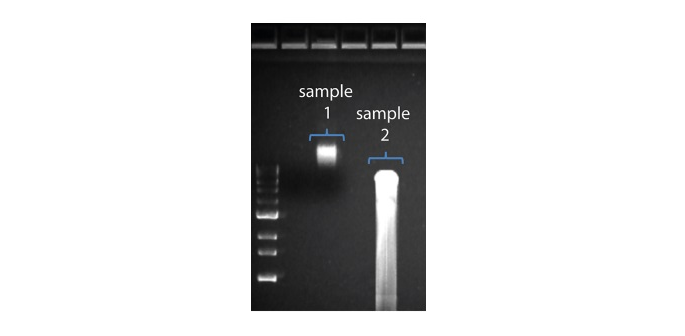 In the image above, Sample 1 is of high molecular weight, whereas Sample 2 has been fragmented. In the image above, Sample 1 is of high molecular weight, whereas Sample 2 has been fragmented.3. During library prep, avoid pipetting and vortexing when mixing reagents. Flicking or inverting the tube is sufficient. |
Large proportion of unavailable pores
| Observation | Possible cause | Comments and actions |
|---|---|---|
Large proportion of unavailable pores (shown as blue in the channels panel and pore activity plot) 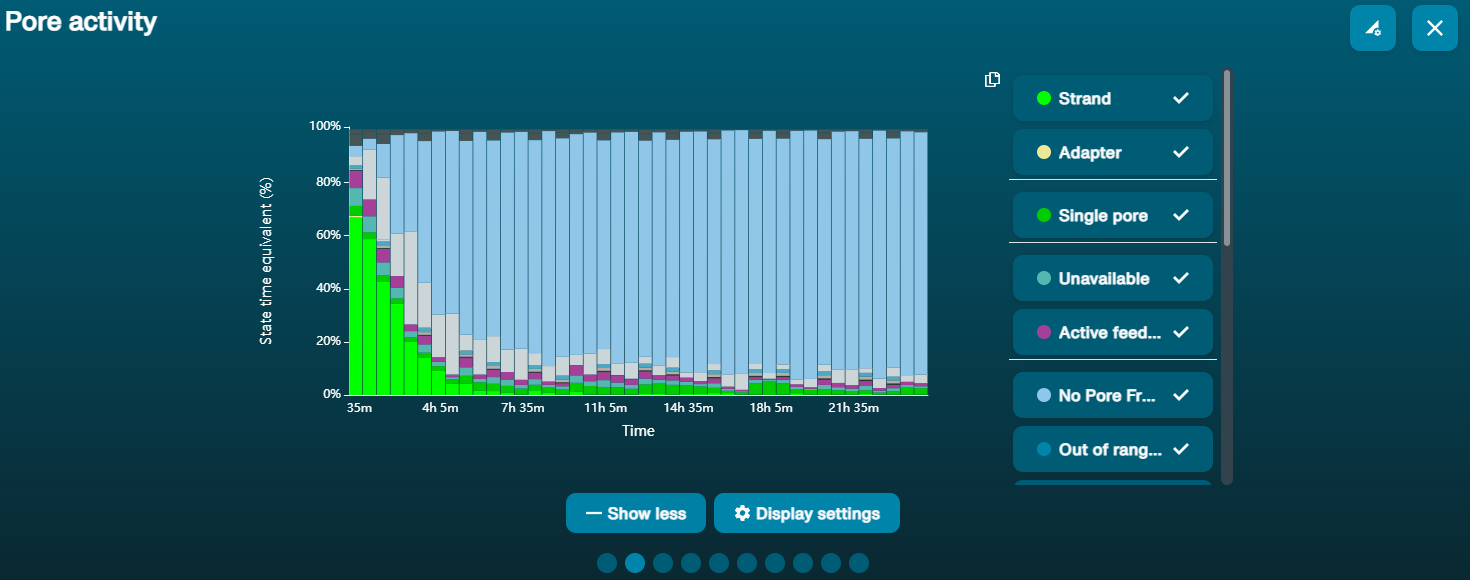 The pore activity plot above shows an increasing proportion of "unavailable" pores over time. The pore activity plot above shows an increasing proportion of "unavailable" pores over time. | Contaminants are present in the sample | Some contaminants can be cleared from the pores by the unblocking function built into MinKNOW. If this is successful, the pore status will change to "sequencing pore". If the portion of unavailable pores stays large or increases: 1. A nuclease flush using the Flow Cell Wash Kit (EXP-WSH004) can be performed, or 2. Run several cycles of PCR to try and dilute any contaminants that may be causing problems. |
Large proportion of inactive pores
| Observation | Possible cause | Comments and actions |
|---|---|---|
| Large proportion of inactive/unavailable pores (shown as light blue in the channels panel and pore activity plot. Pores or membranes are irreversibly damaged) | Air bubbles have been introduced into the flow cell | Air bubbles introduced through flow cell priming and library loading can irreversibly damage the pores. Watch the how to load a MinION Flow Cell or how to load a PromethION Flow Cell videos for best practice. |
| Large proportion of inactive/unavailable pores | Certain compounds co-purified with DNA | Known compounds, include polysaccharides, typically associate with plant genomic DNA. 1. Please refer to the Plant leaf DNA extraction method. 2. Clean-up using the QIAGEN PowerClean Pro kit. 3. Perform a whole genome amplification with the original gDNA sample using the QIAGEN REPLI-g kit. |
| Large proportion of inactive/unavailable pores | Contaminants are present in the sample | The effects of contaminants are shown in the Contaminants Know-how piece. Please try an alternative extraction method that does not result in contaminant carryover. |
Temperature fluctuation
| Observation | Possible cause | Comments and actions |
|---|---|---|
| Temperature fluctuation | The flow cell has lost contact with the device | Check that there is a heat pad covering the metal plate on the back of the flow cell. Re-insert the flow cell and press it down to make sure the connector pins are firmly in contact with the device. If the problem persists, please contact Technical Services. |
Failed to reach target temperature
| Observation | Possible cause | Comments and actions |
|---|---|---|
| MinKNOW shows "Failed to reach target temperature" | The instrument was placed in a location that is colder than normal room temperature, or a location with poor ventilation (which leads to the flow cells overheating) | MinKNOW has a default timeframe for the flow cell to reach the target temperature. Once the timeframe is exceeded, an error message will appear and the sequencing experiment will continue. However, sequencing at an incorrect temperature may lead to a decrease in throughput and lower q-scores. Please adjust the location of the sequencing device to ensure that it is placed at room temperature with good ventilation, then re-start the process in MinKNOW. Please refer to this link for more information on MinION temperature control. |
Last updated: 4/22/2026
Document options





