SARS-CoV-2 virus PCR tiling and sequencing from RNA using SQK-RBK114.96 (COV_9300_v114_revA_08Dec2025)


MinION: Protocol
SARS-CoV-2 virus PCR tiling and sequencing from RNA using SQK-RBK114.96 V COV_9300_v114_revA_08Dec2025
This protocol:
- Uses extracted RNA samples
- Uses third-party reagents and primers, alongside the SQK-RBK114.96 kit
- Includes reverse transcription and tiled PCR amplification
- Is for multiplexing 1-96 samples
- Has a library preparation time of ~315 minutes
- Includes fragmentation
- Is compatible with R10.4.1 flow cells
For Research Use Only
FOR RESEARCH USE ONLY.
Contents
Introduction to the protocol
Library preparation
- 3. Reverse transcription
- 4. PCR
- 5. Addition of rapid barcodes
- 6. Pooling samples and clean-up
- 7. Priming and loading the MinION and GridION Flow Cell
Sequencing and data analysis
Overview
This protocol:
- Uses extracted RNA samples
- Uses third-party reagents and primers, alongside the SQK-RBK114.96 kit
- Includes reverse transcription and tiled PCR amplification
- Is for multiplexing 1-96 samples
- Has a library preparation time of ~315 minutes
- Includes fragmentation
- Is compatible with R10.4.1 flow cells
For Research Use Only
1. Overview of the protocol
Please make sure you always use the most recent version of the protocol.
This protocol is an updated version of the SARS-CoV-2 virus PCR tiling and sequencing from RNA using EXP-MRT001 and SQK-RBK114.96 using third-party reagents and customer-ordered RT PCR primers. This enables users to continue performing the method without the need of the Midnight RT PCR Expansion (EXP-MRT001).
Introduction to the protocol
To continue support for SARS-CoV-2 sequencing, the team at Oxford Nanopore Technologies have put together an updated workflow based on the ARTIC Network protocols and analysis methods. The protocol uses third-party reagents and customer-ordered RT PCR primers for sample preparation; and the Oxford Nanopore Technologies' Rapid Barcoding Kit 96 V14 (SQK-RBK114.96) for barcoding and library preparation.
While this protocol is available in the Nanopore Community, we kindly ask users to ensure they are citing the members of the ARTIC network who have been behind the development of these methods.
This protocol is similar to the ARTIC amplicon sequencing protocol for MinION for SARS-CoV-2 v3 (LoCost) by Josh Quick and the method used in Freed et al., 2020. The protocol generates amplicons in a tiled fashion across the whole SARS-CoV-2 genome.
To generate tiled PCR amplicons from the SARS-CoV-2 viral cDNA for use with the Rapid Barcoding Kit 96 V14 (SQK-RBK114.96), primers were designed by Freed *et al.*, 2020 using Primal Scheme. These primers are designed to generate 1.2 kb amplicons. Primer sequences can be found here.
As mutations in SARS-CoV-2 variants emerge, amplicon drop out may be observed. For users wishing to design their own primer spike-ins to address this, we suggest adding to the appropriate primer pool at a final concentration between 3.33 µM and 6.66 µM.
Steps in the sequencing workflow:
Prepare for your experiment
You will need to:
- Extract your RNA.
- Ensure you have your sequencing kit, the correct equipment and reagents.
- Download the software for acquiring and analysing your data.
- Check your flow cell to ensure it has enough pores for a good sequencing run.
Prepare your library
You will need to:
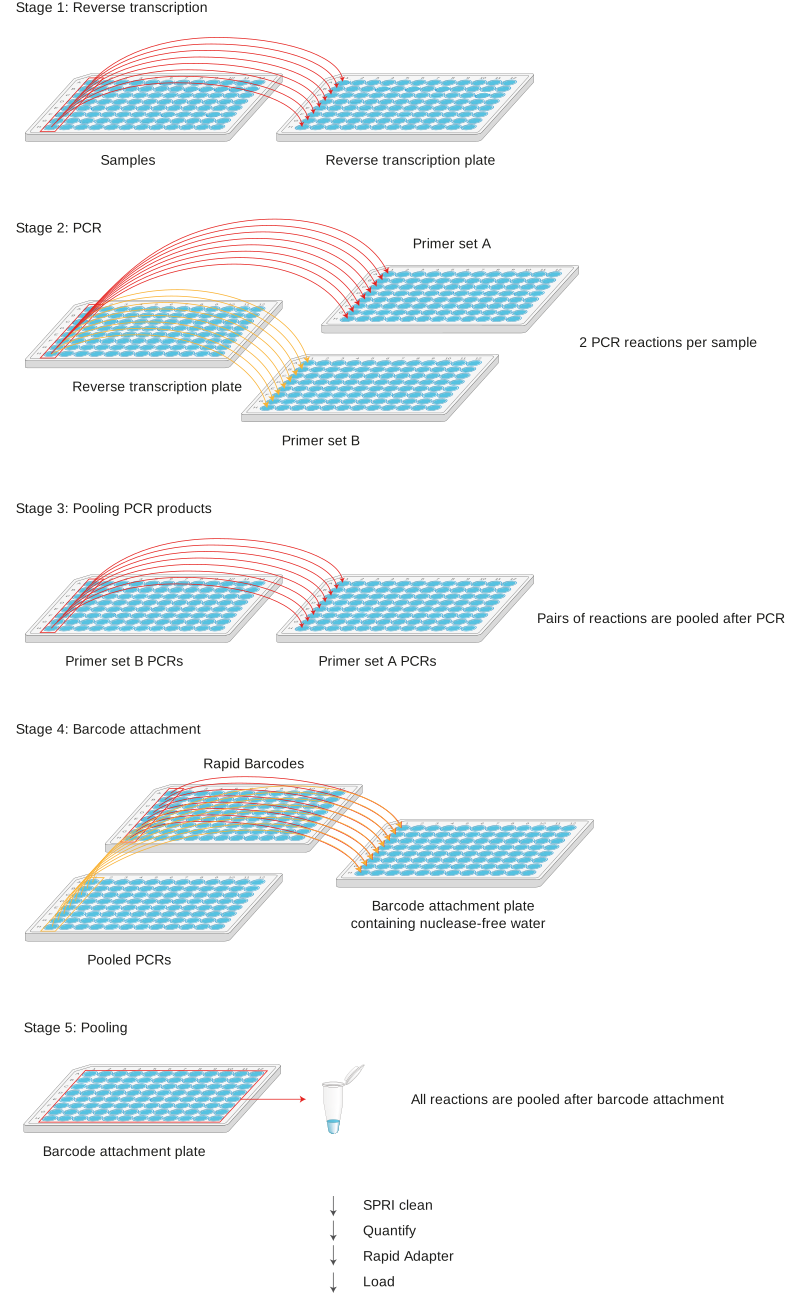
- Reverse transcribe your RNA samples with random hexamers.
- Amplify the samples by tiled PCR using separate primer pools.
- Combine the primer pools.
- Attach Rapid Barcodes supplied in the kit to the DNA ends, pool the samples and SPRI purify.
- Prime the flow cell and load your DNA library into the flow cell.
Sequencing and analysis
You will need to:
- Start a sequencing run using the MinKNOW software, selecting SQK-RBK114.96 in kit selection, which will collect raw data from the device and convert it into basecalled reads.
- (Optional): Perform downstream analysis of the data using the wf-artic analysis workflow integrated within the EPI2ME Labs application.
Before starting
This protocol outlines how to carry out PCR tiling of SARS-CoV-2 viral RNA samples on a 96-well plate using third-party reagents, customer-ordered primers; and the Rapid Barcoding Kit 96 V14 (SQK-RBK114.96).
It is required to use total RNA extracted from samples that have been screened by a suitable qPCR assay.
When processing multiple samples at once, we recommend making master mixes with an additional 10% of the volume. We also recommend using a template-free pre-PCR hood for making up the master mixes, and a separate template pre-PCR hood for handling the samples. It is important to clean and/or UV irradiate these hoods between sample batches. Furthermore, to track and monitor cross-contamination events, it is important to run a negative control reaction at the reverse transcription stage using nuclease-free water instead of sample, and carrying this control through the rest of the prep.
All post-PCR procedures must be carried out in a separate area to the pre-PCR preparation, with dedicated equipment for liquid handling in each area.
Compatibility of this protocol
This protocol should only be used in combination with:
- Rapid Barcoding Kit 96 V14 (SQK-RBK114.96)
- MinION Flow Cell R10.4.1 (FLO-MIN114)
- Flow Cell Wash Kit (EXP-WSH004)
- MinION Mk1D - MinION Mk1D IT requirements document
- GridION - GridION IT requirements document
2. Equipment and consumables
Materials
- Input RNA in 10 mM Tris-HCl, pH 8.0
- Rapid Barcoding Kit 96 V14 (SQK-RBK114.96)
Consumables
- xGen™ SARS-CoV-2 Midnight Amplicon Panel (IDT, 10011644)
- LunaScript® RT SuperMix (NEB, M3010)
- Q5® Hot Start High-Fidelity 2X Master Mix (NEB, cat # M0494)
- Nuclease-free water (e.g. Thermo Scientific, AM9937)
- Freshly prepared 80% ethanol in nuclease-free water
- Qubit dsDNA HS Assay Kit (Invitrogen, Q32851)
- Qubit™ Assay Tubes (Invitrogen, Q32856)
- 1.5 ml Eppendorf DNA LoBind tubes
- 2 ml Eppendorf DNA LoBind tubes
- 5 ml Eppendorf DNA LoBind tubes
- Eppendorf twin.tec® PCR plate 96 LoBind, semi-skirted (Eppendorf, 0030129504) with PCR seals
- Bovine Serum Albumin (BSA) (50 mg/ml) (e.g. Invitrogen™ UltraPure™ BSA 50 mg/ml, AM2616)
Equipment
- Hula mixer (gentle rotator mixer)
- Magnetic separation rack
- Centrifuge capable of taking 96-well plates
- Microfuge
- Vortex mixer
- Thermal cycler
- Multichannel pipettes suitable for dispensing 0.5–10 μl, 2–20 μl and 20–200 μl, and tips
- P1000 pipette and tips
- P200 pipette and tips
- P100 pipette and tips
- P20 pipette and tips
- P10 pipette and tips
- Ice bucket with ice
- Timer
- Qubit fluorometer (or equivalent)
Optional equipment
- Eppendorf 5424 centrifuge (or equivalent)
- PCR hood with UV steriliser (optional but recommended to reduce cross-contamination)
- PCR-Cooler (Eppendorf)
- Stepper pipette and tips
Check your flow cell
We highly recommend that you check the number of pores in your flow cell prior to starting a sequencing experiment. This should be done within 12 weeks of purchasing your MinION/GridION Flow Cells. Oxford Nanopore Technologies will replace any unsed flow cell with fewer than the number of pores listed in the Table below, when the result is reported within two days of performing the flow cell check, and when the storage recommendations have been followed. To do the flow cell check, please follow the instructions in the Flow Cell Check document.
| Flow cell | Minimum number of active pores covered by warranty |
|---|---|
| MinION/GridION Flow Cell | 800 |
For this protocol, you will need your extracted RNA in 8 µl 10 mM Tris-HCl, pH 8.0.
The Rapid Adapter (RA) used in this kit and protocol is not interchangeable with other sequencing adapters.
Rapid Barcoding Kit 96 V14 (SQK-RBK114.96) contents
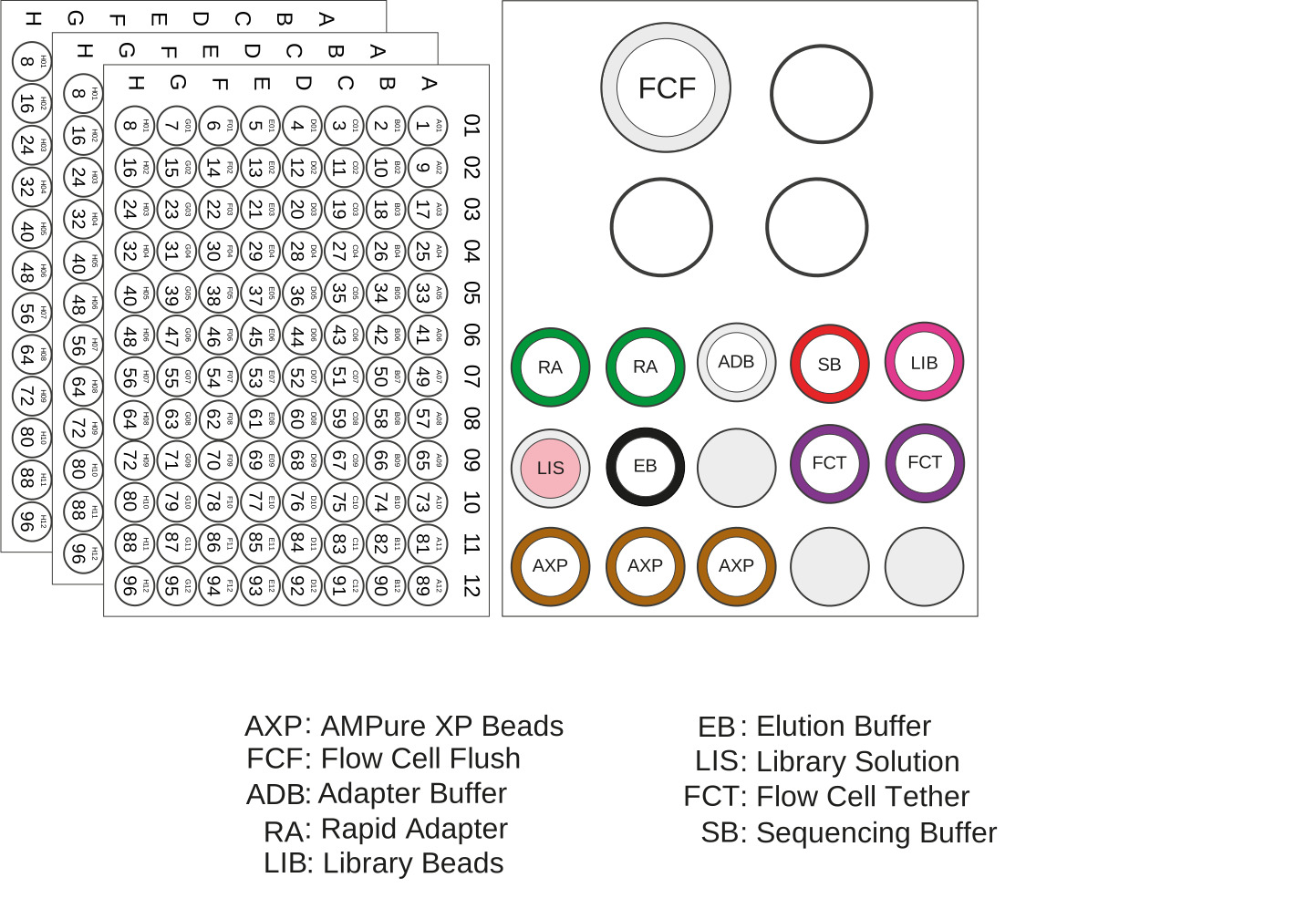
| Name | Acronym | Cap colour | No. of vials | Fill volume per vial (µl) |
|---|---|---|---|---|
| Rapid Adapter | RA | Green | 2 | 15 |
| Adapter Buffer | ADB | Clear | 1 | 100 |
| AMPure XP Beads | AXP | Amber | 3 | 1,200 |
| Elution Buffer | EB | Black | 1 | 1,500 |
| Sequencing Buffer | SB | Red | 1 | 1,700 |
| Library Beads | LIB | Pink | 1 | 1,800 |
| Library Solution | LIS | White cap, pink label | 1 | 1,800 |
| Flow Cell Flush | FCF | Clear | 1 | 15,500 |
| Flow Cell Tether | FCT | Purple | 2 | 200 |
| Rapid Barcodes | RB01-96 | - | 3 plates | 8 µl per well |
This product contains AMPure XP reagent manufactured by Beckman Coulter, Inc. and can be stored at -20°C with the kit without detriment to reagent stability.
Primer sequences
For ease of use, we recommend purchasing the panel xGen™ SARS-CoV-2 Midnight Amplicon Panel (IDT, 10011644). A full list of the primers contained in the xGen™ SARS-CoV-2 Midnight Amplicon Panel (IDT, 10011644) can be found on the supplier website.
As mutations in SARS-CoV-2 variants emerge, amplicon drop out may be observed. For users wishing to design their own primer spike-ins to address this, we suggest adding to the appropriate primer pool at a final concentration between 3.33 µM and 6.66 µM.
Alternatively, users can opt to order primers independently and generate the panels. Please find below a full list of the are the sequences for the primer scheme used in the Midnight RT PCR Expansion:
Pool A
| Primer name | Primer Sequence | Final Concentration |
|---|---|---|
SARSCoV_1200_1_LEFT | ACCAACCAACTTTCGATCTCTTGT | 3.33μM |
SARSCoV_1200_1_RIGHT | GGTTGCATTCATTTGGTGACGC | 3.33μM |
SARSCoV_1200_3_LEFT | GGCTTGAAGAGAAGTTTAAGGAAGGT | 3.33μM |
SARSCoV_1200_3_RIGHT | GATTGTCCTCACTGCCGTCTTG | 3.33μM |
SARSCoV_1200_5_LEFT | ACCTACTAAAAAGGCTGGTGGC | 3.33μM |
SARSCoV_1200_5_RIGHT | AGCATCTTGTAGAGCAGGTGGA | 3.33μM |
SARSCoV_1200_7_LEFT | ACCTGGTGTATACGTTGTCTTTGG | 6.66μM |
SARSCoV_1200_7_RIGHT | GCTGAAATCGGGGCCATTTGTA | 6.66μM |
SARSCoV_1200_9_LEFT | AGAAGTTACTGGCGATAGTTGTAATAACT | 6.66μM |
SARSCoV_1200_9_RIGHT | TGCTGATATGTCCAAAGCACCA | 6.66μM |
SARSCoV_1200_11_LEFT | AGACACCTAAGTATAAGTTTGTTCGCA | 3.33μM |
SARSCoV_1200_11_RIGHT | GCCCACATGGAAATGGCTTGAT | 3.33μM |
SARSCoV_1200_13_LEFT | ACCTCTTACAACAGCAGCCAAAC | 3.33μM |
SARSCoV_1200_13_RIGHT | CGTCCTTTTCTTGGAAGCGACA | 3.33μM |
SARSCoV_1200_15_LEFT | TTTTAAGGAATTACTTGTGTATGCTGCT | 6.66μM |
SARSCoV_1200_15_RIGHT | ACACACAACAGCATCGTCAGAG | 6.66μM |
SARSCoV_1200_17_LEFT | TCAAGCTTTTTGCAGCAGAAACG | 3.33μM |
SARSCoV_1200_17_RIGHT | CCAAGCAGGGTTACGTGTAAGG | 3.33μM |
SARSCoV_1200_19_LEFT | GGCACATGGCTTTGAGTTGACA | 3.33μM |
SARSCoV_1200_19_RIGHT | CCTGTTGTCCATCAAAGTGTCCC | 3.33μM |
SARSCoV_1200_21_LEFT | TCTGTAGTTTCTAAGGTTGTCAAAGTGA | 6.66μM |
SARSCoV_1200_21_RIGHT | GCAGGGGGTAATTGAGTTCTGG | 6.66μM |
21_right_spike | GTGTATGATTGAGTTCTGGTTGTAAG | 6.66μM |
SARSCoV_1200_23_LEFT | ACTTTAGAGTCCAACCAACAGAATCT | 6.66μM |
23_left_spike | ACTTTAGAGTTCAACCAACAGAATCT | 6.66μM |
SARSCoV_1200_23_RIGHT | TGACTAGCTACACTACGTGCCC | 6.66μM |
SARSCoV_1200_25_LEFT | TGCTGCTACTAAAATGTCAGAGTGT | 3.33μM |
SARSCoV_1200_25_RIGHT | CATTTCCAGCAAAGCCAAAGCC | 3.33μM |
SARSCoV_1200_27_LEFT | TGGATCACCGGTGGAATTGCTA | 3.33μM |
SARSCoV_1200_27_RIGHT | TGTTCGTTTAGGCGTGACAAGT | 3.33μM |
SARSCoV_1200_29_LEFT | TGAGGGAGCCTTGAATACACCA | 3.33μM |
SARSCoV_1200_29_RIGHT | TAGGCAGCTCTCCCTAGCATTG | 3.33μM |
Pool B
| Primer name | Primer sequences | Final concentration |
|---|---|---|
SARSCoV_1200_2_LEFT | CCATAATCAAGACTATTCAACCAAGGGT | 7.14μM |
SARSCoV_1200_2_RIGHT | ACAGGTGACAATTTGTCCACCG | 7.14μM |
SARSCoV_1200_4_LEFT | GGAATTTGGTGCCACTTCTGCT | 3.57μM |
SARSCoV_1200_4_RIGHT | CCTGACCCGGGTAAGTGGTTAT | 3.57μM |
SARSCoV_1200_6_LEFT | ACTTCTATTAAATGGGCAGATAACAACTG | 7.14μM |
SARSCoV_1200_6_RIGHT | GATTATCCATTCCCTGCGCGTC | 7.14μM |
SARSCoV_1200_8_LEFT | CAATCATGCAATTGTTTTTCAGCTATTTTG | 7.14μM |
SARSCoV_1200_8_RIGHT | TGACTTTTTGCTACCTGCGCAT | 7.14μM |
SARSCoV_1200_10_LEFT | TTTACCAGGAGTTTTCTGTGGTGT | 3.57μM |
SARSCoV_1200_10_RIGHT | TGGGCCTCATAGCACATTGGTA | 3.57μM |
SARSCoV_1200_12_LEFT | ATGGTGCTAGGAGAGTGTGGAC | 3.57μM |
SARSCoV_1200_12_RIGHT | GGATTTCCCACAATGCTGATGC | 3.57μM |
SARSCoV_1200_14_LEFT | ACAGGCACTAGTACTGATGTCGT | 3.57μM |
SARSCoV_1200_14_RIGHT | GTGCAGCTACTGAAAAGCACGT | 3.57μM |
SARSCoV_1200_16_LEFT | ACAACACAGACTTTATGAGTGTCTCT | 3.57μM |
SARSCoV_1200_16_RIGHT | CTCTGTCAGACAGCACTTCACG | 3.57μM |
SARSCoV_1200_18_LEFT | GCACATAAAGACAAATCAGCTCAATGC | 3.57μM |
SARSCoV_1200_18_RIGHT | TGTCTGAAGCAGTGGAAAAGCA | 3.57μM |
SARSCoV_1200_20_LEFT | ACAATTTGATACTTATAACCTCTGGAACAC | 7.14μM |
SARSCoV_1200_20_RIGHT | GATTAGGCATAGCAACACCCGG | 7.14μM |
SARSCoV_1200_22_LEFT | GTGATGTTCTTGTTAACAACTAAACGAACA | 3.57μM |
SARSCoV_1200_22_RIGHT | AACAGATGCAAATCTGGTGGCG | 3.57μM |
22_right_spike | AACAGATGCAAATTTGGTGGCG | 3.57μM |
SARSCoV_1200_24_LEFT | GCTGAACATGTCAACAACTCATATGA | 7.14μM |
24_left_spike | GCTGAATATGTCAACAACTCATATGA | 7.14μM |
SARSCoV_1200_24_RIGHT | ATGAGGTGCTGACTGAGGGAAG | 7.14μM |
SARSCoV_1200_26_LEFT | GCCTTGAAGCCCCTTTTCTCTA | 3.57μM |
SARSCoV_1200_26_RIGHT | AATGACCACATGGAACGCGTAC | 3.57μM |
SARSCoV_1200_28_LEFT | TTTGTGCTTTTTAGCCTTTCTGCT | 3.57μM |
SARSCoV_1200_28_RIGHT | GTTTGGCCTTGTTGTTGTTGGC | 3.57μM |
SARSCoV_1200_28_LEFT_27837T | TTTGTGCTTTTTAGCCTTTCTGTT | 7.14μM |
Rapid barcode sequences
| Component | Sequence |
|---|---|
| RB01 | AAGAAAGTTGTCGGTGTCTTTGTG |
| RB02 | TCGATTCCGTTTGTAGTCGTCTGT |
| RB03 | GAGTCTTGTGTCCCAGTTACCAGG |
| RB04 | TTCGGATTCTATCGTGTTTCCCTA |
| RB05 | CTTGTCCAGGGTTTGTGTAACCTT |
| RB06 | TTCTCGCAAAGGCAGAAAGTAGTC |
| RB07 | GTGTTACCGTGGGAATGAATCCTT |
| RB08 | TTCAGGGAACAAACCAAGTTACGT |
| RB09 | AACTAGGCACAGCGAGTCTTGGTT |
| RB10 | AAGCGTTGAAACCTTTGTCCTCTC |
| RB11 | GTTTCATCTATCGGAGGGAATGGA |
| RB12 | CAGGTAGAAAGAAGCAGAATCGGA |
| RB13 | AGAACGACTTCCATACTCGTGTGA |
| RB14 | AACGAGTCTCTTGGGACCCATAGA |
| RB15 | AGGTCTACCTCGCTAACACCACTG |
| RB16 | CGTCAACTGACAGTGGTTCGTACT |
| RB17 | ACCCTCCAGGAAAGTACCTCTGAT |
| RB18 | CCAAACCCAACAACCTAGATAGGC |
| RB19 | GTTCCTCGTGCAGTGTCAAGAGAT |
| RB20 | TTGCGTCCTGTTACGAGAACTCAT |
| RB21 | GAGCCTCTCATTGTCCGTTCTCTA |
| RB22 | ACCACTGCCATGTATCAAAGTACG |
| RB23 | CTTACTACCCAGTGAACCTCCTCG |
| RB24 | GCATAGTTCTGCATGATGGGTTAG |
| RB25 | GTAAGTTGGGTATGCAACGCAATG |
| RB26 | CATACAGCGACTACGCATTCTCAT |
| RB27 | CGACGGTTAGATTCACCTCTTACA |
| RB28 | TGAAACCTAAGAAGGCACCGTATC |
| RB29 | CTAGACACCTTGGGTTGACAGACC |
| RB30 | TCAGTGAGGATCTACTTCGACCCA |
| RB31 | TGCGTACAGCAATCAGTTACATTG |
| RB32 | CCAGTAGAAGTCCGACAACGTCAT |
| RB33 | CAGACTTGGTACGGTTGGGTAACT |
| RB34 | GGACGAAGAACTCAAGTCAAAGGC |
| RB35 | CTACTTACGAAGCTGAGGGACTGC |
| RB36 | ATGTCCCAGTTAGAGGAGGAAACA |
| RB37 | GCTTGCGATTGATGCTTAGTATCA |
| RB38 | ACCACAGGAGGACGATACAGAGAA |
| RB39 | CCACAGTGTCAACTAGAGCCTCTC |
| RB40 | TAGTTTGGATGACCAAGGATAGCC |
| RB41 | GGAGTTCGTCCAGAGAAGTACACG |
| RB42 | CTACGTGTAAGGCATACCTGCCAG |
| RB43 | CTTTCGTTGTTGACTCGACGGTAG |
| RB44 | AGTAGAAAGGGTTCCTTCCCACTC |
| RB45 | GATCCAACAGAGATGCCTTCAGTG |
| RB46 | GCTGTGTTCCACTTCATTCTCCTG |
| RB47 | GTGCAACTTTCCCACAGGTAGTTC |
| RB48 | CATCTGGAACGTGGTACACCTGTA |
| RB49 | ACTGGTGCAGCTTTGAACATCTAG |
| RB50 | ATGGACTTTGGTAACTTCCTGCGT |
| RB51 | GTTGAATGAGCCTACTGGGTCCTC |
| RB52 | TGAGAGACAAGATTGTTCGTGGAC |
| RB53 | AGATTCAGACCGTCTCATGCAAAG |
| RB54 | CAAGAGCTTTGACTAAGGAGCATG |
| RB55 | TGGAAGATGAGACCCTGATCTACG |
| RB56 | TCACTACTCAACAGGTGGCATGAA |
| RB57 | GCTAGGTCAATCTCCTTCGGAAGT |
| RB58 | CAGGTTACTCCTCCGTGAGTCTGA |
| RB59 | TCAATCAAGAAGGGAAAGCAAGGT |
| RB60 | CATGTTCAACCAAGGCTTCTATGG |
| RB61 | AGAGGGTACTATGTGCCTCAGCAC |
| RB62 | CACCCACACTTACTTCAGGACGTA |
| RB63 | TTCTGAAGTTCCTGGGTCTTGAAC |
| RB64 | GACAGACACCGTTCATCGACTTTC |
| RB65 | TTCTCAGTCTTCCTCCAGACAAGG |
| RB66 | CCGATCCTTGTGGCTTCTAACTTC |
| RB67 | GTTTGTCATACTCGTGTGCTCACC |
| RB68 | GAATCTAAGCAAACACGAAGGTGG |
| RB69 | TACAGTCCGAGCCTCATGTGATCT |
| RB70 | ACCGAGATCCTACGAATGGAGTGT |
| RB71 | CCTGGGAGCATCAGGTAGTAACAG |
| RB72 | TAGCTGACTGTCTTCCATACCGAC |
| RB73 | AAGAAACAGGATGACAGAACCCTC |
| RB74 | TACAAGCATCCCAACACTTCCACT |
| RB75 | GACCATTGTGATGAACCCTGTTGT |
| RB76 | ATGCTTGTTACATCAACCCTGGAC |
| RB77 | CGACCTGTTTCTCAGGGATACAAC |
| RB78 | AACAACCGAACCTTTGAATCAGAA |
| RB79 | TCTCGGAGATAGTTCTCACTGCTG |
| RB80 | CGGATGAACATAGGATAGCGATTC |
| RB81 | CCTCATCTTGTGAAGTTGTTTCGG |
| RB82 | ACGGTATGTCGAGTTCCAGGACTA |
| RB83 | TGGCTTGATCTAGGTAAGGTCGAA |
| RB84 | GTAGTGGACCTAGAACCTGTGCCA |
| RB85 | AACGGAGGAGTTAGTTGGATGATC |
| RB86 | AGGTGATCCCAACAAGCGTAAGTA |
| RB87 | TACATGCTCCTGTTGTTAGGGAGG |
| RB88 | TCTTCTACTACCGATCCGAAGCAG |
| RB89 | ACAGCATCAATGTTTGGCTAGTTG |
| RB90 | GATGTAGAGGGTACGGTTTGAGGC |
| RB91 | GGCTCCATAGGAACTCACGCTACT |
| RB92 | TTGTGAGTGGAAAGATACAGGACC |
| RB93 | AGTTTCCATCACTTCAGACTTGGG |
| RB94 | GATTGTCCTCAAACTGCCACCTAC |
| RB95 | CCTGTCTGGAAGAAGAATGGACTT |
| RB96 | CTGAACGGTCATAGAGTCCACCAT |
3. Reverse transcription
Materials
- Input RNA in 10 mM Tris-HCl, pH 8.0
Consumables
- LunaScript® RT SuperMix (NEB, M3010)
- Nuclease-free water (e.g. Thermo Scientific, AM9937)
- Eppendorf twin.tec® PCR plate 96 LoBind, semi-skirted (Eppendorf, 0030129504) with PCR seals
Equipment
- Multichannel pipettes suitable for dispensing 0.5–10 μl, 2–20 μl and 20–200 μl, and tips
- Thermal cycler
- Centrifuge capable of taking 96-well plates
- Ice bucket with ice
Optional equipment
- PCR-Cooler (Eppendorf)
- PCR hood with UV steriliser (optional but recommended to reduce cross-contamination)
- Stepper pipette and tips
Keep the RNA sample on ice as much as possible to prevent nucleolytic degradation, which may affect sensitivity.
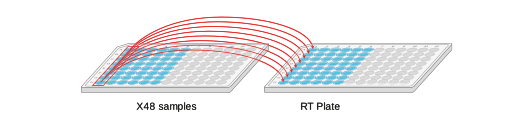
In a clean pre-PCR hood, place a fresh 96-well plate (RT plate) into a PCR Cooler (if using). Using a stepper pipette, or multichannel pipette, add 2 µl of LunaScript RT SuperMix per well.
Depending on the number of samples, fill each well per column as follows:
| Plate location | X24 samples | X48 samples | X96 samples |
|---|---|---|---|
| Columns | 1-3 | 1-6 | 1-12 |

To each well containing LunaScript RT SuperMix, add 8 µl of sample and gently mix by pipetting. If adding less than 8 µl, make up the rest of the volume with nuclease-free water.
Example for X48 samples:
We recommend having a negative control and a positive control for every plate of samples.
Seal the RT plate and spin down.
Incubate the samples in the thermal cycler using the following program:
| Step | Temperature | Time | Cycles |
|---|---|---|---|
| Primer annealing | 25°C | 2 min | 1 |
| cDNA synthesis | 55°C | 10 min | 1 |
| Heat inactivation | 95°C | 1 min | 1 |
| Hold | 4°C | ∞ |
While the reverse transcription reaction is running, prepare the master mixes as described in the next section.
4. PCR
Consumables
- Q5® Hot Start High-Fidelity 2X Master Mix (NEB, cat # M0494)
- xGen™ SARS-CoV-2 Midnight Amplicon Panel (IDT, 10011644)
- Nuclease-free water (e.g. Thermo Scientific, AM9937)
- 1.5 ml Eppendorf DNA LoBind tubes
- Eppendorf twin.tec® PCR plate 96 LoBind, semi-skirted (Eppendorf, 0030129504) with PCR seals
Equipment
- Multichannel pipettes suitable for dispensing 0.5–10 μl, 2–20 μl and 20–200 μl, and tips
- P1000 pipette and tips
- P200 pipette and tips
- Thermal cycler
- Microfuge
- Centrifuge capable of taking 96-well plates
- Ice bucket with ice
Optional equipment
- PCR-Cooler (Eppendorf)
- PCR hood with UV steriliser (optional but recommended to reduce cross-contamination)
- Stepper pipette and tips
Primer design
To generate tiled PCR amplicons from the SARS-CoV-2 viral cDNA, primers were designed by Freed et al., 2020 using Primal Scheme. These primers are designed to generate 1200 bp amplicons that overlap by approximately 20 bp. These primer sequences can be found here.
Primer concentration
Please note the Oxford Nanopore Technologies method uses the PCR primers at a different concentration to the manufacturers recommendation to optimise reagent usage and keep the method in-line with our legacy product.
If using the xGen™ SARS-CoV-2 Midnight Amplicon Panel (IDT, 10011644)
- Use the primers at the increased stock concentration of ≥ 100 μM provided by the manufacturer (you are not required to dilute these primers).
If you have ordered your own primers using the primer sequences and concentrations documented in the equipment and consumables section of this method
- Primer pool A should be used at the formulated concentration of ~133 μM.
- Primer pool B should be used at the formulated concentration of ~143 μM.
We recommend handling the primers in a clean template-free PCR hood.
In the template-free pre-PCR hood, prepare the following master mixes in Eppendorf DNA LoBind tubes and mix thoroughly as follows:
Volume per sample:
| Reagent | Pool A | Pool B |
|---|---|---|
| Nuclease-free water | 3.7 µl | 3.7 µl |
| Midnight Primer Pool A | 0.05 µl | - |
| Midnight Primer Pool B | - | 0.05 µl |
| Q5 HS Master Mix | 6.25 µl | 6.25 µl |
| Total | 10 µl | 10 µl |
For x24 samples:
| Reagent | Pool A | Pool B |
|---|---|---|
| Nuclease-free water | 102 µl | 102 µl |
| Midnight Primer Pool A | 2 µl | - |
| Midnight Primer Pool B | - | 2 µl |
| Q5 HS Master Mix | 172 µl | 172 µl |
| Total | 276 µl | 276 µl |
For x48 samples:
| Reagent | Pool A | Pool B |
|---|---|---|
| Nuclease-free water | 203 µl | 203 µl |
| Midnight Primer Pool A | 3 µl | - |
| Midnight Primer Pool B | - | 3 µl |
| Q5 HS Master Mix | 344 µl | 344 µl |
| Total | 550 µl | 550 µl |
For x96 samples:
| Reagent | Pool A | Pool B |
|---|---|---|
| Nuclease-free water | 407 µl | 407 µl |
| Midnight Primer Pool A | 6 µl | - |
| Midnight Primer Pool B | - | 6 µl |
| Q5 HS Master Mix | 687 µl | 687 µl |
| Total | 1,100 µl | 1,100 µl |
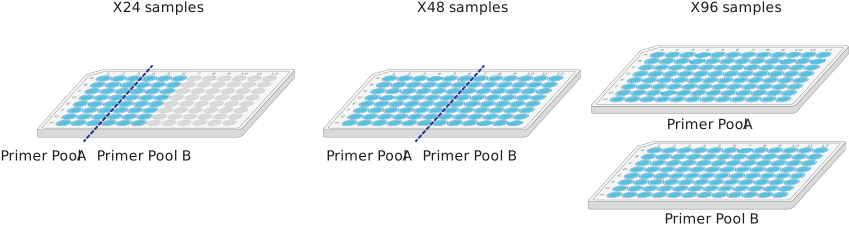
Using a stepper pipette or a multichannel pipette, aliquot 10 µl of Pool A and Pool B into a clean 96-well plate(s) as follows:
| Plate location | X24 samples | X48 samples | X96 samples |
|---|---|---|---|
| Columns | Pool A: 1-3 Pool B: 4-6 | Pool A: 1-6 Pool B: 7-12 | Pool A: 1-12 Pool B: 1-12 |
Note: For X96 samples, Pool A is a separate plate to Pool B.
Using a multichannel pipette, transfer 2.5 μl of each RT reaction from the RT plate to the corresponding well for both Pool A and Pool B in the PCR plate(s), taking care not to cross-contaminate different wells. Mix by pipetting the contents of each well up and down.
There should be two PCR reactions per sample.
Example for X48 samples:
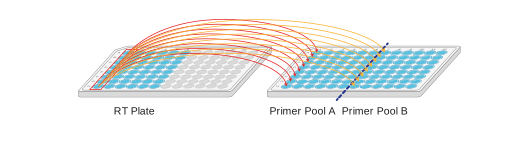
Mix by pipetting the contents of each well up and down.
Carry forward the negative control from the reverse transcription reaction to monitor cross-contamination events.
We recommend having a negative control and a positive control for every plate of samples.
Seal the plate(s) and spin down briefly.
Incubate using the following program, with the heated lid set to 105°C:
| Step | Temperature | Time | Cycles |
|---|---|---|---|
| Initial denaturation | 98°C | 30 sec | 1 |
| Denaturation Annealing and extension | 98°C 61°C 65°C | 15 sec 2 min 3 min | 35 |
| Hold | 4°C | ∞ |
If necessary, the protocol can be paused at this point. The samples should be kept at 4°C and can be stored overnight.
5. Addition of rapid barcodes
Materials
- Rapid Barcode Plate (RB01-96)
Consumables
- Nuclease-free water (e.g. Thermo Scientific, AM9937)
- Eppendorf twin.tec® PCR plate 96 LoBind, semi-skirted (Eppendorf, 0030129504) with PCR seals
Equipment
- Multichannel pipettes suitable for dispensing 2–20 μl and 20–200 μl, and tips
- Thermal cycler
- Centrifuge capable of taking 96-well plates
Check your flow cell.
We recommend performing a flow cell check before the addition of barcodes to samples to ensure you have a flow cell with enough pores for a good sequencing run.
See the flow cell check document for more information.
Spin down the Rapid Barcode Plate and PCR reactions prior to opening to collect material in the bottom of the wells.
The wells of the barcoding plate are intended for single use only. Please ensure your barcode well is sealed before use, and do not reuse the barcode well once pierced/opened.
Using a multichannel pipette or stepper pipette, transfer 2.5 μl nuclease-free water to the wells of a fresh 96-well plate (Barcode Attachment Plate).
Depending on the number of samples, aliquot into each well of the columns as follows:
| Plate location | X24 samples | X48 samples | X96 samples |
|---|---|---|---|
| Columns | 1-3 | 1-6 | 1-12 |

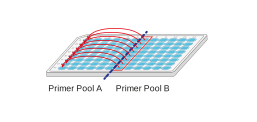
Using a multichannel pipette, transfer the entire contents of each well of PCR Pool B to the corresponding well of PCR Pool A and mix by pipetting.
Depending on the number of samples, Pool B columns will correspond to different Pool A columns.
| No. of samples | Pool B column | Corresponding Pool A column |
|---|---|---|
| X24 | 4 5 6 | 1 2 3 |
| X48 | 7 8 9 10 11 12 | 1 2 3 4 5 6 |
| X96 | 1 2 3 4 5 6 7 8 9 10 11 12 | 1 2 3 4 5 6 7 8 9 10 11 12 |
Example for X48 samples:
Using a multichannel pipette, transfer 5 µl from each well of PCR Pool A (now containing pooled PCR products) to the corresponding well of the Barcode Attachment Plate and mix by pipetting.
Depending on the number of samples, PCR Pool A will be in each well of the following columns:
| Plate location | X24 samples | X48 samples | X96 samples |
|---|---|---|---|
| Columns | 1-3 | 1-6 | 1-12 |
Example for X48 samples: 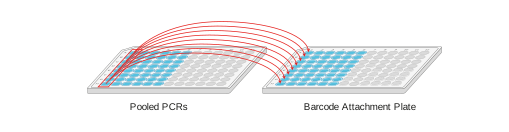
Using a multichannel pipette, transfer 2.5 μl from the Rapid Barcode Plate to the corresponding well of the Barcode Attachment Plate, taking care not to cross-contaminate different wells. Mix by pipetting.
Depending on the number of samples, aliquot into each well of the columns as follows:
| Plate location | X24 samples | X48 samples | X96 samples |
|---|---|---|---|
| Columns | 1-3 | 1-6 | 1-12 |
Example for X48 samples: 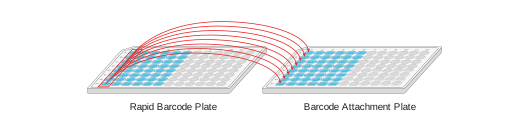
Samples must be thoroughly mixed.
Seal the Barcode Attachment Plate and spin down.
Incubate the plate in a thermal cycler at 30°C for 2 minutes and then at 80°C for 2 minutes.
6. Pooling samples and clean-up
Materials
- AMPure XP Beads (AXP)
- Elution Buffer from the Oxford Nanopore kit (EB)
- Rapid Adapter (RA)
- Adapter Buffer (ADB)
Consumables
- Freshly prepared 80% ethanol in nuclease-free water
- 1.5 ml Eppendorf DNA LoBind tubes
- 5 ml Eppendorf DNA LoBind tubes
- Qubit dsDNA HS Assay Kit (Invitrogen, Q32851)
- Qubit™ Assay Tubes (Invitrogen, Q32856)
Equipment
- Microfuge
- Centrifuge capable of taking 96-well plates
- Hula mixer (gentle rotator mixer)
- Magnetic separation rack
- Ice bucket with ice
- P1000 pipette and tips
- P200 pipette and tips
- P20 pipette and tips
- P10 pipette and tips
- Qubit fluorometer plate reader (or equivalent for QC check)
Briefly spin down the Barcode Attachment Plate to collect the liquid at the bottom of the wells prior to opening.
Pool the barcoded samples in a 1.5 ml Eppendorf DNA LoBind tube.
We expect to have about ~10 µl per sample.
| X24 samples | X48 samples | X96 samples | |
|---|---|---|---|
| Total volume | ~240 µl | ~480 µl | ~960 µl |
Mix pooled samples by vortexing.
Pooled barcoded samples must be thoroughly mixed.
Transfer half of the barcoded pooled sample to a clean 1.5 ml Eppendorf DNA LoBind tube.
Per sample, we expect to take forward ~5 µl.
| X24 samples | X48 samples | X96 samples | |
|---|---|---|---|
| Example volume | 120 µl | 240 µl | 480 µl |
Resuspend the AMPure XP Beads (AXP) by vortexing.
To the pooled barcoded sample, add an equal volume of resuspended AMPure XP Beads (AXP, or SPRI) and mix by pipetting.
| Example volume | X24 samples | X48 samples | X96 samples |
|---|---|---|---|
| Volume of 1X AXP | 120 µl | 240 µl | 480 µl |
Incubate on a Hula mixer (rotator mixer) for 5 minutes at room temperature.
Prepare at least 3 ml of fresh 80% ethanol in nuclease-free water.
Spin down the sample and pellet on a magnet. Keep the tube on the magnet, and pipette off the supernatant when clear and colourless.
Keep the tube on the magnet and wash the beads with 1 ml of freshly-prepared 80% ethanol without disturbing the pellet. Remove the ethanol using a pipette and discard.
Repeat the previous step.
Briefly spin down and place the tube back on the magnet. Pipette off any residual ethanol. Allow to dry for 30 seconds, but do not dry the pellet to the point of cracking.
Remove the tube from the magnetic rack and resuspend the pellet by pipetting in 15 µl Elution Buffer (EB). Incubate for 10 minutes at room temperature.
Pellet the beads on a magnet until the eluate is clear and colourless.
Remove and retain 15 µl of eluate containing the DNA library into a clean 1.5 ml Eppendorf DNA LoBind tube.
Quantify the DNA concentration by using the Qubit dsDNA HS Assay Kit.
Take forward 11 µl of your eluted DNA library.
In a fresh 1.5 ml Eppendorf DNA LoBind tube, dilute the Rapid Adapter (RA) as follows and pipette mix:
| Reagent | Volume |
|---|---|
| Rapid Adapter (RA) | 1.5 μl |
| Adapter Buffer (ADB) | 3.5 μl |
| Total | 5 μl |
Add 1 µl of the diluted Rapid Adapter (RA) to the barcoded DNA.
Mix gently by flicking the tubes, and spin down.
Incubate the reaction for 5 minutes at room temperature.
The prepared library is used for loading into the flow cell. Store the library on ice until ready to load.
7. Priming and loading the MinION and GridION Flow Cell
Materials
- Flow Cell Flush (FCF)
- Flow Cell Tether (FCT)
- Library Solution (LIS)
- Library Beads (LIB)
- Sequencing Buffer (SB)
Consumables
- 1.5 ml Eppendorf DNA LoBind tubes
- MinION/GridION Flow Cell
- Nuclease-free water (e.g. Thermo Scientific, AM9937)
- Bovine Serum Albumin (BSA) (50 mg/ml) (e.g. Invitrogen™ UltraPure™ BSA 50 mg/ml, AM2616)
Equipment
- MinION or GridION device
- MinION/GridION Flow Cell Light Shield
- P1000 pipette and tips
- P100 pipette and tips
- P20 pipette and tips
- P10 pipette and tips
Please note, this kit is only compatible with R10.4.1 flow cells (FLO-MIN114).
Take the flow cell out of the fridge and leave it at room temperature for 20 minutes. This will improve visibility of the array during priming and sample loading.
Priming and loading a flow cell
We recommend all new users watch the 'Priming and loading your flow cell' video before your first run.
Using the Library Solution
For most sequencing experiments, use the Library Beads (LIB) for loading your library onto the flow cell. However, for viscous libraries it may be difficult to load with the beads and may be appropriate to load using the Library Solution (LIS).
Thaw the Sequencing Buffer (SB), Library Beads (LIB) or Library Solution (LIS, if using), Flow Cell Tether (FCT) and Flow Cell Flush (FCF) at room temperature before mixing by vortexing. Then spin down and store on ice.
For optimal sequencing performance and improved output on MinION R10.4.1 flow cells (FLO-MIN114), add Bovine Serum Albumin (BSA) to the flow cell priming mix at a final concentration of 0.2 mg/ml.
Note: We do not recommend using any other albumin type (e.g. recombinant human serum albumin).
Prepare the flow cell priming mix with BSA in a suitable tube for the number of flow cells to flush. Once combined, mix well by pipette mixing.
| Reagents | Volume per flow cell |
|---|---|
| Flow Cell Flush (FCF) | 1,170 µl |
| Bovine Serum Albumin (BSA) at 50 mg/ml | 5 µl |
| Flow Cell Tether (FCT) | 30 µl |
| Total volume | 1,205 µl |
Open the MinION or GridION device lid and slide the flow cell under the clip. Press down firmly on the priming port cover to ensure correct thermal and electrical contact.
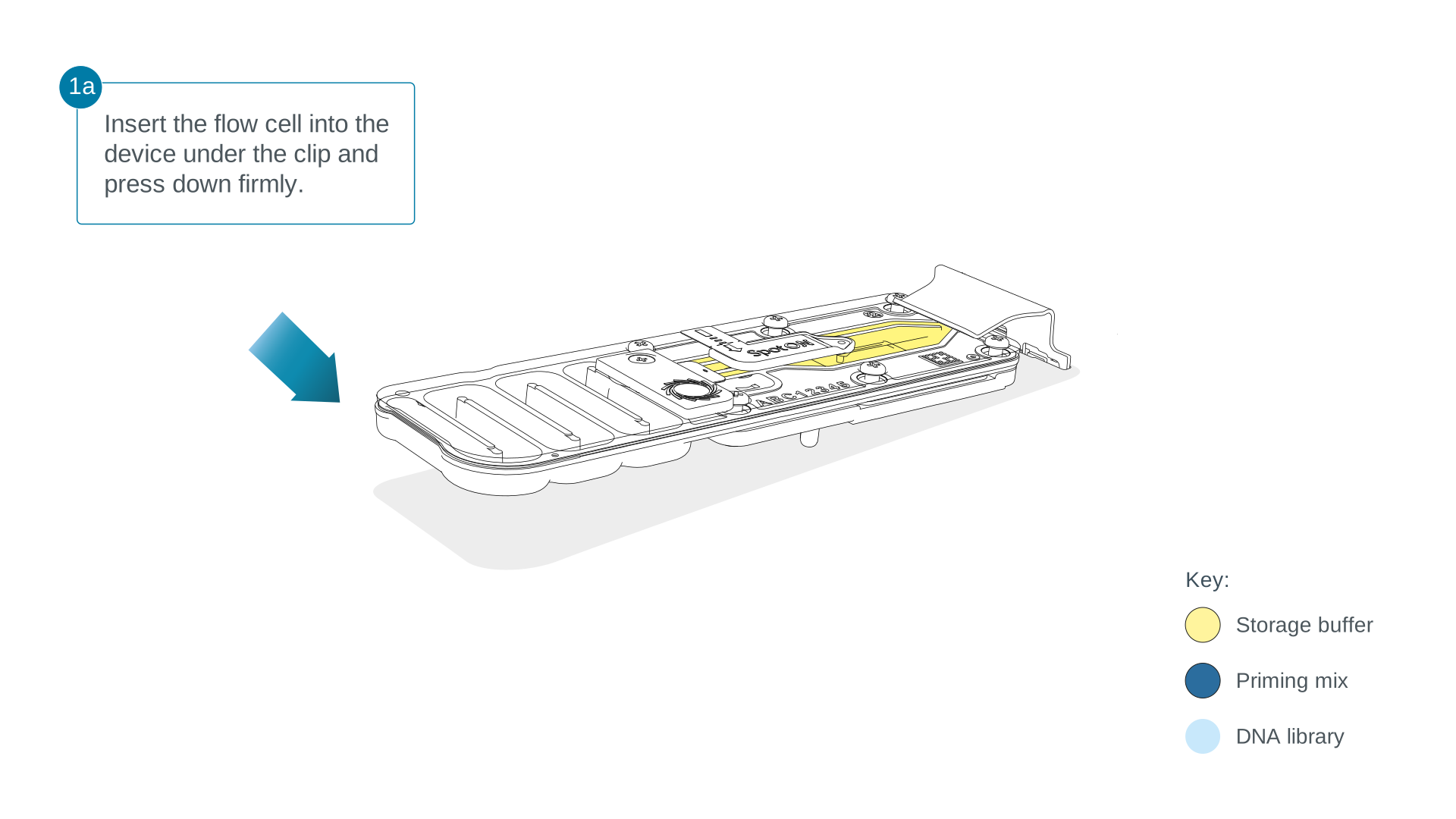
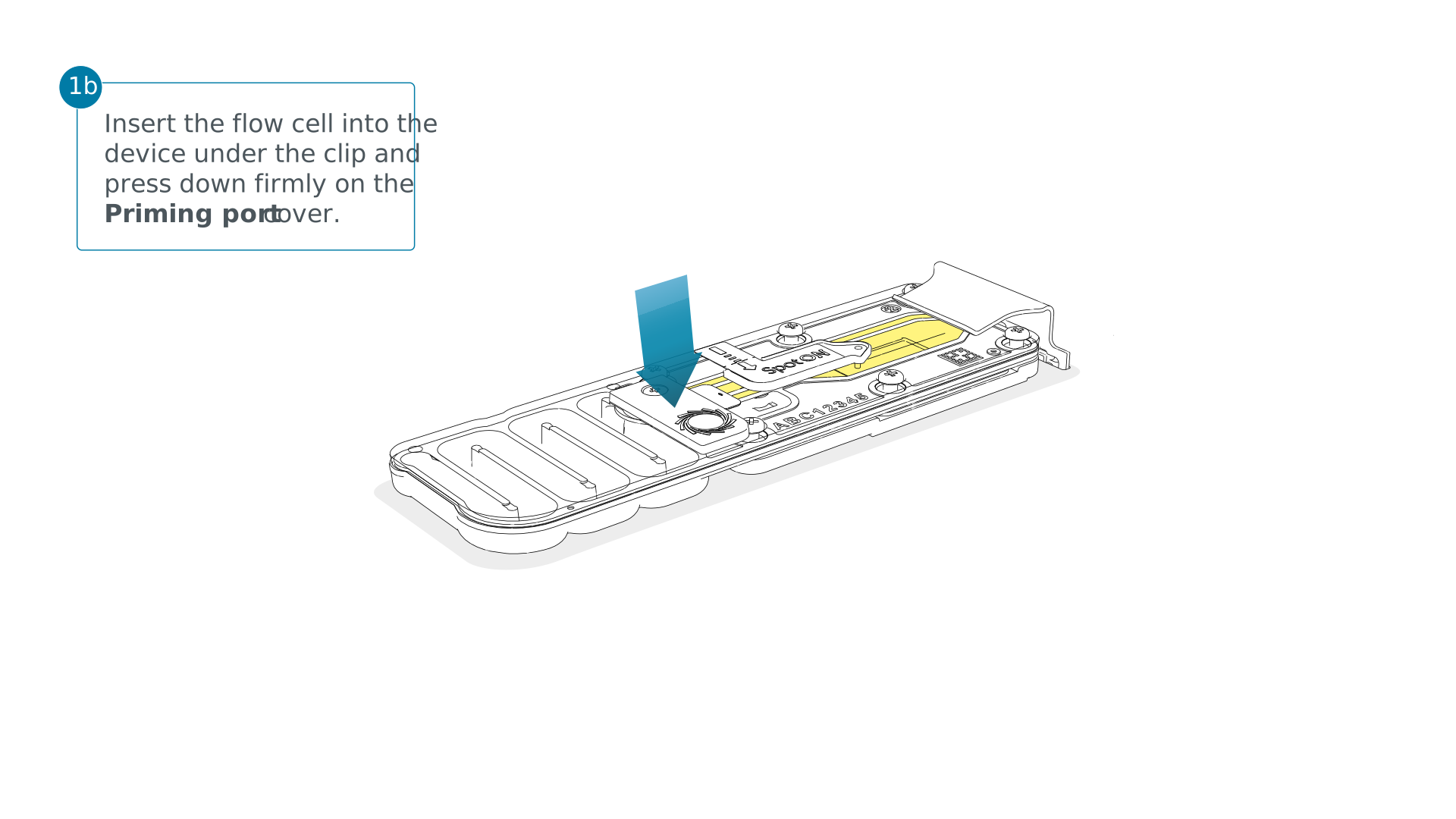
Complete a flow cell check to assess the number of pores available before loading the library.
This step can be omitted if the flow cell has been checked previously.
See the flow cell check document for more information.
Slide the flow cell priming port cover clockwise to open the priming port.
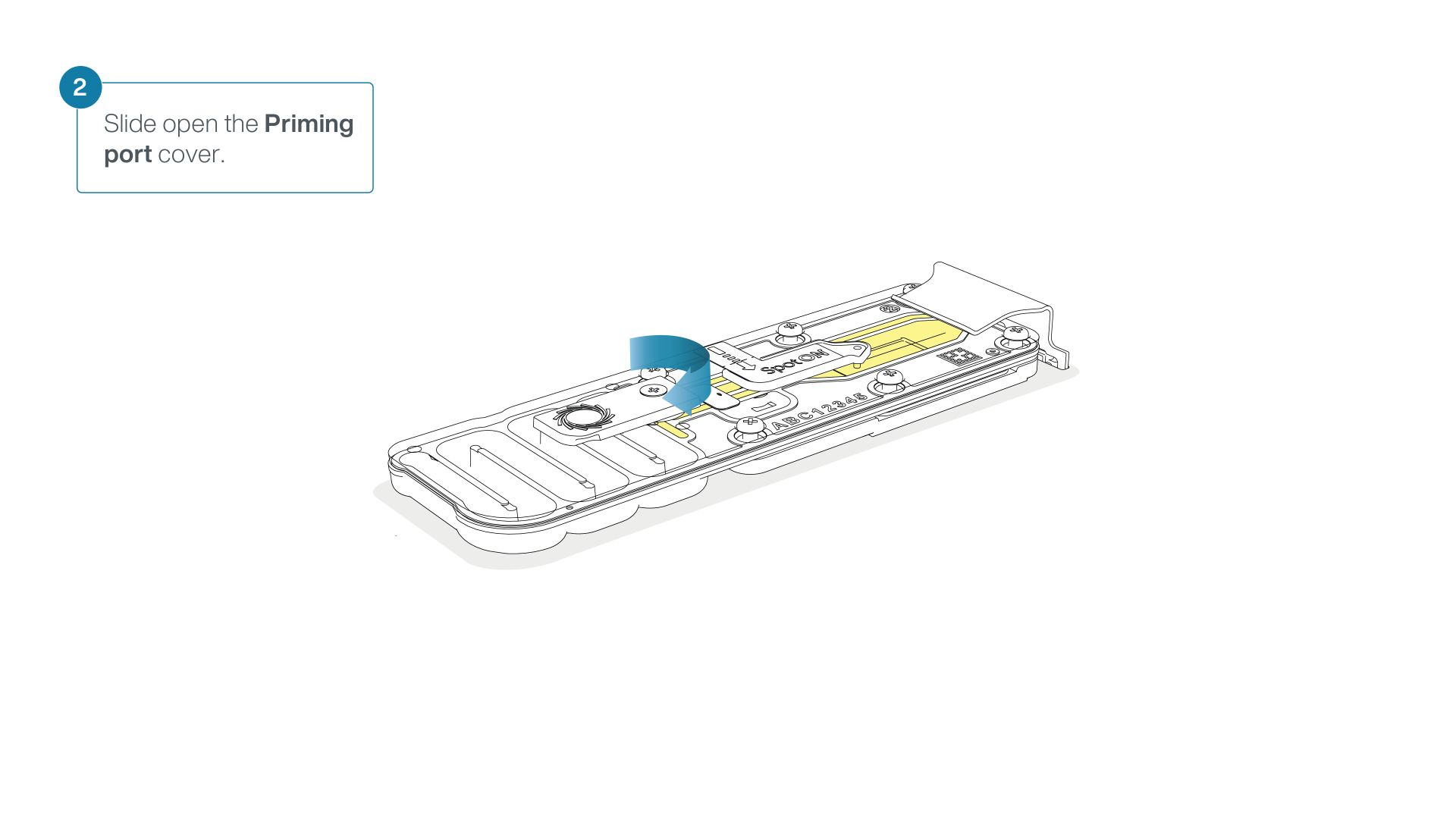
Take care when drawing back buffer from the flow cell. Do not remove more than 20-30 µl, and make sure that the array of pores are covered by buffer at all times. Introducing air bubbles into the array can irreversibly damage pores.
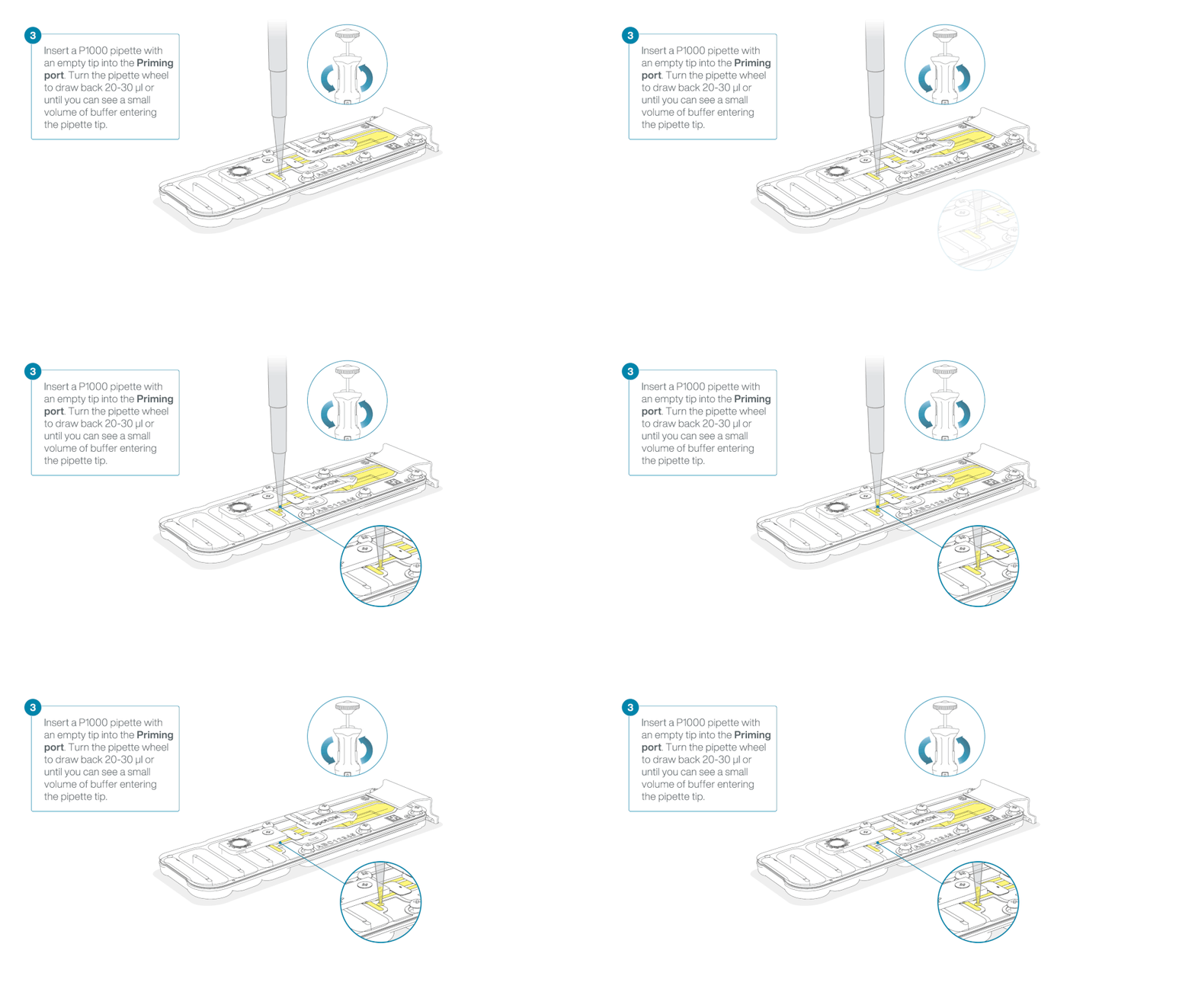
After opening the priming port, check for a small air bubble under the cover. Draw back a small volume to remove any bubbles:
- Set a P1000 pipette to 200 µl
- Insert the tip into the priming port
- Turn the wheel until the dial shows 220-230 µl, to draw back 20-30 µl, or until you can see a small volume of buffer entering the pipette tip
Note: Visually check that there is continuous buffer from the priming port across the sensor array.
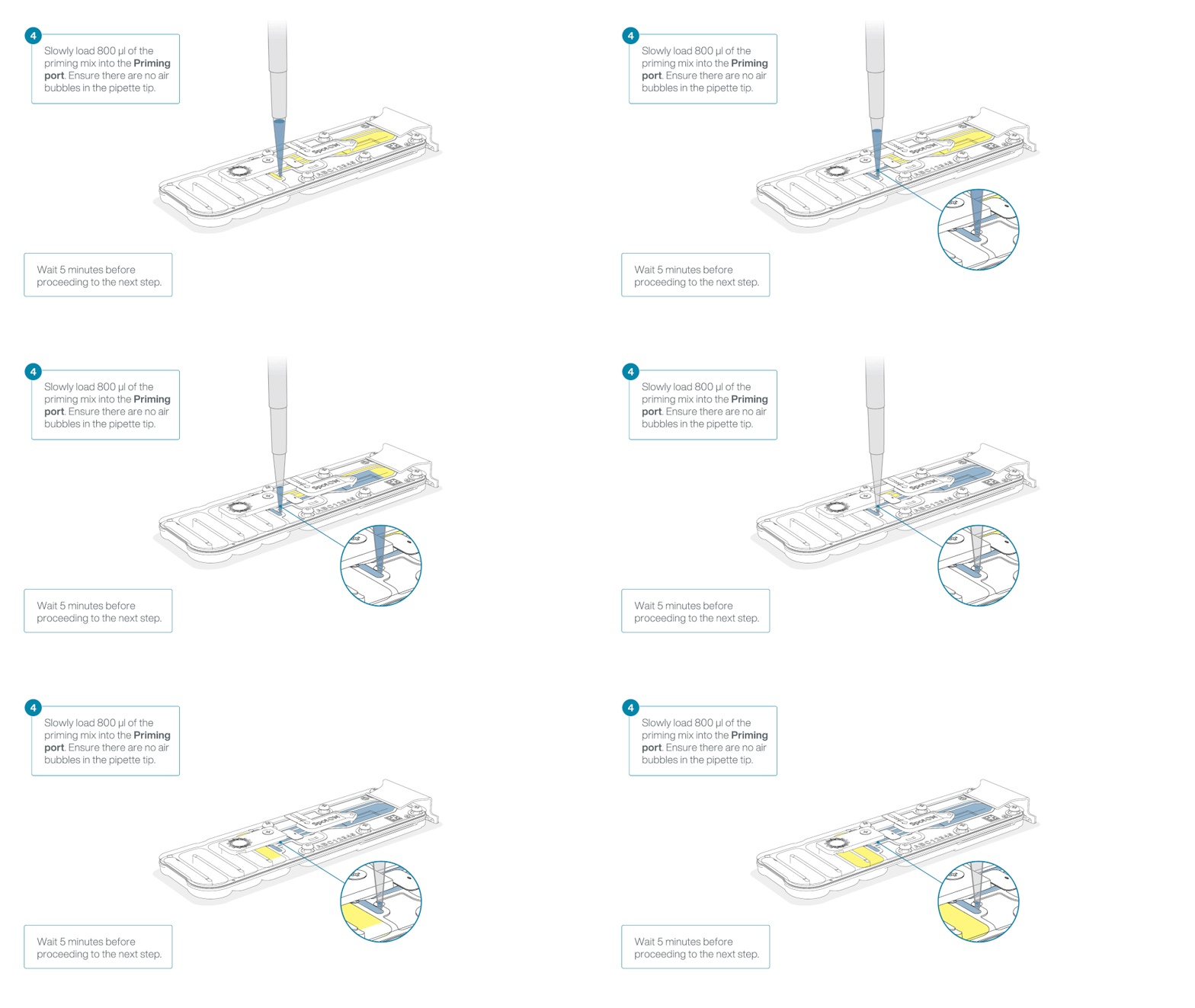
Load 800 µl of the priming mix into the flow cell via the priming port, avoiding the introduction of air bubbles. Wait for five minutes. During this time, prepare the library for loading by following the steps below.
Thoroughly mix the contents of the Library Beads (LIB) by pipetting.
The Library Beads (LIB) tube contains a suspension of beads. These beads settle very quickly. It is vital that they are mixed immediately before use.
We recommend using the Library Beads (LIB) for most sequencing experiments. However, the Library Solution (LIS) is available for more viscous libraries.
In a new 1.5 ml Eppendorf DNA LoBind tube, prepare the library for loading as follows:
| Reagent | Volume per flow cell |
|---|---|
| Sequencing Buffer (SB) | 37.5 µl |
| Library Beads (LIB) mixed immediately before use, or Library Solution (LIS), if using | 25.5 µl |
| DNA library | 12 µl |
| Total | 75 µl |
Complete the flow cell priming:
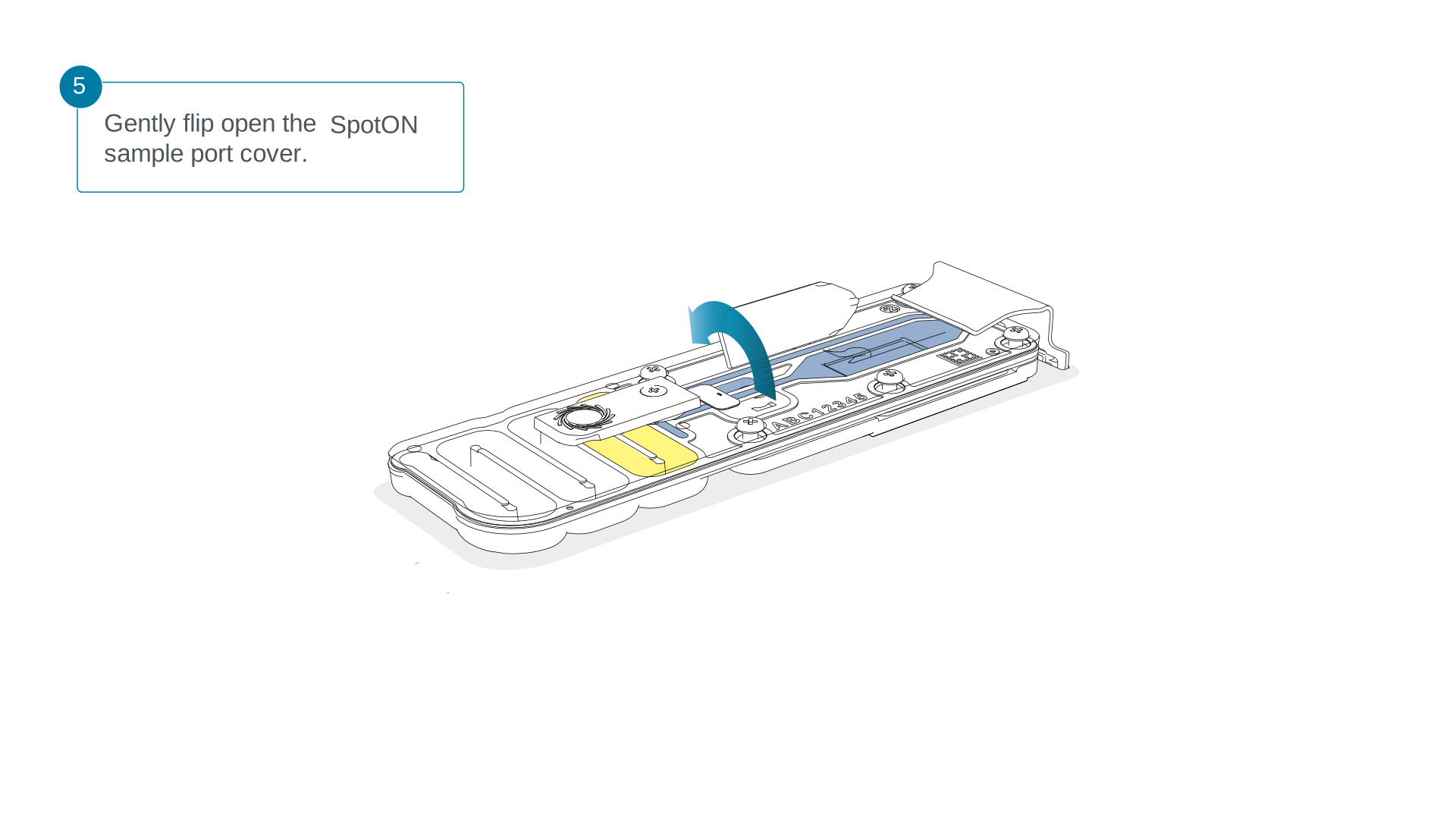
- Gently lift the SpotON sample port cover to make the SpotON sample port accessible.
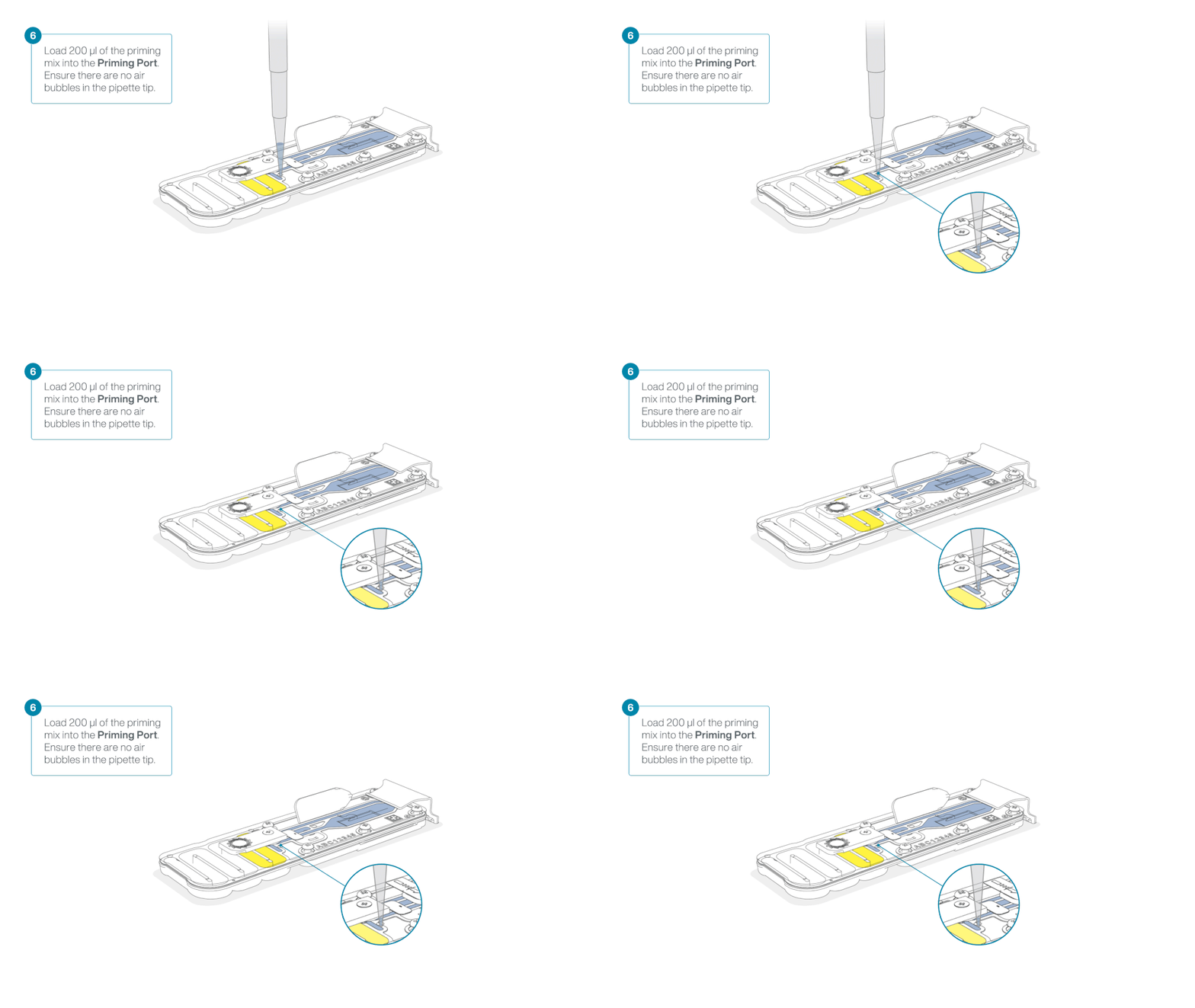
- Load 200 µl of the priming mix into the flow cell priming port (not the SpotON sample port), avoiding the introduction of air bubbles.
Mix the prepared library gently by pipetting up and down just prior to loading.
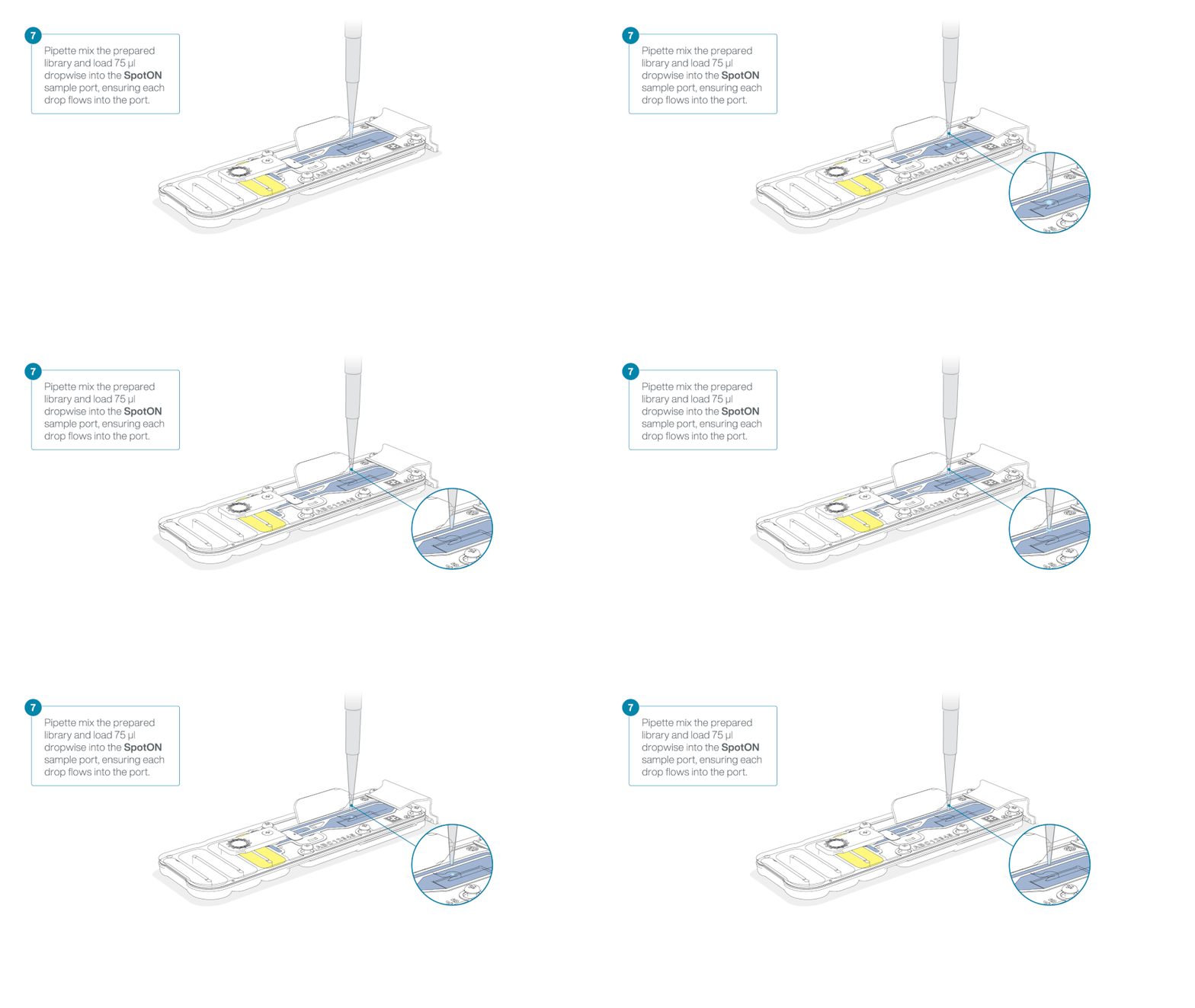
Add 75 μl of the prepared library to the flow cell via the SpotON sample port in a dropwise fashion. Ensure each drop flows into the port before adding the next.
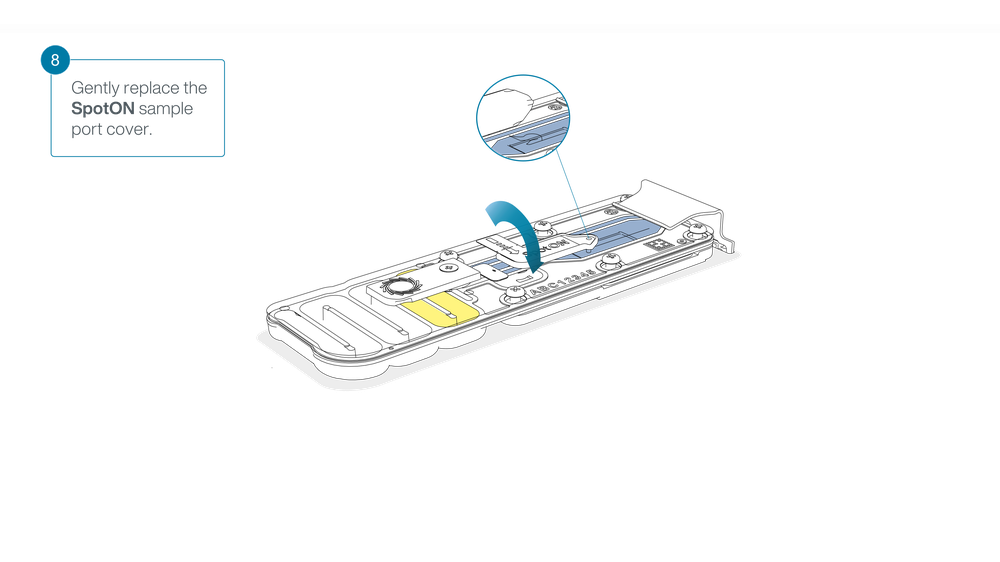
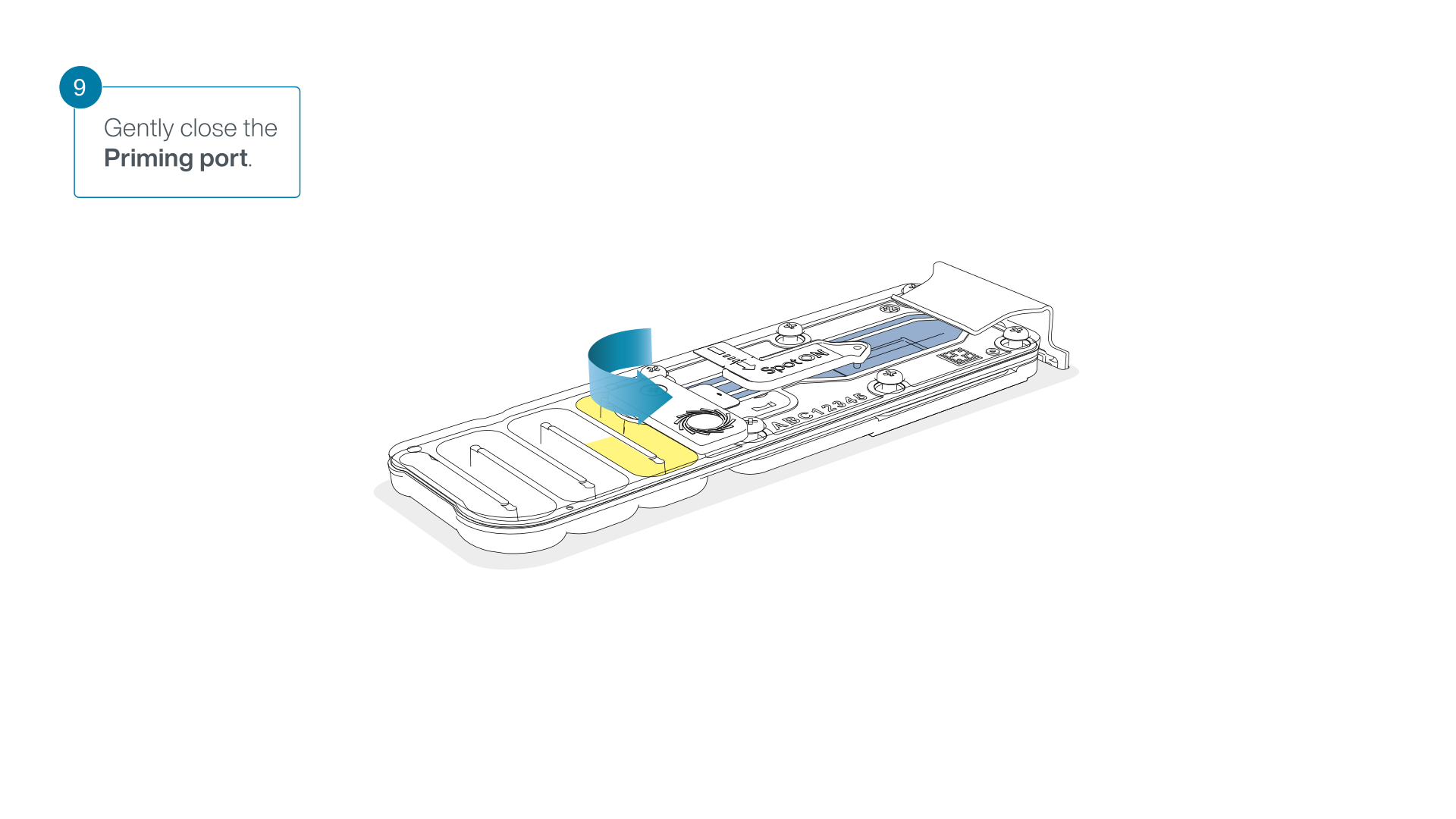
Gently replace the SpotON sample port cover, making sure the bung enters the SpotON port and close the priming port.
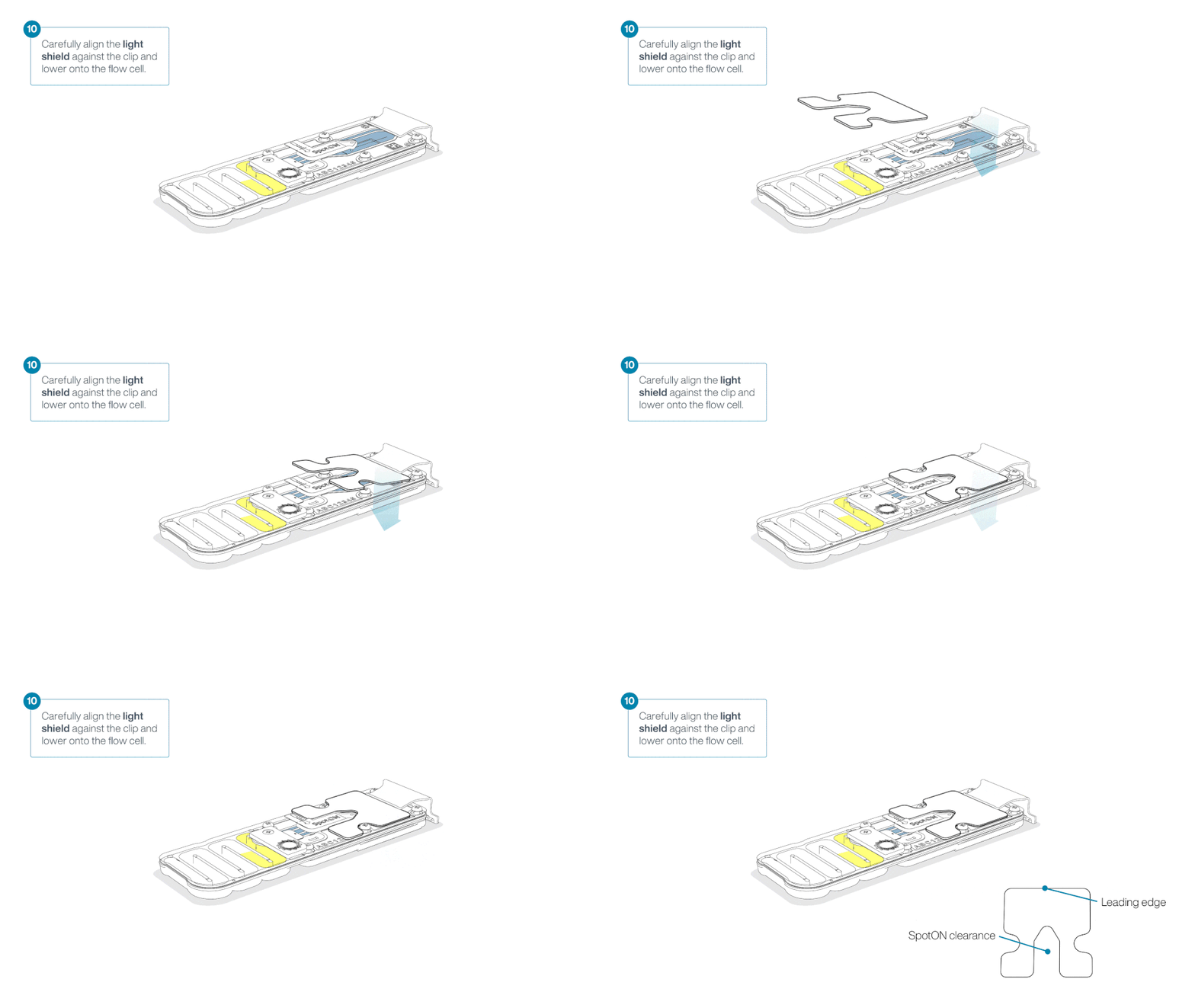
For optimal sequencing output, install the light shield on your flow cell as soon as the library has been loaded.
We recommend leaving the light shield on the flow cell when library is loaded, including during any washing and reloading steps. The shield can be removed when the library has been removed from the flow cell.
Place the light shield onto the flow cell, as follows:
Carefully place the leading edge of the light shield against the clip. Note: Do not force the light shield underneath the clip.
Gently lower the light shield onto the flow cell. The light shield should sit around the SpotON cover, covering the entire top section of the flow cell.
The MinION Flow Cell Light Shield is not secured to the flow cell and careful handling is required after installation.
Close the device lid and set up a sequencing run on MinKNOW.
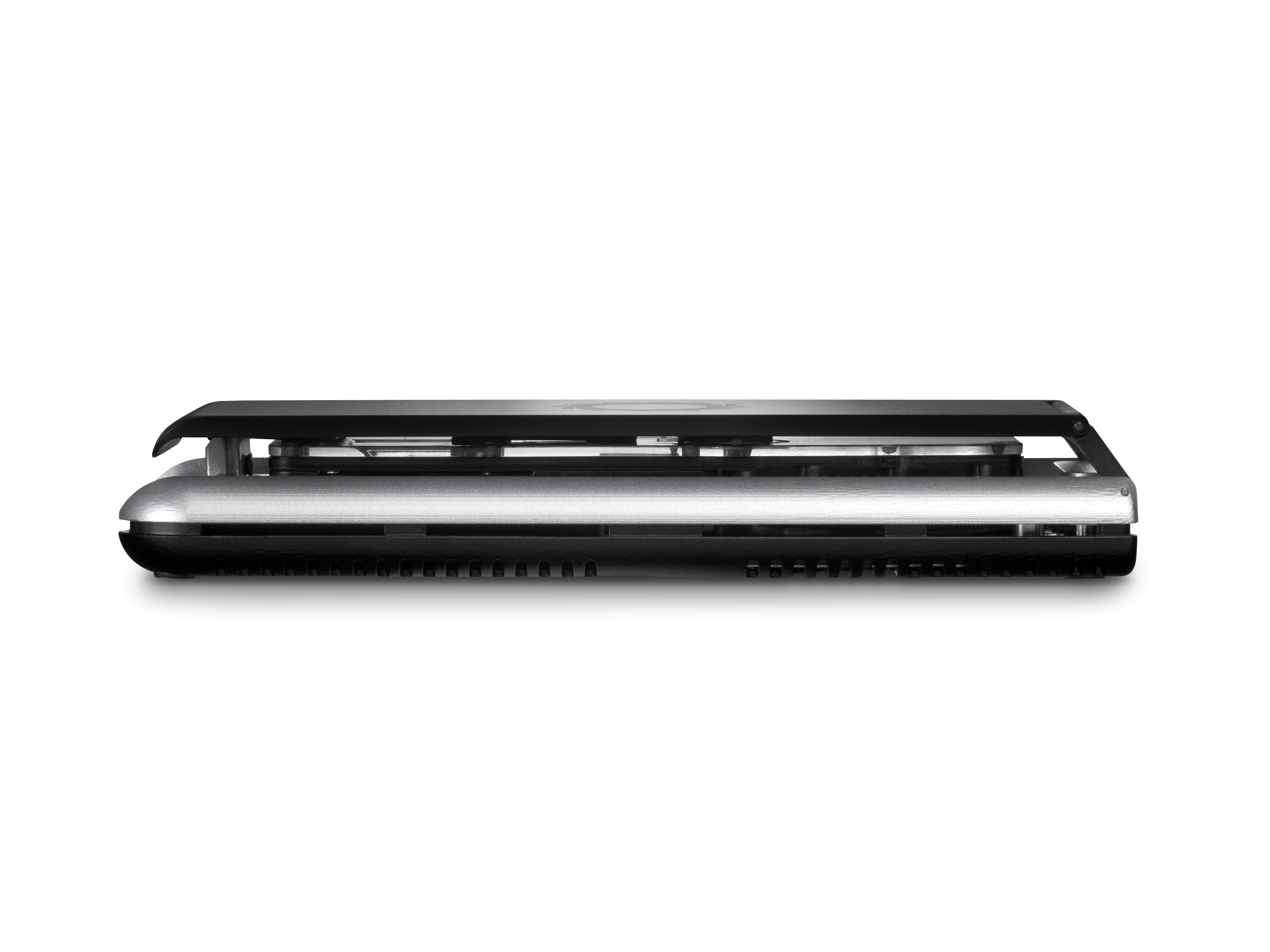
When a flow cell is inserted into the MinION Mk1D, the device lid will sit on top of the flow cell, leaving a small gap around the sides. This is normal and has no impact on the performance of the device.
Please refer to this FAQ regarding the device lid.
8. Data acquisition and basecalling
We do not recommend sequencing and performing data analysis simultaneously on your device.
To ensure the compute on your device can keep up with the requirements for sequencing and/or analysis, we strongly recommend against running both processes at the same time.
Ensure your sequencing run has completed before setting off data analysis. Data analysis will be performed post-sequencing.
Equally, we do not recommend starting a sequencing run if you are currently performing data analysis on your device.
How to start sequencing
Data acquisition and real-time basecalling are carried out by the MinKNOW software. Please ensure MinKNOW is installed on your computer or device. Further instructions for setting up a sequencing run can be found in the MinKNOW protocol.
We recommend setting up your sequencing run using the basecalling and barcoding recommendations outlined below. All other parameters can be left to their default settings.
MinKNOW settings
For fastest turnaround time and easiest analysis, basecalling should be performed live during the sequencing run using the High Accuracy (HAC) basecaller.
Below are the recommendations for MinKNOW settings:
Positions
Flow cell position: [user defined]
Experiment name: [user defined]
Flow cell type: FLO-MIN114
Sample ID: [user defined]
Kit
Kit selection: Rapid Barcoding Kit 96 (SQK-RBK114-96)
Run configuration
Sequencing and analysis
Basecalling: On [default]
Modified bases: Off
Model: High-accuracy basecalling (HAC) [default]
Barcoding: On [default]
Trim barcodes: Off [default]
Barcode both ends: On
Custom barcodes selection: Off [default]
Alignment: Off [default]
Adaptive sampling: Off [default]
Advanced options
Active channel selection: On [default]
Time between pore scans: 1.5 [default]
Reserve pores: On [default]
Data targets
Run limit: [user defined]*
*Sequencing time will depend on data requirements.
Output
Output format
.POD5: On [default]
.FASTQ: On [default]
.BAM: On
Filtering: On [default]
Qscore: 9 [default]
Minimum read length: 200 bp [default]
9. Downstream analysis
Recommended pipeline analysis
The wf-artic is a bioinformatics workflow for the analysis of ARTIC sequencing data prepared using the Midnight protocol. The bioinformatics workflow is orchestrated by the Nextflow software. Nextflow is a publicly available and open-source project that enables the execution of scientific workflows in a scalable and reproducible way. The use of the Nextflow software has been integrated into the EPI2ME Labs software that we recommend for running our downstream analysis methods.
Alternative methods for downstream analysis are available using your device terminal or command line, however we only suggest this for experienced users.
Demultiplexed sequence reads are processed using the ARTIC Field Bioinformatics software that has been modified for the analysis of FASTQ sequences prepared using Oxford Nanopore Rapid Sequencing kits. The other modification to the ARTIC workflow is the use of a primer scheme that defines the sequencing primers used by the Midnight protocol and their genomic locations on the SARS-CoV-2 genome.
The wf-artic workflow includes other analytical steps that include cladistic analysis using Nextclade and strain assignment using Pangolin. The data facets included in the report are parameterised and additional information such as plots of depth-of-coverage across the reference genome is optional.
The complete source for wf-artic is linked, and the Nextflow software will download the scripts and logic flow from this location.
The wf-artic workflow needs to be started manually as outlined below in 'Running a Midnight analysis using EPI2ME Labs'.
Software set-up and installation
The EPI2ME application provides a clean interface to accessing bioinformatics workflows, and is our recommended method in performing your post-sequencing analysis.
Follow the instructions in the EPI2ME Installation guide to install the application on your device.
For more information on how to use EPI2ME, refer to the EPI2ME Quick Start guide.
Installing and updating the wf-artic workflow in EPI2ME Labs:
Ensure you have installed the wf-artic workflow prior to the first analysis set-up.
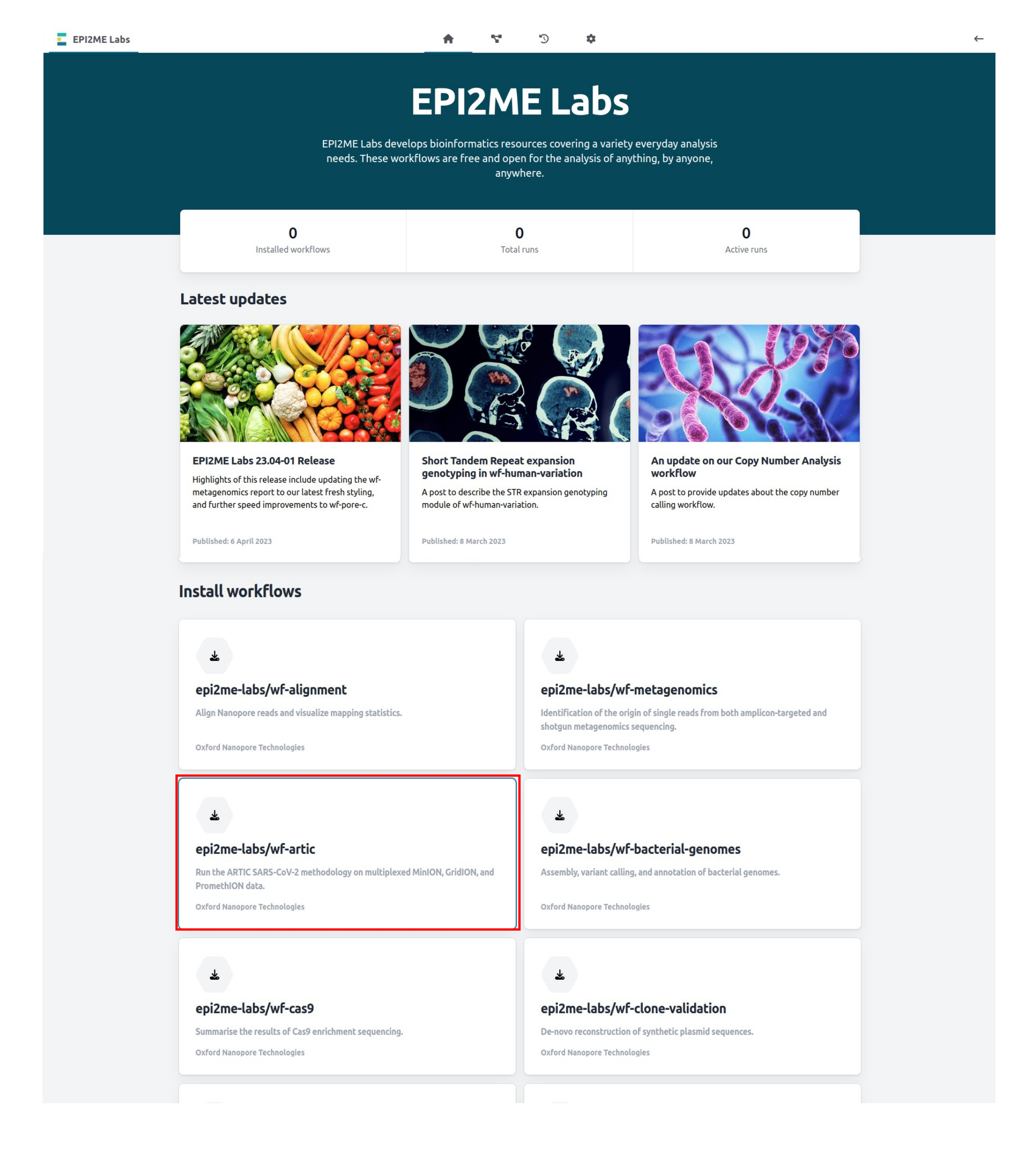
In the EPI2ME Labs home page, scroll down to the "Install workflows" section and click on epi2me-labs/wf-artic:
If you have already installed the wf-artic workflow, ensure you are using the latest version.
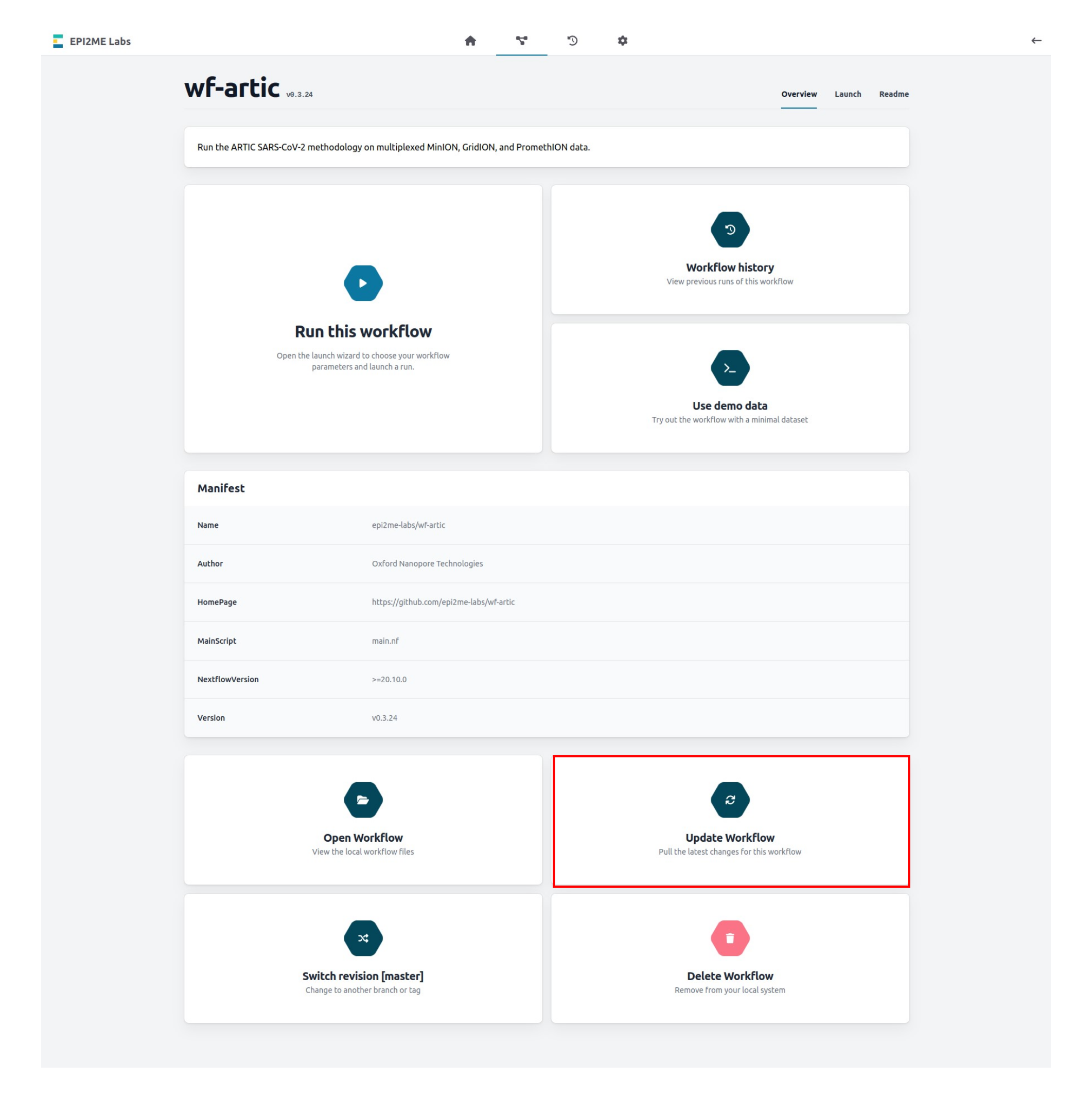
Updating the workflow can be done directly through EPI2ME Labs by navigating to the wf-artic workflow page and clicking Update Workflow:
Demultiplexing of multiple barcoded samples
The wf-artic analysis requires FASTQ sequence data that has already been demultiplexed.
Reads will be demultiplexed during sequencing if you are following the recommended "Required settings in MinKNOW". However, demultiplexing can also be done post-sequencing using the MinKNOW software.
For more information and guides on demultiplexing using MinKNOW, refer to the "Post-run analysis" section in our MinKNOW Protocol.
The expected input for wf-artic is a folder of folders as shown below. Each of the barcode folders should contain the FASTQ sequence data and files may either be uncompressed or gzipped.
$ tree -d MidnightFastq/
MidnightFastq/
├── barcode01
├── barcode02
├── barcode03
├── barcode04
├── barcode05
├── barcode06
└── unclassified
Basecalling model
The basecalling model should be specified when setting up the wf-artic analysis. This should reflect the basecalling model selected during your run set-up as follows:
- If using the default model, High-accuracy basecalling (HAC): r1041_e82_400bps_hac_variant_g615
- If you have used Super accurate basecalling (SUP), please use: r1041_e82_400bps_sup_variant_g615
- If you have used FAST basecalling, please use: r1041_e82_400bps_fast_variant_g615
Running a Midnight analysis using EPI2ME Labs
Open the EPI2ME Labs application on your device.
Open the "Workflows" tab in the EPI2ME Labs application and click on the "wf-artic" workflow:
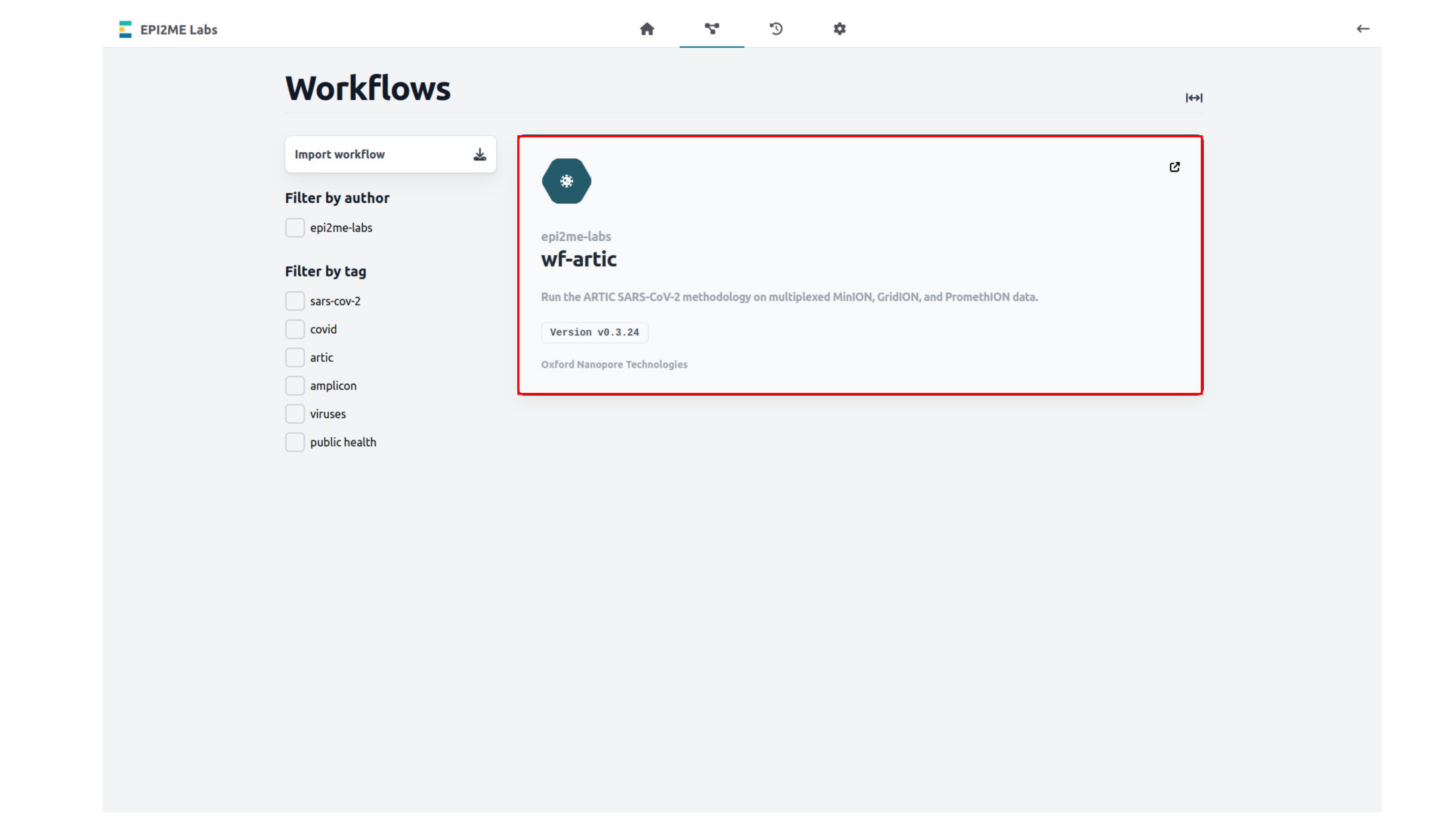
In the "wf-artic" workflow page, select "Run this workflow" to open analysis set-up:
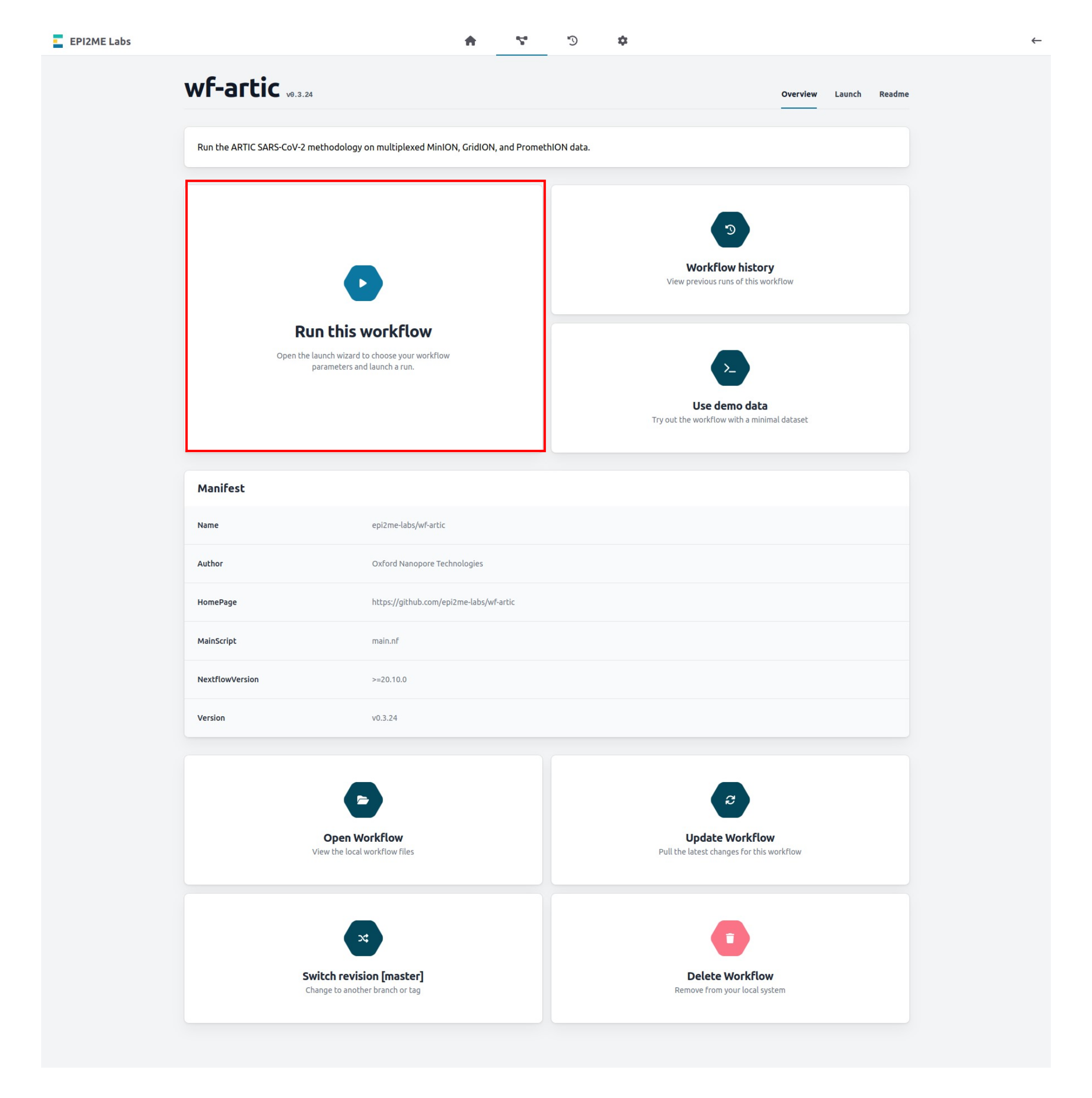
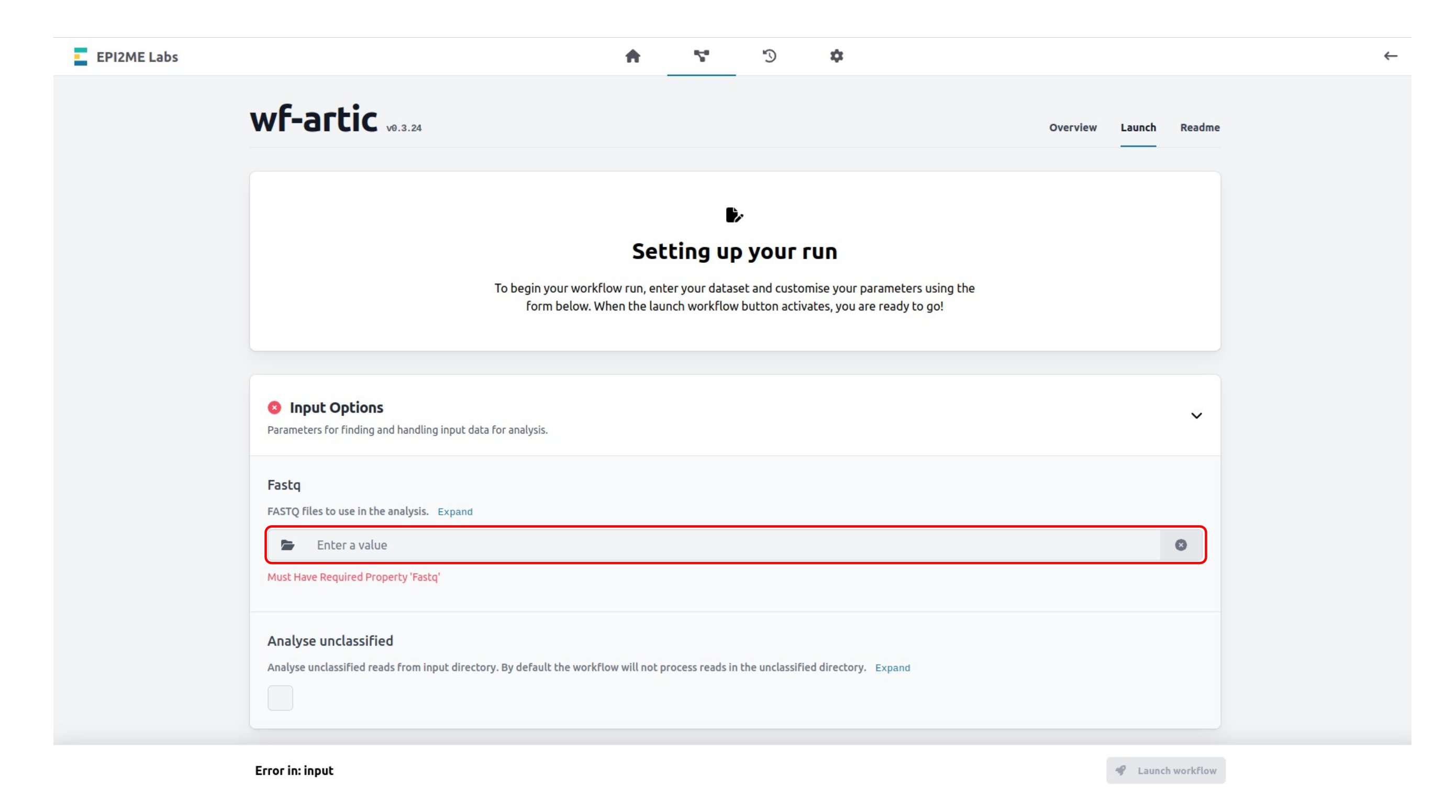
Complete the wf-artic run set-up:
Select your data input file location. Please note, this folder must contain the demultiplexed FASTQ files of your sequencing run.
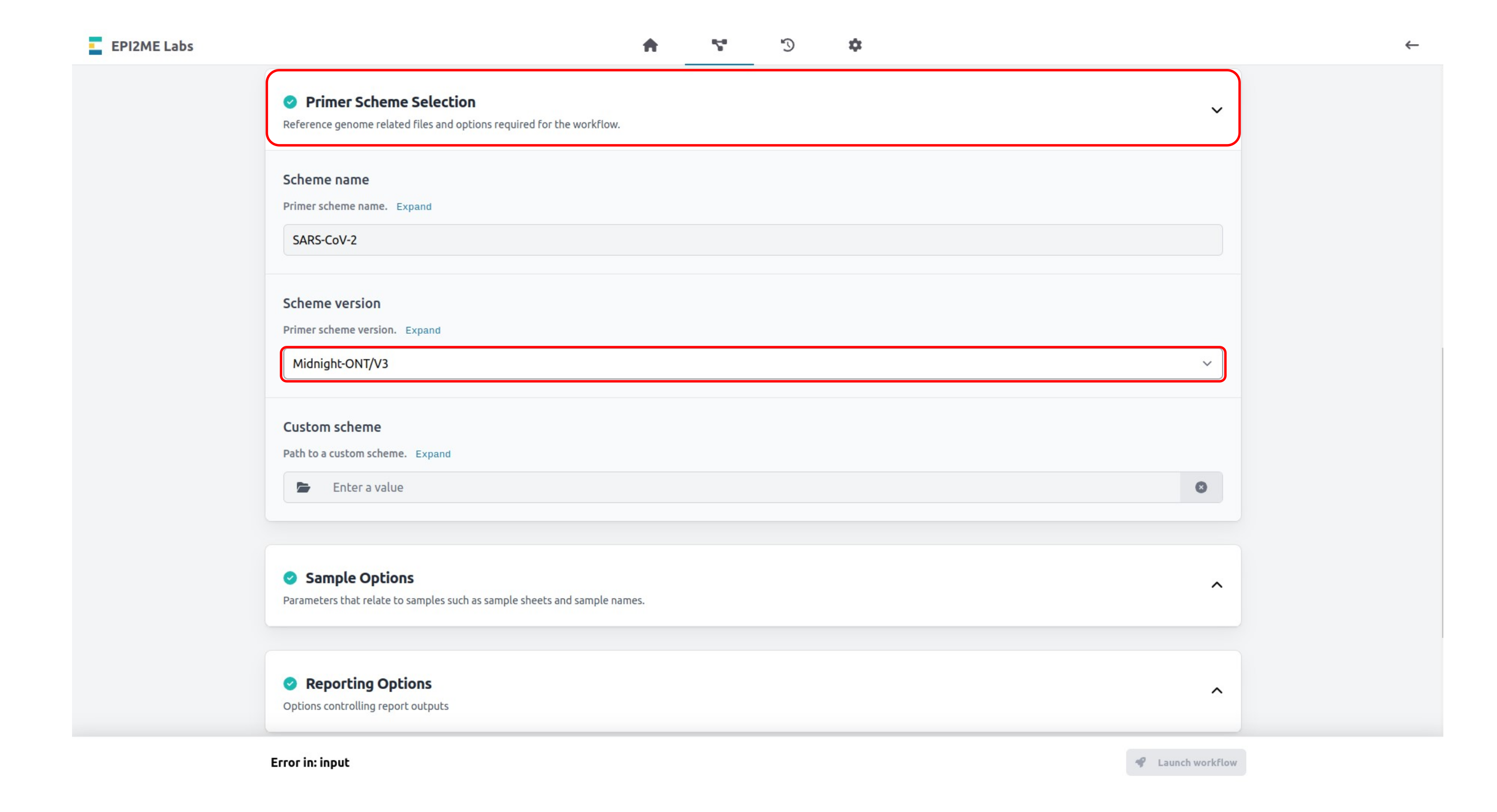
Expand the Primer Scheme Selection tab and set the Scheme version to Midnight-ONT/V3.
Expand the Advanced Options tab and set the Medaka model to the basecalling model used in your sequencing run.
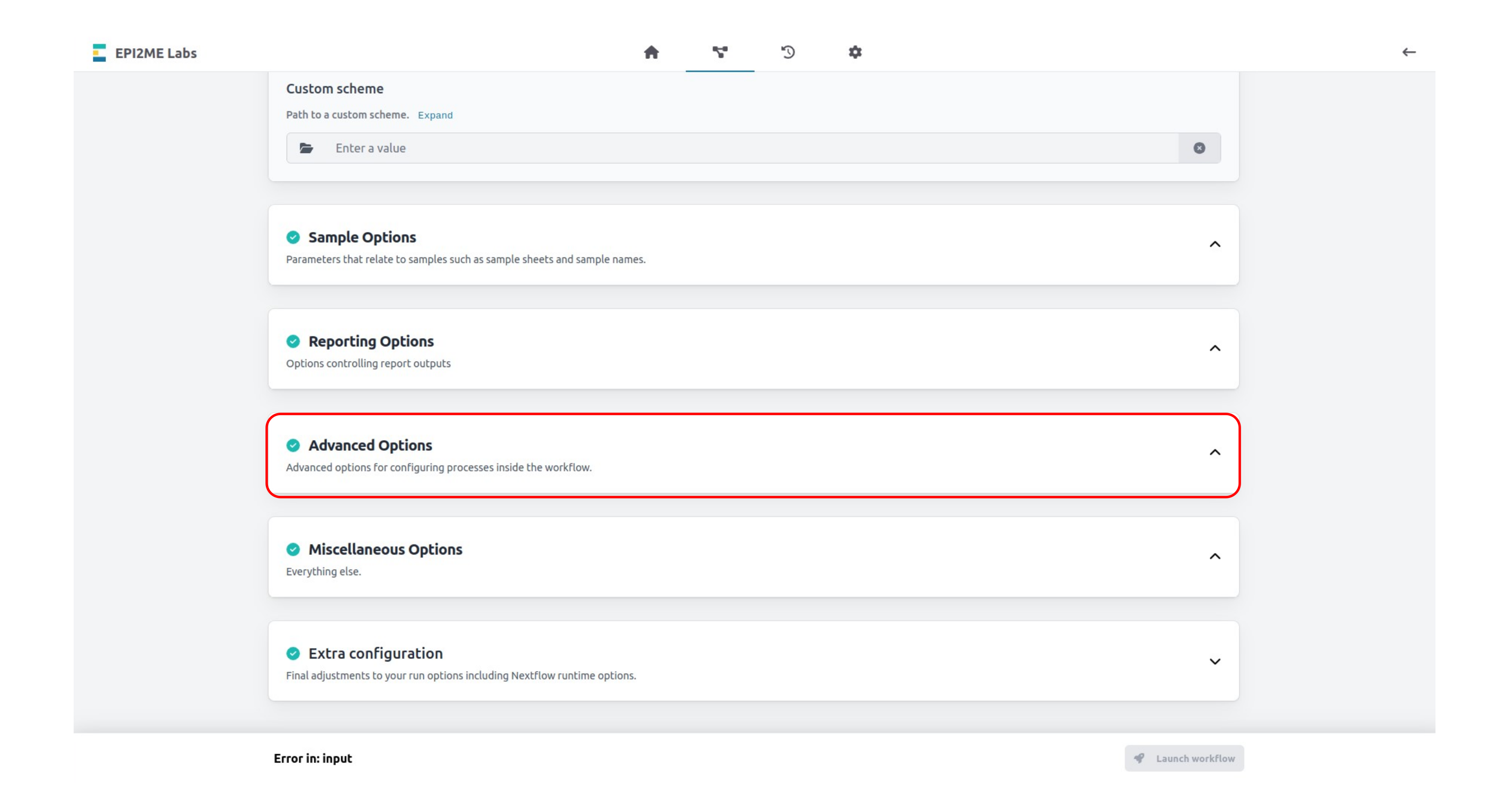
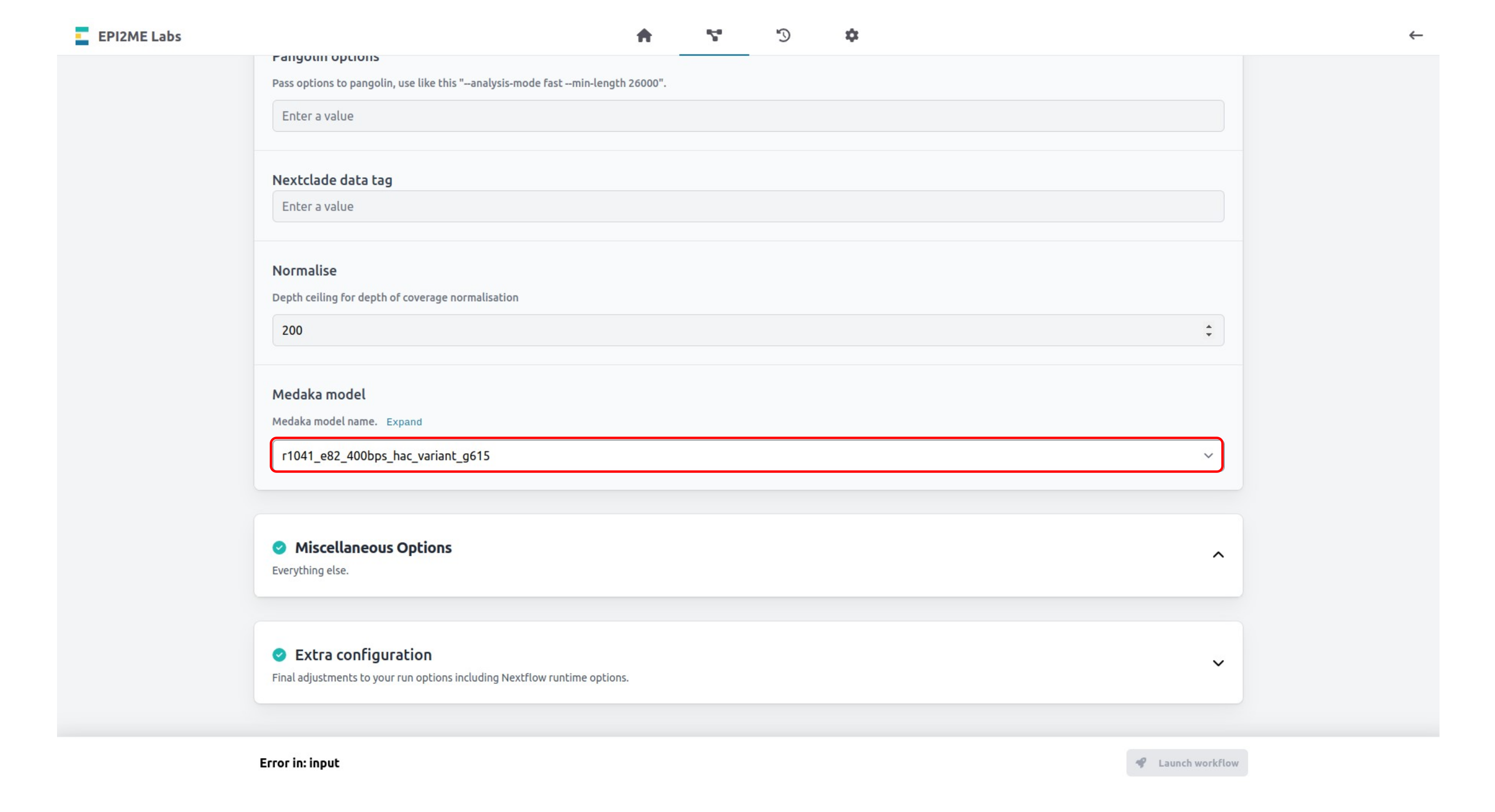
Expand the Extra configuration tab and set the Run name for your wf-artic analysis.
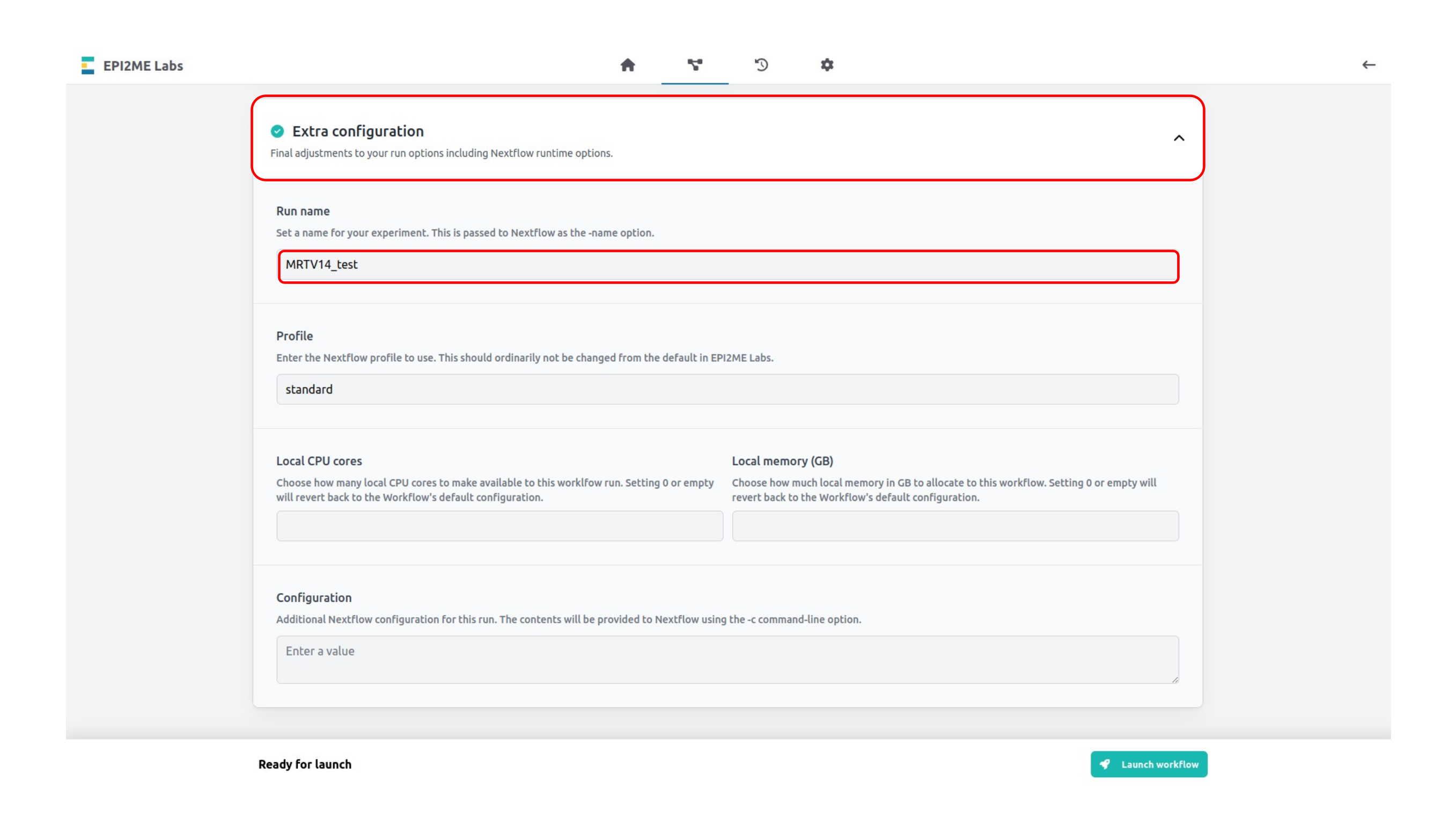
Click Launch workflow at the bottom of the page to begin your analysis.
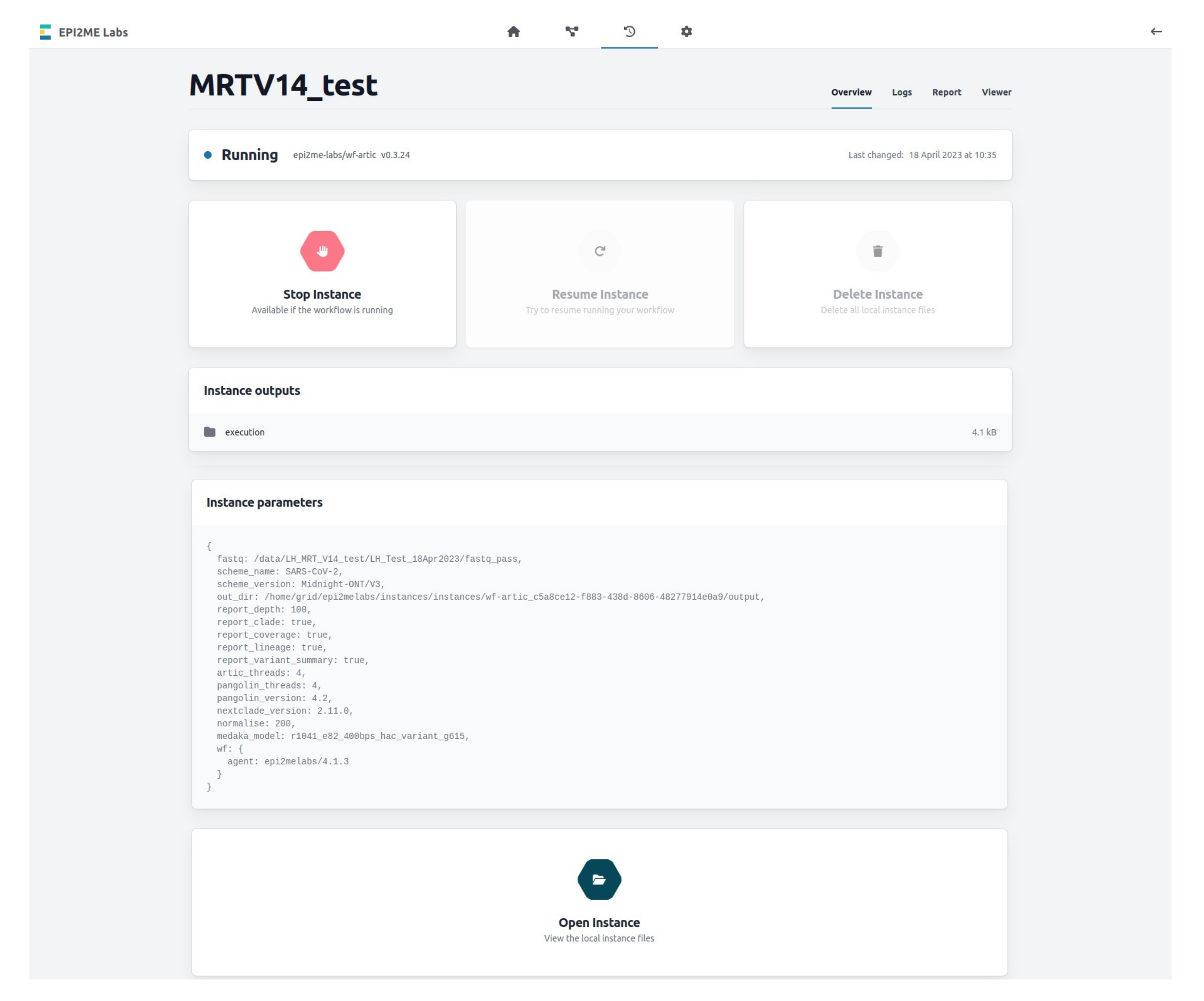
Navigate to the "Analysis" tab in the EPI2ME Labs application to monitor your run:
Completed analysis and result files
The wf-artic analysis outputs will be written to the Working Directory folder specified in the EPI2ME Labs Settings tab.
The location of this folder is specified in the wf-artic run Instance parameters preceeded by out_dir.
However, these files can also be accessed directly in the EPI2ME Labs application from the completed analysis page for your run:
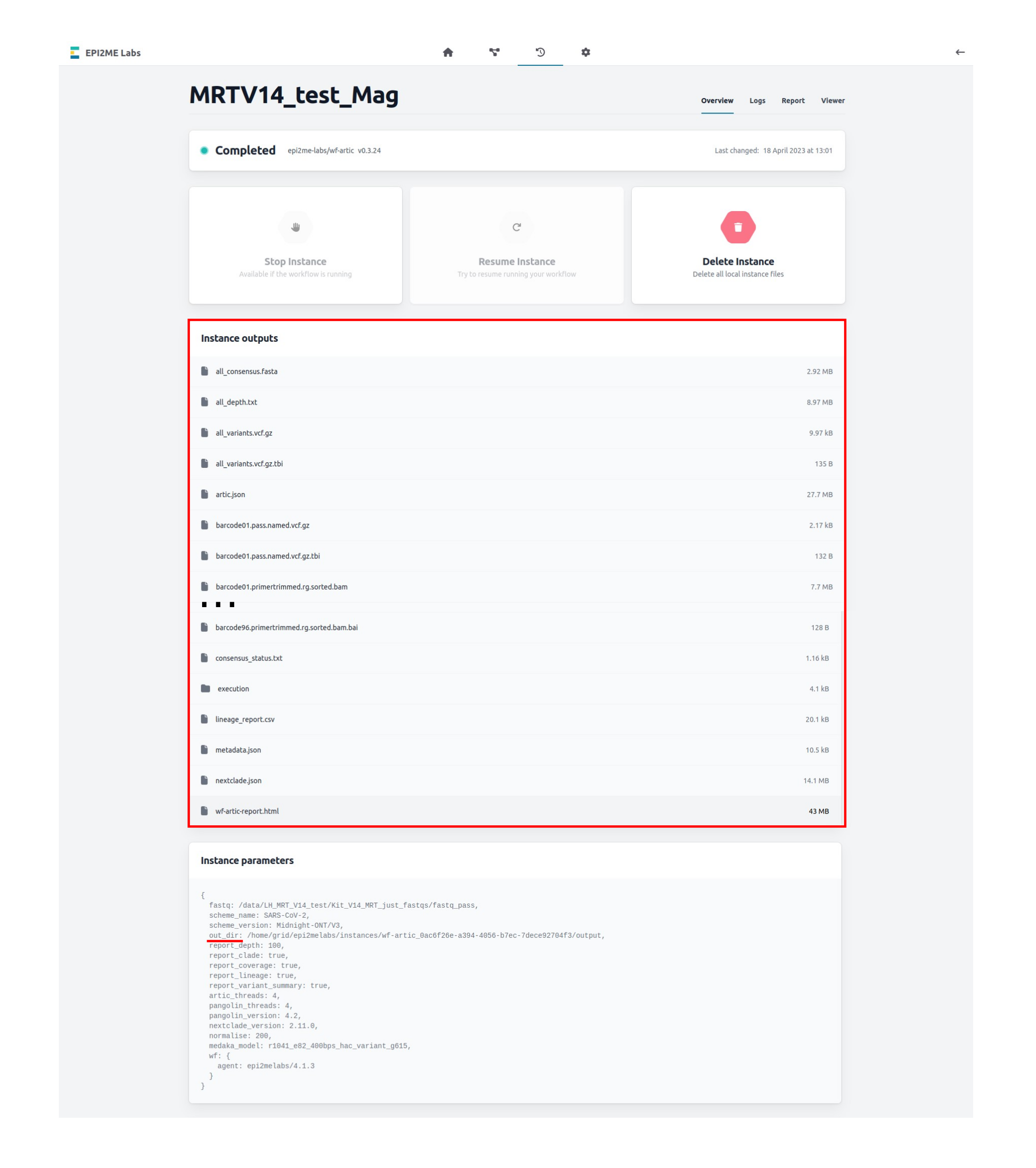
These outputs include:
all_consensus.fastaA multi-FASTA format sequence file containing the consensus sequence for each of the samples investigated. This consensus sequence has been prepared for the whole SARS-CoV-2 genome, not just the spike protein region. The consensus sequence masks the non-spike regions and regions of low sequence coverage with N residues.all_variants.vcf.gzA gzipped VCF file that describes all high-quality genetic variants called by medaka from the sequenced samples.all_variants.vcf.gz.tbiAn index file for the gzipped VCF file.consensus_status.txtA tab delimited file that reports whether a consensus sequence has been successfully prepared for a sample, or not.wf-artic-report.htmlA report summarising these data. This HTML format report also includes the output of the Nextclade software that can be used for a visual inspection of, for example, primer drop out or other qualitative consensus sequence aspects.
Other files are included in the work-directory. This includes per sample VCF files of all genetic variants prior to filtering and other sequences.
Housekeeping and disk usage
The "Working Directory" can be specified in the EPI2ME Labs "Settings" tab and defines where the workflow intermediate files and outputs are stored.
This folder will accumulate a significant number of files that correspond to raw BAM files, other larger intermediates and analysis results files. We recommend this folder to be routinely cleared.
10. Flow cell reuse and returns
Materials
- Flow Cell Wash Kit (EXP-WSH004)
After your sequencing experiment is complete, if you would like to reuse the flow cell, please follow the Flow Cell Wash Kit protocol and store the washed flow cell at +2°C to +8°C.
The Flow Cell Wash Kit protocol is available on the Nanopore Community.
We recommend you to wash the flow cell as soon as possible after you stop the run. However, if this is not possible, leave the flow cell on the device and wash it the next day.
Alternatively, follow the returns procedure to send the flow cell back to Oxford Nanopore.
Instructions for returning flow cells can be found here.
If you encounter issues or have questions about your sequencing experiment, please refer to the Troubleshooting Guide that can be found in this protocol.
Last updated: 5/7/2026
Document options