Rapid PCR barcoding DNA V14 – automated ElysION MinION (SQK-RPB114.24) (RPEM_9237_v114_revA_26Aug2026)


Protocol
Rapid PCR barcoding DNA V14 – automated ElysION MinION (SQK-RPB114.24) V RPEM_9237_v114_revA_26Aug2026
This is an automated rapid PCR barcoding method using the ElysION™ device with a MinION™ setup, outlining library preparation and sequencing.
This protocol:
- Is an automated method using the ElysION device with a MinION sequencing setup
- Uses genomic DNA
- Has a low input requirement
- Involves tagmentation, barcoding, and PCR amplification
- Allows multiplexing of 1–24 samples
- Is compatible with R10.4.1 flow cells
For Research Use Only
FOR RESEARCH USE ONLY.
Contents
Introduction to the protocol
Sample sheet generation
Automated library preparation and sequencing
Troubleshooting
概览
This is an automated rapid PCR barcoding method using the ElysION™ device with a MinION™ setup, outlining library preparation and sequencing.
This protocol:
- Is an automated method using the ElysION device with a MinION sequencing setup
- Uses genomic DNA
- Has a low input requirement
- Involves tagmentation, barcoding, and PCR amplification
- Allows multiplexing of 1–24 samples
- Is compatible with R10.4.1 flow cells
For Research Use Only
1. Overview of protocol
Introduction to the automated rapid PCR barcoding DNA protocol using ElysION with a MinION sequencing setup
The ElysION automated Rapid PCR Barcoding Kit 24 V14 (SQK-RPB114.24) workflow is optimised for simplicity and speed to automatically prepare and sequence between 1 to 24 purified DNA samples. This method is PCR-based, enabling low DNA input and contains 24 unique barcodes which allows you to pool up to 24 different samples into one sequencing experiment.
After sequencing, the ElysION can perform downstream analysis using the EPI2ME metagenomic workflow (wf-metagenomics) for taxonomic classification of your metagenomic samples. If you wish for the analysis to be automatically performed after sequencing, use the Metagenomics assay.
Steps in the sequencing workflow:
Prepare for your experiment
You will need to:
- Ensure your ElysION device is installed with the required hardware and software package for this workflow.
- Ensure you have your sequencing kit, the correct equipment and third-party reagents.
- Check your flow cell during the ElysION run setup to ensure it has sufficient pores for a good sequencing run.
Automated library preparation, sequencing, and analysis
The Table below is an overview of the steps automated by the ElysION device:
| Library preparation step | Process |
|---|---|
| DNA tagmentation | Tagmentation of the DNA using the Fragmentation Mix provided in the kit. |
| PCR amplification and barcoding | PCR amplification and barcoding of the DNA using barcoded primers supplied in the kit. |
| Sample pooling and clean-up | Pooling of barcoded libraries and AMPure XP bead clean-up. |
| Adapter ligation | Attachment of sequencing adapters to the DNA ends. |
| Priming and loading the flow cell | Prime the flow cell and load the prepared library for sequencing. |
| Sequencing | The sequencing run uses the MinKNOW software which will collect raw data to basecall and demultiplex the barcoded reads. |
| Data analysis | Once sequencing is complete, there are a number of downstream analysis options available for your data through EPI2ME. |
| Flow cell wash or flush | Wash the flow cell using the Flow Cell Wash Kit (EXP-WSH004) for reuse or flush the flow cell for return to Oxford Nanopore for recycling. |
Compatibility of this protocol
This protocol should only be used in combination with:
- Rapid PCR Barcoding Kit 24 V14 (SQK-RPB114.24)
- R10.4.1 MinION/GridION Flow Cells (FLO-MIN114)
- Flow Cell Wash Kit (EXP-WSH004)
- Flow Cell Priming Kit V14 (EXP-FLP004)
- Sequencing Auxiliary Vials V14 (EXP-AUX003)
- Rapid Adapter Auxiliary V14 (EXP-RAA114)
- ElysION device with MinION integration
2. Equipment and consumables
材料
- 25 ng gDNA in 15 µl per sample (concentration: ~1.66 ng/µl) in a Hard-Shell® 96-Well PCR Plate, low profile, thin wall, skirted, red/clear (Bio-Rad™, HSP9611)
- 快速 PCR 条形码测序试剂盒-24 V14(SQK-RPB114.24)
- 测序芯片清洗剂盒(EXP-WSH004)
耗材
- MinION/GridION Flow Cell (FLO-MIN114)
- Hard-Shell® 96-Well PCR Plates, low profile, thin wall, skirted, red/clear (Bio-Rad™, HSP9611)
- Nunc™ 96 Well Polypropylene 2 ml DeepWell™ Plate (ThermoFisher, 95040452)
- Reservoir Plate (Porvair, 390015)
- Azenta PCR Plate Lid (Azenta, 4ti-0291)
- Screw cap micro tube 2 ml, sterile (Sarstedt™, 72.694.006)
- Screw cap micro tube 0.5 ml, sterile (Sarstedt™, 72.785.005)
- LongAmp 热启动 Taq 酶 2X 预混液(NEB, M0533)
- 牛血清白蛋白(BSA)(50 mg/mL)(例如 Invitrogen™ UltraPure™ BSA 50 mg/mL, AM2616)
- 新制备的 80% 乙醇(用无核酸酶水配制)
- 无核酸酶水(如 ThermoFisher,AM9937)
- 1.5 ml Eppendorf DNA LoBind 离心管
- 1000 µL Disposable Tips - Filtered, Pure, Single Stack (Tecan, 30057817)
- 200 µL Disposable Tips - Filtered, Pure, Single Stack (Tecan, 30057815)
- 50 µL Disposable Tips - Filtered, Pure, Single Stack (Tecan, 30057813)
- 10 µL Disposable Tips - Filtered, Pure, Single Stack (Tecan, 30104974)
- LiHa empty Disposable Tip Box Large (Tecan, 30058507)
- LiHa empty Disposable Tip Box Small (Tecan, 30058506)
- Waste bin (Tecan, 30185747)
- Qubit™ dsDNA HS Assay Kit (Invitrogen, Q23851) - optional
- Qubit™ Assay Tubes (Invitrogen, Q32856) - optional
仪器
- ElysION device with MinION integration
- 迷你离心机
- 涡旋混匀仪
- 微孔板离心机
- 多通道移液枪和枪头
- P1000 移液枪和枪头
- P200 移液枪和枪头
- P100 移液枪和枪头
- P20 移液枪和枪头
- P2 移液枪和枪头
- 盛有冰的冰桶
可选仪器
- Qubit™ 荧光计 (或用于质控检测的等效仪器)
For this protocol, 25 ng high molecular weight gDNA in 15 µl is required per sample as input.
The starting concentration of your sample(s) should be ~1.66 ng/µl in 15 µl of volume.
Note: Your input DNA must be at least 4 kb in length to ensure correct tagmentation and PCR amplification.
Third-party reagents
We have validated and recommend the use of all third-party reagents used in this protocol. Alternatives have not been tested by Oxford Nanopore.
For all third-party reagents, we recommend following the manufacturer’s instructions to prepare the reagents for use.
Input DNA
How to QC your input DNA
It is important that the input DNA meets the quantity and quality requirements. Using too little or too much DNA, or DNA of poor quality (e.g. highly fragmented DNA or DNA containing RNA or chemical contaminants) can affect your library preparation.
For instructions detailing how to perform quality control of your DNA sample, read the Input DNA/RNA QC protocol.
Chemical contaminants
Depending on the DNA extraction method used, certain chemical contaminants may remain in the purified DNA, which can affect library preparation efficiency and sequencing quality. Read more about contaminants on the Contaminants page on the Community.
Check your flow cell
The number of pores in your flow cell will be checked by the ElysION device at the start of your assay. MinION/GridION Flow Cells should be checked within 12 weeks of purchase.
Oxford Nanopore will replace any unused flow cell with fewer than the number of pores listed in the Table below, when the result is reported within two days of performing the flow cell check, and when the storage recommendations have been followed. To do the flow cell check, follow the instructions on the ElysION on-screen display.
| Flow cell | Minimum number of active pores covered by warranty |
|---|---|
| MinION/GridION Flow Cell | 800 |
The Rapid Adapter (RA) used in this kit and protocol is not interchangeable with other sequencing adapters.
Rapid PCR Barcoding Kit 24 V14 (SQK-RPB114.24) contents
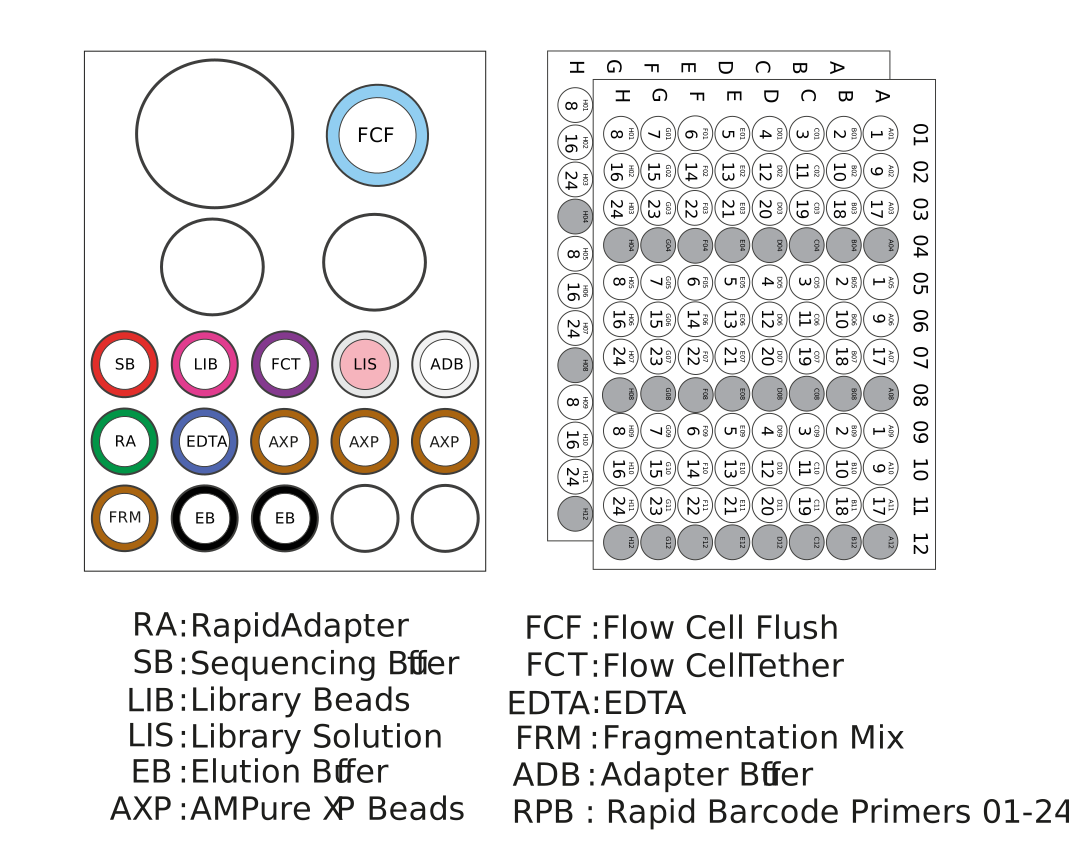
For automated applications, we recommend using the SQK-RPB114.24 kit in plate format with Rapid Barcode Primers at 1 µM concentration.
Plate format with Rapid Barcode Primers at 1 µM
| Name | Acronym | No. of vials | Cap colour | Fill volume per vial (µl) |
|---|---|---|---|---|
| Fragmentation Mix | FRM | 1 | Brown | 160 |
| Rapid Adapter | RA | 1 | Green | 15 |
| Adapter Buffer | ADB | 1 | Clear | 100 |
| AMPure XP Beads | AXP | 3 | Amber | 1,200 |
| Elution Buffer | EB | 2 | Black | 500 |
| EDTA | EDTA | 1 | Blue | 700 |
| Sequencing Buffer | SB | 1 | Red | 700 |
| Library Beads | LIB | 1 | Pink | 600 |
| Library Solution | LIS | 1 | White cap, pink label | 600 |
| Flow Cell Flush | FCF | 1 bottle | Clear cap, light blue label | 8,000 |
| Flow Cell Tether | FCT | 1 | Purple | 200 |
| Rapid Barcode Primers (01–24) at 1 µM | RPB | - | 2 plates, 3 sets of primer barcodes per plate | 15 µl per well |
Note: This product contains AMPure XP reagent manufactured by Beckman Coulter Inc. and can be stored at -20°C with the kit, without detriment to reagent stability.
Rapid Barcode Primers
| Component | Sequence |
|---|---|
| Rapid Barcode Primer 01 | AAGAAAGTTGTCGGTGTCTTTGTG |
| Rapid Barcode Primer 02 | TCGATTCCGTTTGTAGTCGTCTGT |
| Rapid Barcode Primer 03 | GAGTCTTGTGTCCCAGTTACCAGG |
| Rapid Barcode Primer 04 | TTCGGATTCTATCGTGTTTCCCTA |
| Rapid Barcode Primer 05 | CTTGTCCAGGGTTTGTGTAACCTT |
| Rapid Barcode Primer 06 | TTCTCGCAAAGGCAGAAAGTAGTC |
| Rapid Barcode Primer 07 | GTGTTACCGTGGGAATGAATCCTT |
| Rapid Barcode Primer 08 | TTCAGGGAACAAACCAAGTTACGT |
| Rapid Barcode Primer 09 | AACTAGGCACAGCGAGTCTTGGTT |
| Rapid Barcode Primer 10 | AAGCGTTGAAACCTTTGTCCTCTC |
| Rapid Barcode Primer 11 | GTTTCATCTATCGGAGGGAATGGA |
| Rapid Barcode Primer 12 | GTTGAGTTACAAAGCACCGATCAG |
| Rapid Barcode Primer 13 | AGAACGACTTCCATACTCGTGTGA |
| Rapid Barcode Primer 14 | AACGAGTCTCTTGGGACCCATAGA |
| Rapid Barcode Primer 15 | AGGTCTACCTCGCTAACACCACTG |
| Rapid Barcode Primer 16 | CGTCAACTGACAGTGGTTCGTACT |
| Rapid Barcode Primer 17 | ACCCTCCAGGAAAGTACCTCTGAT |
| Rapid Barcode Primer 18 | CCAAACCCAACAACCTAGATAGGC |
| Rapid Barcode Primer 19 | GTTCCTCGTGCAGTGTCAAGAGAT |
| Rapid Barcode Primer 20 | TTGCGTCCTGTTACGAGAACTCAT |
| Rapid Barcode Primer 21 | GAGCCTCTCATTGTCCGTTCTCTA |
| Rapid Barcode Primer 22 | ACCACTGCCATGTATCAAAGTACG |
| Rapid Barcode Primer 23 | CTTACTACCCAGTGAACCTCCTCG |
| Rapid Barcode Primer 24 | GCATAGTTCTGCATGATGGGTTAG |
3. ElysION SQK-RPB114.24 sample sheet setup
Sample sheet information
The sample sheet assigns a barcode to each sample, allowing you to pick a range from the 96-well plate, and for a sample ID to be tracked from input to results.
For more information on setting up a sample sheet, refer to the ElysION MinION user guide.
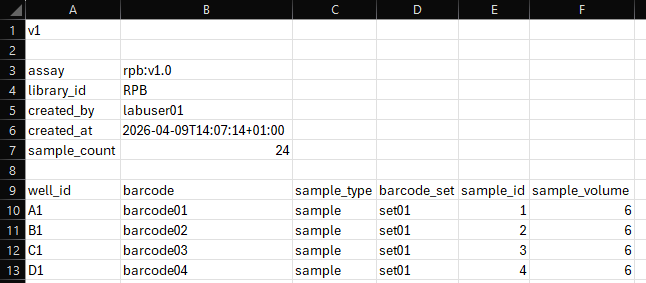
Set up your sample sheet as a CSV file with the following information:
| Required field | User input | Definition / field info |
|---|---|---|
| v1 | Version field, no input required outside of field | |
| assay | rpb:vX.x | Assay ID and version |
| library_id | User-defined | Identification for the DNA library |
| created_by | User-defined | Identification of operator setting up sample sheet |
| created_at | User-defined | Date and time of creation. Follow the format outlined in the ElysION MinION user guide. |
| sample_count | User-defined | Number of samples processed in run (1 to 24 samples) |
| well_id | A1–H3 | Positions in 96-well plate being used (1 to 24 samples) Samples must start from position A1 in the 96-well plate and run consecutively column-wise. |
| barcode | barcode01–barcode24 | Rapid barcode primers from SQK-RPB114.24 being used in library preparation. Up to 24 barcodes are available in the sequencing kit. These should be used sequentially (e.g. Barcodes 01–12 or Barcodes 13–24). |
| sample_type | User-defined | Description or characteristics of sample input |
| barcode_set | set01, set02, set03 | Each rapid barcode primer plate contains 3 sets of 24 barcodes. To select the first set (columns 01 to 03), enter set01, for the second set (columns 05 to 07), enter set02, or for the third set (columns 09 to 11), enter set03. |
| sample_id | User-defined from LIMS system (lims-sampleid-12345) | Identification for each sample input (e.g. from LIMS system) |
| sample_volume | User-defined | Input sample volume to be automatically normalised by the robot to the required input volume using nuclease-free water. |
Below is an example of a sample sheet CSV file:
4. ElysION run setup
The automated library preparation and sequencing method using the ElysION device can be followed using the on-screen display on the device.
Ensure you have all the correct hardware components, software packages, and workflows installed to carry out this method.
For more information on the device and the processes, refer to the ElysION MinION user guide.
Thaw the kit components at room temperature, spin down briefly using a microfuge and mix by pipetting as indicated in the Table below:
| Reagent | 1. Thaw at room temperature | 2. Briefly spin down | 3. Mix well by pipetting |
|---|---|---|---|
| Rapid Barcode Primers in plate (RPB01–24 at 1 µM) | ✓ | ✓ | - |
| Fragmentation Mix (FRM) | Not frozen | ✓ | ✓ |
| Rapid Adapter (RA) | Not frozen | ✓ | ✓ |
| LongAmp Hot Start Taq 2X Master Mix | ✓ | ✓ | ✓ |
| AMPure XP Beads (AXP) | ✓ | ✓ | Mix by pipetting or vortexing immediately before use |
| EDTA (EDTA) | ✓ | ✓ | ✓ |
| Elution Buffer (EB) | ✓ | ✓ | ✓ |
| Adapter Buffer (ADB) | ✓ | ✓ | Mix by vortexing |
| Flow Cell Flush (FCF) | ✓ | ✓ | ✓ |
| Flow Cell Tether (FCT) | ✓ | ✓ | ✓ |
| Sequencing Buffer (SB) | ✓ | ✓ | ✓ |
| Library Beads (LIB) | ✓ | ✓ | Mix by pipetting or vortexing immediately before use |
| Bovine Serum Albumin (BSA) | -✓ | ✓ | ✓ |
| Wash Mix (WMX) | Not frozen | ✓ | ✓ |
| Wash Diluent (DIL) | ✓ | ✓ | Mix by vortexing |
| Storage Buffer (S) | ✓ | ✓ | Mix by vortexing |
条形码板孔仅限一次使用。使用前请确认所选孔密封完好;一旦刺穿或开启,不得再次使用。
Switch on the ElysION device and its computer following the user guide.
The Background Services application (BotQL) should start up automatically in the background when starting up the device.
Ensure the Background Services application is running.
If the UI is unable to connect to the instrument, open the Services application using the Windows search bar. Scroll down to the BotQL application which should show as running. If the application is not running, press Start. To restart the application, press Restart. Wait a few seconds before reopening the UI.
Open the ElysION UI application and wait for a few seconds for the UI to connect to the liquid handler.
Ensure that the ElysION deck is clear of any labware before performing automated checks.
Failure to ensure the deck is clear can lead to errors in checks or damage to the equipment.
Close the door to the robot and select "Initialise" on the display.
The ElysION device will perform automated checks.
Robot initialisation must complete before proceeding with the library preparation method.
Method variables
Refer to the ElysION MinION user guide for more details.
If you wish to alter the default variables for your assay, select the System tab on the bottom left of the screen, then Method configurator. Then select the method that you wish to modify.
The variables for the Rapid PCR Barcoding protocol are detailed below:
| Variable name | Default parameter | Parameter range | Description |
|---|---|---|---|
| Fragmentation Time - Step 1 (unit = seconds) | 120 s | Min = 60 s Max = 240 s | Allows you to adjust the length of the 30°C hold on the On-Deck Thermal Cycler (ODTC) during fragmentation. |
| Fragmentation Time - Step 2 (unit = seconds) | 120 s | Min = 60 s Max = 240 s | Allows you to adjust the length of the 80°C hold on the ODTC during fragmentation. |
| Number of PCR Cycles | 14 | Min = 1 Max = 40 | Allows you to adjust the number of PCR cycles. |
| Pause for QC post PCR | 0 = off | 0 = off 1 = on | Enabling this feature will instruct the ElysION to pause post PCR, allowing normalisation of samples. |
| AMPure XP Bead Clean-up Ratio | 0.6X | 0.4X, 0.6X, 0.8X, 1.0X, 1.2X | Allows you to adjust the ratio of AXP bead volume to sample volume during the clean-up step. For example, for the default value of 0.6, 60 µl of beads will be added to 100 µl of pooled samples. For a value of 1.0, 100 µl of beads will be added to 100 µl of pooled samples. |
| Bead Binding Time (unit = minutes) | 5 min | Min = 2 min Max = 30 min | Allows you to adjust the bead binding time. |
| Bead Elution Time (unit = minutes) | 15 min | Min = 2 min Max = 30 min | Allows you to adjust the bead elution time before pelleting on the magnet. |
| Pause for QC pre Flow Cell Loading | 0 = off | 0 = off 1 = on | Enabling this feature will instruct the ElysION to pause prior to the final eluate collection, allowing sample normalisation to a desired concentration, before automated flow cell loading. |
Recommendations for the "Pause for QC" variable when enabled are provided at the end of this section.
Select "Run method" on the on-screen display.
Select the method "Rapid PCR Barcoding Kit" on the on-screen display.
If you have created a modified assay, it will display as: Rapid PCR Barcoding Kit.[version number]
Click Next to proceed.
If you require data analysis to be automatically performed after sequencing, select the "Metagenomics" assay.
Then click Next to proceed.
Select the MinION Mk1D position that you wish to load and insert a MinION/GridION Flow Cell into the correct location on the deck as shown on the on-screen display.
Instructions for inserting a flow cell onto the ElysION device can be found in the ElysION MinION user guide.
Select "Run checks" on the on-screen display.
You may check three flow cells simultaneously on the ElysION deck if you wish to set up interleaving runs. However, any unused flow cells should be returned to the fridge after checking, until required for the subsequent library preparation.
Refer to the end of this section for interleaving run setup.
Note: If your flow cell does not reach the required number of pores for your run, insert a new flow cell and repeat the flow cell check before proceeding with the run setup.
Select "Import" on the on-screen display to upload your sample sheet.
Once completed, click Next to proceed.
Prepare the reagents in accordance with the reagent preparation page on the on-screen display.
Once completed, click Next to proceed.
Once your flow cell check has successfully completed, set up your sequencing run conditions on the on-screen display.
Select the sequencing time limit, or stop the run when the flow cell pores are depleted.
Select a data target.
Select whether to perform:
- A flow cell flush to return the used flow cell to Oxford Nanopore.
- Or a flow cell wash using the Flow Cell Wash Kit (EXP-WSH004) to reuse your flow cell.
Select whether write out to a POD5 file format is turned on or off.
Volumes for reagents and guidelines for flow cell wash or flush setup will be provided on the deck loading page. If you wish to perform a flow cell wash for reuse, it is recommended to thaw the wash reagents at the same time as the library preparation reagents.
For more information on the run conditions, refer to the ElysION MinION user guide.
Reagents and consumables requirements
Consider the following when preparing and loading your reagents and consumables into the ElysION device to mitigate risk of workflow failure and equipment damage:
Correct consumables are used with each reagent.
Spin down all samples and reagents, making sure they do not contain bubbles.
Tip boxes are inserted correctly into the nest positions and sit flat against the deck.
Plates are flat in their deck position and sit within the barriers on the deck, and tubes are fully inserted into the rack.
Set up the ElysION deck according to the deck layout outlined in the UI of the on-screen display.
The position of the tip boxes and reagents will change depending on the sample count and run setup. Follow the instructions on the on-screen display correctly for your run.
Insert two empty waste bins into the disposable waste drawer below the deck.
Close the door of the ElysION device.
Click "Begin run" to start the automated library preparation and sequencing.
Data analysis will automatically be carried out by the ElysION device, if the "Metagenomics" assay was selected.
The analysis pipeline is wf-metagenomics.
For more information on how to access your sequencing data and the analysis outputs, consult the ElysION MinION user guide.
Pause for QC post PCR
If "Pause for QC post PCR" is enabled via the Method configurator during the run setup, the robot will pause for sample normalisation post PCR, with the PCR plate on position B3. Quantify 1 µl of barcoded prep using a Qubit fluorometer (or equivalent) for QC check.
Pause for QC post PCR sample normalisation
We recommend normalising your samples so that 800 ng total DNA is pooled in an equimolar ratio by the robot.
11.5 µl is pooled per sample by the robot from at least 20 µl in the PCR plate.
Normalise your samples to a concentration which when pooled (11.5 µl per sample) by the robot, results in 800 ng total DNA. There should be at least 20 µl of each normalised sample present in the same well location of a new PCR plate to account for the required dead volume.
Spin down the PCR plate to ensure the samples do not contain bubbles and then place the plate in position B3 on the ElysION.
To resume library preparation, press Continue on the on-screen display if using the 'Overview' page, or press Resume if using the 'Run Details' page.
Example for 8 samples:
800 ng/8 = 100 ng per sample per 11.5 µl pooled by robot
100 ng/11.5 µl = ~8.7 ng/µl
- Add a minimum of 20 µl of each sample at ~8.7 ng/µl to the same well location of a new PCR plate.
Pause for QC pre Flow Cell Loading
If "Pause for QC pre Flow Cell Loading" is enabled via the Method configurator during the run setup, the robot will pause prior to the final eluate collection, with the next step shown as "Pause for QC".
Pause for QC pre Flow Cell Loading
To QC your samples pre flow cell loading, we recommend the following:
Quantify 1 µl of eluted sample using a Qubit fluorometer. The eluted sample is present in well A1 of the DeepWell plate (DWP) in position B1 on the deck.
Make up 17.6 µl of 10–50 fmol eluate in well A1 of a new DWP using Elution Buffer (EB). Then spin down the plate to ensure the sample does not contain bubbles and place the plate in position B1 on the deck.
If you have less than the minimum ng mass of DNA required to generate the minimum fmol amount of DNA in 17.6 µl, return the original DWP with the remaining 16.6 µl of library in EB to position B1 on the deck.
To resume library preparation, press Continue on the on-screen display if using the 'Overview' page, or press Resume if using the 'Run Details' page.
Interleaving run setup
Once the first library preparation has completed and started sequencing, to set up a second run, select a new "Run Method" in the UI. Follow the on-screen instructions to unload any reagents and consumables that are not required from the deck and complete the deck setup for the new run.
Once your runs have completed, unload the labware according to the deck clearing instructions, empty the waste bins, and discard or store in the freezer any unused reagents.
5. Issues during the automated library preparation
ElysION device troubleshooting
For commonly encountered issues, refer to the ElysION MinION user guide.
For in-depth troubleshooting, refer to the ElysION Operating manual provided with your device.
For additional customer support, contact the Oxford Nanopore support channel (support@nanoporetech.com).